
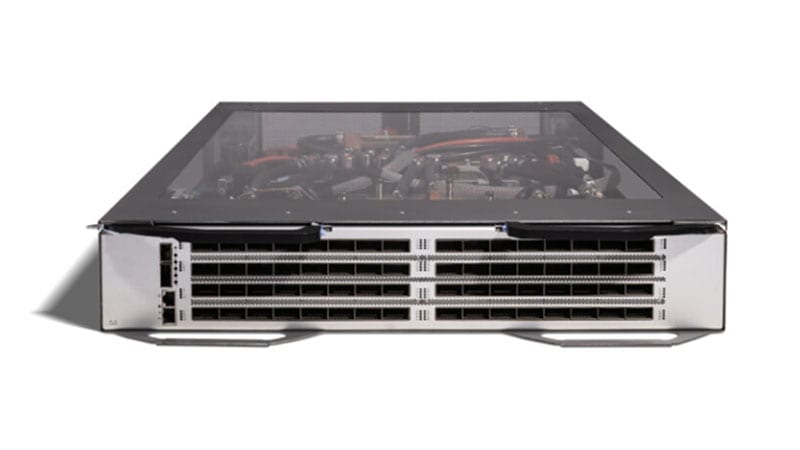
The Cisco MDS 9222i Multiservice Modular Switch (PID DS-C9222I-K9) was a clever piece of engineering for its day: a 3RU semi-modular SAN switch that paired 18 fixed 4-Gbps Fibre Channel ports and four fixed 1-Gigabit Ethernet IP storage ports with a single modular expansion slot and a built-in application services engine. That services engine is what made it special, it ran the SAN Extension over IP software package so you could carry Fibre Channel traffic across an IP WAN with FCIP for disaster recovery and remote replication. With the expansion slot populated, it scaled toward 66 ports and could even add a second services engine. For a decade it anchored remote-replication links and midsize fabrics in federal, healthcare, and enterprise data centers. That role is over. The DS-C9222I-K9 is fully end of life, and if one is still moving production or replication traffic, this guide covers exactly what that exposes and how to move to its supported successor, the MDS 9250i.
Where the DS-C9222I-K9 stands today
Cisco set two milestones that matter, and the distance between them and today is the entire point. End of Sale was October 22, 2014, the last day the 9222i could be ordered new through Cisco. The Last Day of Support (LDoS) was April 30, 2020. We are now years past that final date. LDoS is the milestone with operational teeth, because once a product crosses it, every form of Cisco backing ends simultaneously.
- No Cisco TAC support, you cannot open a case for a fabric outage, an FCIP tunnel failure, a zoning problem, or an NX-OS defect on this platform.
- No RMA or hardware replacement, a failed power supply, fan, supervisor, or the services engine itself cannot be swapped under any contract; spares come only from gray-market or salvaged stock of unknown provenance.
- No software maintenance or PSIRT fixes, any Fibre Channel, FCIP, or NX-OS vulnerability disclosed from LDoS onward will never be patched on this hardware.
- No interoperability validation, Cisco no longer qualifies the 9222i against current storage arrays, HBAs, or NX-OS releases, so new endpoints may simply be unsupported against it.
A working switch is not a supported switch: The 9222i will keep passing frames and keeping FCIP tunnels up until the day it doesn't. The risk is not that it fails today, it is that the day a power supply or the services engine dies, there is no contract, no TAC engineer, and no replacement chassis between your replication link and a stalled DR posture. On a multiservice switch, that single point of failure sits underneath both local storage and your offsite copy.
Why acting now matters: the audit and risk math
Storage extension is uniquely unforgiving. The 9222i was usually doing two jobs at once, edge Fibre Channel switching and FCIP storage extension to a second site. When that hardware fails, you do not just lose local paths, you can lose the replication link that your recovery point objective depends on. Running both functions on a platform with zero vendor support is a concentrated single-point-of-failure risk that no organization would knowingly accept if it were written plainly on a risk register.
It is also a documented finding waiting to happen. Federal and regulated buyers operate under frameworks, FISMA, FedRAMP, HIPAA, PCI DSS, and CMMC among them, that expect infrastructure to be vendor-supported and patchable. An assessor who finds a DS-C9222I-K9 years past LDoS will flag it as unsupported, unpatchable infrastructure, and that finding can stall an authorization or audit sign-off no matter how reliably the switch has run. The remediation is always the same: replace it. Doing that on a planned refresh is far cheaper and calmer than doing it under an audit deadline or after a 2 a.m. fabric failure. The full milestone detail for platforms like this lives on the Cisco EoL hub, which tracks the rest of your fleet.
The recommended replacement: MDS 9250i Multiservice Fabric Switch (DS-C9250I-K9)
Cisco maps the 9222i to the MDS 9250i Multiservice Fabric Switch (DS-C9250I-K9). It keeps the multiservice identity of the 9222i, Fibre Channel plus IP storage extension plus FCoE, but collapses it into a denser, faster, fixed 2RU platform with no separate line card to source or fail. The base configuration ships with 20 ports of 16-Gbps Fibre Channel, two 1/10-Gigabit Ethernet IP storage ports for FCIP and iSCSI, and eight 10-Gigabit Ethernet ports for FCoE. It runs the same NX-OS operational model, so the command set and fabric concepts carry straight over.
What is concretely better
- Four times the per-port FC speed, 16-Gbps line-rate Fibre Channel versus the 9222i's 4-Gbps ports, with autonegotiation down to 8/4 Gbps so existing endpoints connect unchanged.
- Higher density in less rack space, up to 40 16G FC ports in 2RU versus 18 fixed 4G ports in the 9222i's 3RU chassis, scaled on-site with the MDS 9250i On-Demand Port Activation license that turns on the second bank of 20 FC ports.
- Faster, license-included storage extension, the SAN Extension over IP package is enabled as standard on the two fixed 1/10-Gigabit Ethernet ports, so FCIP and hardware compression run at up to 10G per port without buying a separate services engine, versus the 9222i's 1G FCIP on its fixed application engine.
- Native FCoE, eight 10-Gigabit Ethernet FCoE ports let the same switch carry converged Ethernet storage traffic, a capability the 9222i did not offer.
- Supported lifecycle, TAC, RMA, software maintenance, and PSIRT coverage are all current, and TAA-compliant, GPC-payable options exist for government buyers.
Note what does not carry over, because it shapes the bill of materials. The 9222i used 4G SFP optics and, for FCIP, 1-Gigabit Ethernet copper or optical; the 9250i uses 16G FC SFP+ and 10-Gigabit Ethernet optics. The modular expansion slot and any 9000-family services or switching module in the old chassis have no equivalent, their function is now fixed and integrated. Plan for new optics and the correct On-Demand Port Activation count rather than a lift-and-shift of accessories. You can browse the replacement and current pricing in the catalog.
A practical migration plan
1. Assessment and inventory
Start on the live switch. Run show inventory and show version to capture the chassis serial, any installed expansion module, the running NX-OS train, and the activated feature set. Run show running-config to export zoning, VSAN assignments, port-channels (ISLs), FSPF, device aliases, and any role-based access or SNMP configuration. Critically, export the full FCIP profile and tunnel configuration, the IP interface, peer address, TCP parameters, compression and write-acceleration settings, since storage extension is the part most likely to be hand-tuned and the part you cannot afford to reconstruct from memory. Document which hosts and storage ports land on which interfaces, current per-port speeds, and your real used-port count. That number drives whether the 9250i's 20-port base is enough or you need the On-Demand activation.
2. License and feature parity
Size On-Demand Port Activation on the 9250i to your real FC port count rounded up, leaving headroom for growth. Both platforms run NX-OS, so core SAN features, VSANs, zoning, NPV/NPIV, port-channels, and fabric services, carry forward conceptually. Confirm your zoning model (enhanced versus basic) and VSAN-to-port mappings are reproduced. The good news on extension: the SAN Extension over IP package is included on the 9250i's IP ports, so the FCIP licensing the 9222i needed is now standard, but you should rebuild the FCIP tunnel profile deliberately and retune for the higher 10G ceiling rather than copying 1G-era TCP window settings verbatim. Align the 9250i NX-OS release with what your storage arrays and HBAs are currently qualified against.
3. Physical: rack, power, optics, uplinks
The 9250i is a fixed 2RU switch with dual redundant power supplies, so it actually reclaims a rack unit over the 3RU 9222i while adding ports. Order 16G FC SFP+ short-wave optics for host and array links, long-wave for extended runs, matching optics for inter-switch links to your core MDS or director, and 10-Gigabit Ethernet optics for the FCIP and FCoE ports. If your DR link previously rode 1G FCIP, confirm the WAN circuit and any intermediate firewalls or routers can actually feed the higher 10G FCIP capability before you assume the bottleneck has moved. Cable the new switch alongside the old one so you can build and validate the fabric, and bring up a parallel FCIP tunnel, before any production traffic moves.
4. Phased cutover
Most SAN hosts are dual-fabric, an A side and a B side through independent switches, so a hard cutover is rarely necessary. Migrate one fabric at a time: stand up the 9250i on the B fabric, replicate zoning and VSANs, move B-side links host by host, and verify multipathing keeps every host fully redundant throughout. Treat FCIP separately and carefully: bring up the new tunnel in parallel, confirm replication is healthy across it, then retire the old 1G tunnel only after the new path has proven itself through a real replication cycle. Once the B fabric and extension are stable on the 9250i, repeat for the A fabric. Sequenced this way, no host is ever down to a single uncutover path and the DR link is never without a working tunnel.
5. Secure decommission
After the last link has moved and the fabric plus FCIP have run clean through a full business and replication cycle, decommission the 9222i. Wipe its configuration so zoning, FCIP peer details, credentials, SNMP strings, and topology do not leave with the hardware. For federal and DoD environments, follow your media sanitization policy (NIST SP 800-88 guidance is typical) and capture a certificate of data destruction or sanitization before the asset is recycled, returned, or surplused.
Procurement notes for government and enterprise buyers
- TAA compliance, order the 9250i through SKUs and supply paths that meet Trade Agreements Act requirements; the legacy 9222i has no current TAA SKU, so a refresh is also how you bring the SAN edge and DR link back into compliant procurement.
- GPC and card payment, the replacement is available on Government Purchase Card-payable terms for in-threshold buys, keeping small refreshes off a long contracting cycle.
- Lead times, 16G FC and 10G Ethernet optics and On-Demand Port Activation licenses can carry their own lead times separate from the chassis; quote the full bill of materials (switch, FC optics, 10G optics, port licenses, rack kit) together so nothing is the late item on cutover day.
- Authorized sourcing, buy from an authorized Cisco partner so the hardware is genuine, warranty-eligible, and entitled to current TAC and software support, the exact coverage a post-LDoS 9222i no longer has.
Replacing the 9222i is one of the higher-value refreshes in a data center precisely because it does two jobs: it modernizes the SAN edge and the storage-extension link in a single move, while reclaiming rack space and quadrupling per-port speed. The cost of waiting is the opposite, an unsupported single point of failure under both local storage and your offsite copy, plus a standing audit finding. If you have a DS-C9222I-K9 still carrying traffic, scope the 9250i now while it is on your terms. Get a refresh quote with your port count, FCIP requirements, and optics, and we will return a TAA-compliant, GPC-payable bill of materials sized to your fabric.
Frequently asked questions
Is the Cisco MDS 9222i (DS-C9222I-K9) still supported?
No. The DS-C9222I-K9 reached End of Sale on October 22, 2014 and its Last Day of Support was April 30, 2020. As of now it is years past LDoS, which means no Cisco TAC cases, no RMA hardware replacement, no software maintenance, and no new PSIRT security fixes for Fibre Channel, FCIP, or NX-OS issues. Any 9222i still in a fabric, especially one carrying an FCIP replication link, is running entirely at your own risk.
What is Cisco's recommended replacement for the MDS 9222i?
The Cisco MDS 9250i Multiservice Fabric Switch (DS-C9250I-K9). It is a fixed 2RU multiservice switch that ships with 20 ports of 16G Fibre Channel (scaling to 40 via On-Demand Port Activation), two 1/10-Gigabit Ethernet IP storage ports for FCIP and iSCSI, and eight 10-Gigabit Ethernet FCoE ports. It keeps the 9222i's multiservice role but quadruples FC port speed to 16G and raises FCIP from 1G to 10G.
Will my existing 4G and 8G HBAs, arrays, and ISLs work on the MDS 9250i?
Yes. The 9250i's 16G Fibre Channel ports autonegotiate down to 8 and 4 Gbps, so existing host bus adapters, storage targets, and inter-switch links connect and run normally. You gain a 16G-capable fabric immediately and can upgrade endpoints to 16G on your own schedule without a flag day. Note that optics do not transfer, you will need 16G FC SFP+ and 10G Ethernet optics for the new chassis.
Do I need a separate license for FCIP on the MDS 9250i like the 9222i required?
No. On the 9250i the SAN Extension over IP package is enabled as standard on the two fixed 1/10-Gigabit Ethernet IP storage ports, so FCIP and hardware compression are available without buying a separate services engine or add-on license. You should still rebuild your FCIP tunnel profile deliberately and retune TCP and compression settings for the higher 10G ceiling rather than copying 1G-era parameters from the old switch.
Why migrate now if the 9222i is still passing traffic and keeping FCIP up?
A working switch is not a supported switch. Past LDoS there is no path to replace a failed power supply, services engine, or chassis under contract, no fixes for newly disclosed Fibre Channel, FCIP, or NX-OS vulnerabilities, and the device will be flagged in any FISMA, FedRAMP, HIPAA, PCI DSS, or CMMC assessment as unsupported infrastructure. Because the 9222i typically anchors both the SAN edge and a DR replication link, the operational and audit risk compounds the longer it stays in production.
Uniqcli Team
The Uniqcli Team is an authorized Cisco partner specializing in Catalyst wireless, switching, datacenter fabric, licensing, and managed services for U.S. federal, state, local, and education customers. We scope Cisco bills of materials, validate procurement paths (TAA, FIPS, contract vehicles), and deliver design, deployment, and managed operations.
Ready to scope your Cisco build?
Build a quoteRelated reading
View all → Guides
Cisco MDS 9148 (DS-C9148-K9) Replacement & Migration Guide
The MDS 9148 8G fabric switch is past last day of support, here is why moving to the 16G MDS 9148S now protects your SAN, your TAC coverage, and your audit posture.
December 17, 2025 · 8 min readGuidesCisco MDS 9124 End of Life: Migrating to the MDS 9148T 32G
The Cisco MDS 9124 (DS-C9124-K9) hit Last Day of Support in 2019, no TAC, RMA, or security patches. Here is what its lifecycle dates mean and how to migrate your Fibre Channel fabric to the 32G MDS 9148T with zero downtime.
June 15, 2026 · 6 min readGuidesCisco MDS 9506 EoL: Migrating Your SAN Core to the MDS 9706
The MDS 9506 director passed Last Day of Support on April 30, 2022, here is why it must come out of your SAN core and how to migrate cleanly to the 16/32/64-Gbps MDS 9706.
April 15, 2026 · 9 min readGuidesCisco MDS 9513 EoL: Migration to the MDS 9718 Director
The MDS 9513 (DS-C9513) passed Last Day of Support on April 30, 2022, no patches, no TAC, no RMA. Here is why the SAN core has to move and how to refresh cleanly to the 18-slot MDS 9718.
April 17, 2026 · 9 min readGuidesCisco Nexus 2248TP EoL: Migrate to the 2248TP-E FEX
The Nexus 2248TP (N2K-C2248TP-1GE) passed Last Day of Support on November 30, 2021. Here is why it must come out of the rack and how to refresh cleanly to the enhanced Nexus 2248TP-E Fabric Extender.
January 27, 2026 · 9 min read Guides
Cisco 2960-24TC-L EoL: Migrate to Catalyst 9200L Guide
The original Catalyst 2960-24TC-L (WS-C2960-24TC-L) passed Last Day of Support on October 31, 2019. Here's why this Fast Ethernet LAN Base switch must come out, and how to refresh cleanly to the Gigabit, PoE+ Catalyst 9200L-24P-4X.
June 7, 2026 · 7 min read