
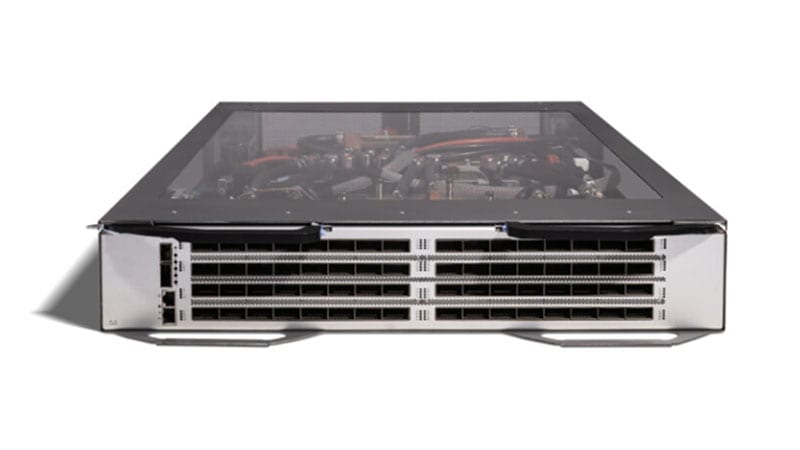
If you still have Cisco Catalyst 4900M switches (PID WS-C4900M) at the top of a server rack, they are past every Cisco lifecycle milestone that matters. The 4900M reached its Last Day of Support on October 5, 2021. From that date forward Cisco provides no software fixes, no PSIRT security patches, and no TAC support or RMA hardware replacement for this platform. The switch still forwards 10-Gigabit traffic, which is precisely why these boxes quietly survive in data center racks years after they should have been decommissioned. This guide explains what the end-of-life dates actually mean for a switch that is still in production, why the recommended Nexus 9300 (N9K-C93180YC-FX3) is a generational upgrade rather than a like-for-like swap, and how to plan a clean cutover.
WS-C4900M lifecycle at a glance: End of Sale: October 30, 2016. End of Software Maintenance: not separately published for this platform. Last Day of Support (LDoS): October 5, 2021. Every milestone has passed. The full milestone record lives on the EoL detail page for this PID.
What the Catalyst 4900M actually was
The Catalyst 4900M (WS-C4900M) was a compact 2RU, fixed-plus-modular Layer 2/3 switch purpose-built as a top-of-rack server-access device. It shipped with eight fixed wired 10-Gigabit Ethernet ports (X2 optics: 10GBASE-SR, -LR, -CX4, and X2-to-Twinax) plus two half-card module slots. Each half-card could host either an additional eight wired 10GbE X2 ports or twenty 10/100/1000 + SFP combos, giving the chassis a typical maximum of 24 ports of 10GbE or a mix of 10GbE and Gigabit. The integrated supervisor delivered roughly 320 Gbps of switching capacity and ran classic Cisco IOS (the Catalyst 4500-derived 12.2(54)SG-era trains). It supported front-to-back airflow for hot-aisle deployment, dual AC or DC power supplies, and full Layer 3 routing. For 2008-era 10GbE server access it was an excellent box. Measured against current rack economics it is slow, X2-bound, and a single-supervisor chassis with no patch path.
Why acting now matters
The risk of an EoL access switch is not that it fails outright. It is that it keeps forwarding traffic while the entire support floor disappears beneath it. Three concrete exposures stack up after LDoS:
- No PSIRT security patches. When a new IOS or hardware vulnerability is disclosed, the 4900M will not receive a fixed image. Its software is frozen at the last 12.2SG-era build. Any CVE that touches that code, including issues that later land on the CISA Known Exploited Vulnerabilities catalog, is permanent on this hardware.
- No TAC or RMA. A failed switch cannot be opened as a support case or swapped under a service contract. Your only recovery is a cold spare you bought before LDoS or a gray-market unit of the same dead-end platform, with no warranty and no provenance.
- Audit and compliance exposure. The frameworks federal, DoD, SLED, and healthcare buyers operate under (FedRAMP, CMMC 2.0, the HIPAA Security Rule, PCI DSS 4.0, STIGs, and CISA directives) expect supported, patchable infrastructure. An unsupported core/access switch that cannot be patched is an audit finding waiting to happen, and 'the vendor no longer ships fixes for it' is not a defensible remediation plan.
What each milestone means in practice
- End of Sale (2016-10-30): the last day Cisco accepted new orders for the WS-C4900M. Everything after this date has been consuming the support tail.
- End of Software Maintenance: Cisco did not publish a distinct software-maintenance date for this PID separate from the support window; treat the LDoS date as the hard software and security cutoff.
- Last Day of Support / LDoS (2021-10-05): the hard wall. No TAC, no RMA, no patches of any kind. The hardware is on its own from this date.
The recommended replacement: Nexus 9300 N9K-C93180YC-FX3
Cisco positions the fixed Nexus 9300 line as the modern data center top-of-rack platform, and the N9K-C93180YC-FX3 is the direct fit for a 4900M's role. It is a 1RU switch with 48 ports of 1/10/25-Gigabit SFP28 server-facing downlinks plus 6 ports of 40/100-Gigabit QSFP28 uplinks, built on the Cisco Cloud Scale ASIC. The jump from the 4900M is generational on every axis that matters in a rack:
- Throughput and density. The 93180YC-FX3 delivers 3.6 Tbps of switching capacity and roughly 1.2 Bpps in 1RU, versus ~320 Gbps in the 4900M's 2RU. You move from eight to twenty-four 10G ports up to forty-eight 25G ports plus 100G uplinks, halving rack units while multiplying capacity.
- Modern speeds and optics. Server access steps from 10GbE on legacy X2 optics to 1/10/25GbE on SFP28 with 40/100GbE QSFP28 uplinks. The X2 form factor is long obsolete; SFP28/QSFP28 with DAC/AOC and current transceivers is the supportable, supply-available path.
- NX-OS plus programmability. The platform runs NX-OS 9.3/10.x with VXLAN/EVPN for fabric overlays, native automation (NX-API, Python, Ansible, gNMI/model-driven telemetry), and it can also boot in ACI mode as a leaf under an APIC. The 4900M's classic IOS had none of this.
- Precision timing and visibility. The FX3 adds PTP (IEEE 1588) and SyncE plus hardware streaming telemetry, which matters for trading, broadcast, and time-sensitive federal workloads that the 4900M could never serve.
- Smart Licensing. Software entitlement moves to Cisco Smart Licensing tiers (NX-OS Essentials/Advantage, with optional Day-2 Ops add-ons), managed centrally through Smart Software Manager or Nexus Dashboard rather than the static feature sets baked into IOS images.
4900M to 93180YC-FX3, side by side: Form factor: 2RU to 1RU. Capacity: ~320 Gbps to 3.6 Tbps. Server ports: up to 24x 10G (X2) to 48x 1/10/25G (SFP28). Uplinks: 10G X2 to 6x 40/100G QSFP28. OS: classic IOS (frozen) to NX-OS 10.x or ACI. Licensing: static IOS feature sets to Smart Licensing. The detail page lists the full lifecycle record for WS-C4900M.
A practical migration plan
1. Assessment and inventory
Catalog every WS-C4900M and its installed half-cards, the optics populated (X2 SR/LR/CX4 vs Twinax), the per-port speed mix (10G vs 1G combos), VLAN and SVI count, routing scope (static, OSPF, EIGRP, BGP), and any Layer 4-7 features in use. Map what actually terminates on each port: bare-metal servers, hypervisor uplinks, storage, or aggregation handoff. This determines whether one 93180YC-FX3 per rack is sufficient or whether you need a leaf pair for redundancy. A 4900M is typically a single point of failure; the modern pattern is a vPC pair of two FX3 leaves.
2. License transition
There is no license to migrate from the IOS-based 4900M. Plan the new entitlement instead: choose the NX-OS Essentials or Advantage tier based on whether you need VXLAN EVPN and advanced telemetry, register the new switches to a Smart Account in Cisco Smart Software Manager (an on-prem satellite is available for air-gapped and DoD environments), and size term/subscription length to your refresh horizon. Make sure the Smart Account is the same one your organization uses for procurement and entitlement so renewals and RMAs stay clean.
3. Configuration and feature parity
Do not text-convert the IOS config to NX-OS line by line; the CLI and feature models differ. Translate intent: re-create VLANs and trunks, rebuild SVIs and routing (NX-OS uses the 'feature' model, so OSPF/BGP/PIM must be explicitly enabled), and reproduce ACLs, QoS, and port-channels. Where the 4900M aggregated server uplinks with classic EtherChannel, use vPC across the leaf pair so servers get an active/active dual-homed uplink with no spanning-tree blocking. Validate MTU, jumbo frames, and storm-control settings explicitly, since defaults differ between platforms.
4. Physical: rack, power, airflow, uplinks, and optics
Reclaim a rack unit: the FX3 is 1RU against the 4900M's 2RU. Confirm airflow direction (order port-side-exhaust or port-side-intake to match your hot/cold aisle) and power input (AC or DC) to match the rack's PDUs. Budget for new optics end to end: SFP28 DAC/AOC for in-rack server runs, and 40/100G QSFP28 transceivers or breakout cables for the uplinks to spine or aggregation. None of the 4900M's X2 optics carry forward. Note that this is a data center switch, not an access switch with endpoint PoE; do not plan PoE budget here unless you are also replacing a separate campus access tier.
5. Phased cutover
Rack the new FX3 (or vPC pair) alongside the live 4900M, build and verify the config out of band, then migrate servers rack by rack or NIC by NIC during a maintenance window. Dual-homed servers can be cut one path at a time with zero downtime; single-homed hosts need a brief window. Validate routing adjacencies, reachability, and monitoring (SNMP/telemetry into your NMS) before moving production load, and keep the 4900M powered but isolated for a short rollback window before removing it.
6. Secure decommission
Once traffic is off, erase configuration and credentials from the 4900M (write erase, clear stored keys and certificates), pull it from the rack, and dispose through an asset-disposition process that produces a certificate of data destruction. For federal and DoD environments follow your media-sanitization policy (NIST SP 800-88 guidance) and retain the records for audit. Reclaimed units have residual secondary-market value that can offset refresh cost.
Procurement notes
For US federal, DoD, and SLED buyers, source the N9K-C93180YC-FX3 through an authorized Cisco partner so the units carry valid warranty, are eligible for SmartNet/Solution Support, and register cleanly to your Smart Account. Confirm TAA compliance for GSA and government purchases, and order through a GPC-friendly path where applicable. Current-generation Nexus 9300 hardware ships from active inventory, but optics and specific SKUs can carry lead times, so quote optics, breakout cables, and support contracts together with the chassis. As an authorized partner serving regulated buyers, uniqcli can validate the bill of materials, confirm TAA status, and align licensing tiers to your environment. Browse current data center switching in our catalog, review the full lifecycle record for this platform on the WS-C4900M EoL page, or see all tracked Cisco end-of-life products.
Ready to scope the refresh?: Get a TAA-validated bill of materials for the Nexus 9300 (N9K-C93180YC-FX3), matched optics, and the right NX-OS licensing tier for your environment. Request pricing and lead times at /get-a-quote.
The Catalyst 4900M did its job for over a decade, but every Cisco lifecycle date for it is now in the past. Moving to the Nexus 9300 N9K-C93180YC-FX3 restores a supported, patchable platform while cutting rack space in half and multiplying capacity tenfold. Request a quote to get a scoped, TAA-compliant migration plan for your racks.
Frequently asked questions
Is the Cisco Catalyst 4900M still supported?
No. The WS-C4900M reached End of Sale on October 30, 2016 and its Last Day of Support (LDoS) on October 5, 2021. After LDoS Cisco provides no software or PSIRT security patches, no TAC support cases, and no RMA hardware replacement. The platform should be treated as unsupported and unpatchable.
Why is the Nexus 9300 N9K-C93180YC-FX3 the right replacement for a 4900M?
Both are top-of-rack data center switches, but the FX3 is a generational upgrade: 1RU instead of 2RU, 3.6 Tbps instead of ~320 Gbps, 48 ports of 1/10/25G SFP28 plus 6x 40/100G QSFP28 uplinks instead of up to 24x 10G on obsolete X2 optics, and NX-OS 10.x with VXLAN/EVPN, programmability, and PTP instead of frozen classic IOS.
Can I reuse my Catalyst 4900M optics and cabling on the Nexus 9300?
No. The 4900M used X2 optics and CX4/Twinax for 10GbE, which are obsolete. The 93180YC-FX3 uses SFP28 for 1/10/25G server access and QSFP28 for 40/100G uplinks. Budget for new DAC/AOC and transceivers end to end; the prior optics do not carry forward.
How does licensing change moving from the 4900M to the Nexus 9300?
The 4900M used static IOS feature sets baked into the image. The Nexus 9300 uses Cisco Smart Licensing with NX-OS Essentials and Advantage tiers managed through Smart Software Manager (an on-prem satellite is available for air-gapped or DoD use). Choose the tier based on whether you need VXLAN EVPN and advanced telemetry, and register the switches to your organization's Smart Account.
Is the Nexus 9300 N9K-C93180YC-FX3 TAA compliant for federal purchases?
Current-generation Nexus 9300 hardware can be sourced TAA-compliant for GSA, federal, DoD, and SLED buyers. Always confirm TAA status on the specific SKU and lot at quote time and purchase through an authorized Cisco partner so the units carry valid warranty, support eligibility, and clean Smart Account registration.
Uniqcli Team
The Uniqcli Team is an authorized Cisco partner specializing in Catalyst wireless, switching, datacenter fabric, licensing, and managed services for U.S. federal, state, local, and education customers. We scope Cisco bills of materials, validate procurement paths (TAA, FIPS, contract vehicles), and deliver design, deployment, and managed operations.
Ready to scope your Cisco build?
Build a quoteRelated reading
View all →GuidesNexus 3064 EoL: Migration to Nexus 9300 (93180YC-FX3)
The Nexus 3064 (N3K-C3064PQ-10GE) passed Last Day of Support on June 30, 2021. Here's why it must come out and how to migrate cleanly to the Nexus 9300 (N9K-C93180YC-FX3), 25G access, 100G uplinks, VXLAN/EVPN, and MACsec.
May 9, 2026 · 8 min read Guides
Cisco Nexus 3524-X EoL: Migrate to Nexus 93180YC-FX3
The Nexus 3524-X (N3K-C3524P-10GX) hits Last Day of Support on January 31, 2027. Here is why the low-latency leaf has to come out and how to refresh cleanly to the Cloud Scale 93180YC-FX3.
February 23, 2026 · 8 min readGuidesCisco Nexus 5548P EoL: Migrate to Nexus 9300 (93180YC-FX3)
The Nexus 5548P passed Last Day of Support on September 30, 2020, no patches, no TAC, no RMA. Here is why it must come out of the rack and how to migrate cleanly to the Nexus 9300 (N9K-C93180YC-FX3).
May 27, 2026 · 8 min readGuidesCisco Nexus 6001-64T EoL: Migrate to Nexus 93180YC-FX3
The Nexus 6001-64T (N6K-C6001-64T) passed Last Day of Support on April 30, 2022. Here is what each milestone means, why the 10GBASE-T top-of-rack switch has to come out, and how to refresh cleanly to the Cloud Scale Nexus 93180YC-FX3.
April 19, 2026 · 7 min readGuidesCisco Nexus 9396PX EoL: Migrate to Nexus 93180YC-FX3
The Nexus 9396PX (N9K-C9396PX) passed Last Day of Support on February 19, 2023, here is why this original 9300 leaf has to come out and how to refresh cleanly to the Cloud Scale 93180YC-FX3.
April 2, 2026 · 10 min readGuidesCisco Nexus 9396TX EoL: Migrate to the 93180YC-FX3
The Nexus 9396TX (N9K-C9396TX) passed its Last Day of Support on April 30, 2023. Here is a practical, spec-driven plan to refresh this 10GBASE-T leaf onto the Nexus 93180YC-FX3, covering the milestone dates, what is concretely better, and a phased migration that keeps your fabric supported and audit-clean.
April 1, 2026 · 8 min read