
Cisco Nexus 9396TX EoL: Migrate to the 93180YC-FX3
The Nexus 9396TX (N9K-C9396TX) passed its Last Day of Support on April 30, 2023. Here is a practical, spec-driven plan to refresh this 10GBASE-T leaf onto the Nexus 93180YC-FX3, covering the milestone dates, what is concretely better, and a phased migration that keeps your fabric supported and audit-clean.
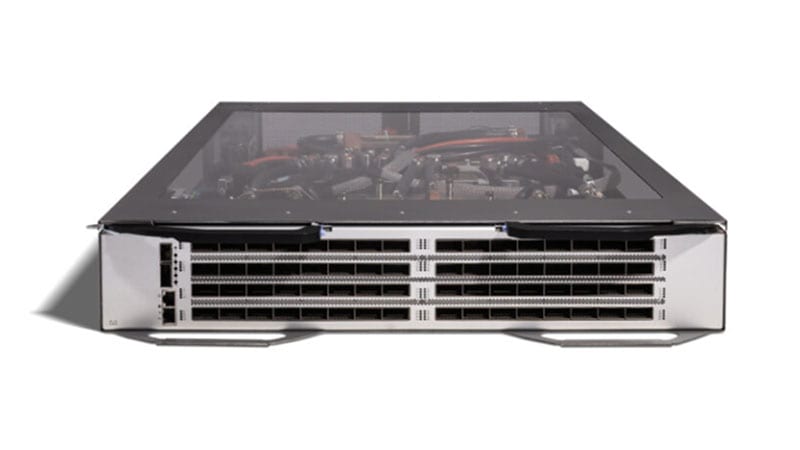
If a Cisco Nexus 9396TX (PID N9K-C9396TX) is still carrying production traffic in your data center, it is doing so without a safety net. This 2RU leaf switch, 48 ports of 1/10GBASE-T copper plus a 40G QSFP+ uplink module, was a workhorse in early Nexus 9300 leaf-spine and ACI deployments. But it went End of Sale on May 1, 2018, and crossed its Last Day of Support (LDoS) on April 30, 2023. Everything that makes a switch safe to run in a regulated environment, security patching, TAC, hardware RMA, ended on that date. This guide explains what each milestone means for the 9396TX specifically, why the Cisco Nexus 93180YC-FX3 (N9K-C93180YC-FX3) is the right modern landing spot, and how to execute the refresh without disrupting the fabric.
Where the 9396TX stands in its lifecycle today
Cisco's hardware lifecycle is a sequence of gates, and the 9396TX is through all of them. Understanding what each gate actually withdraws is the difference between an informed risk decision and an accidental compliance finding.
What each milestone date means for this switch
- End of Sale, May 1, 2018: Cisco stopped selling new 9396TX units and the M6PQ/M12PQ uplink modules through normal channels. Any unit acquired after this date came from secondary-market or remaining channel inventory, not a fresh Cisco order.
- End of Software Maintenance: For this platform the practical reality is that NX-OS maintenance and bug-fix rebuilds for the 9396TX trains wound down well before LDoS. New NX-OS feature releases stopped certifying the platform years ago, so the box is frozen on legacy code.
- Last Day of Support (LDoS), April 30, 2023: This is the hard stop. After this date Cisco TAC will not open a case, Cisco will not RMA a failed chassis, power supply, or uplink module, and, most importantly, PSIRT will not release security fixes for the platform, even for Critical CVEs.
Why acting now matters more than the calendar suggests
It is tempting to treat a switch that still passes traffic as 'fine for now.' Three pressures argue otherwise. First, security: an unpatchable leaf sitting in the data path is a standing finding. If it terminates server access in a CUI, PHI, or cardholder environment, it likely fails the supported-product control outright. Second, reliability: with no RMA, a failed power supply or a dead uplink module on a 2018-era chassis means cannibalizing spares from eBay-grade inventory, with no guarantee of authenticity or firmware integrity. Third, capability debt: the 9396TX caps server access at 10G and uplinks at 40G, which throttles any move toward 25G server NICs or 100G spine fabrics. Every month on the old platform is a month paying that opportunity cost. You can review the full lifecycle record for this exact model on our 9396TX end-of-life page.
The recommended replacement: Nexus 93180YC-FX3
The Cisco Nexus 93180YC-FX3 is the direct, current-generation successor for a 9396TX leaf. It keeps the role identical, a fixed-configuration Nexus 9300 leaf that runs in either standalone NX-OS or as an ACI fabric leaf under APIC, so it drops into the same architectural slot without forcing a fabric redesign. What changes is everything underneath.
Concretely what is better
- Throughput nearly doubles: 3.6 Tbps and 1.2 billion packets per second on the FX3 versus ~1.92 Tbps and roughly 1.5 bpps on the 9396TX, and in half the rack space (1RU vs 2RU).
- Access ports move from copper to 25G-ready fiber: 48x SFP28 ports run 1/10/25G, so the same chassis serves legacy 10G servers today and 25G NICs on your next server refresh, no switch swap required. The 9396TX was locked at 1/10G over RJ-45 copper.
- Uplinks jump to 100G: 6x QSFP28 ports do 40G or 100G, replacing the 9396TX's fixed 40G QSFP+ uplink module. That removes the spine bottleneck for modern 100G fabrics.
- Wire-rate MACsec on every port: the FX3 encrypts links at line rate (IEEE 802.1AE), critical for DoD and inter-rack/inter-DC confidentiality requirements. The 9396TX had no native MACsec.
- Smarter buffering and lower latency: a 40 MB intelligent shared buffer with Approximate Fair Drop (AFD) and Elephant Trap to tame congestion and microbursts, plus sub-microsecond port-to-port latency.
- Timing and telemetry: native SyncE and PTP (boundary clock) for time-sensitive and telco-edge workloads, plus streaming telemetry via gNMI/NETCONF and model-driven programmability, none of which the 9396TX generation supports well.
Licensing: PAK to Smart Licensing
This is the procurement detail teams most often miss. The 9396TX era predates Cisco's current model; the 93180YC-FX3 uses Smart Licensing with entitlements held in your Smart Account. In NX-OS mode that means choosing the right tier, Essentials for base L2/L3 and management, Advantage for VXLAN EVPN fabric, advanced routing, and full telemetry/automation. In ACI mode, the leaf consumes APIC-managed tier licensing instead. Map your current feature set to the new tier before you quote, because the license, not the chassis, often drives the multi-year cost. Day-2 operations also move forward: the FX3 is managed by Nexus Dashboard and NDFC (the successor to DCNM), giving you fabric-wide automation the 9396TX never had.
A practical migration plan
A leaf refresh in a live fabric is low-risk when sequenced correctly, because leaf-spine designs are built for exactly this kind of node-by-node replacement. Work through these phases.
1. Assess and inventory
- Pull serials and uplink-module PIDs from every 9396TX (show inventory / show module) and confirm each unit's NX-OS version and ACI vs standalone role.
- Map per-port server attachment: which downlinks are 1G, which are 10G, and which are RJ-45 copper that will need SFP-10G-T-X transceivers or a server NIC change on the FX3.
- Document uplink topology, port-channels, VPC peer relationships, and the spine ports each 9396TX lands on.
2. License and config parity
- Open or align a Smart Account and size Essentials vs Advantage (NX-OS) against the features in your running config, VXLAN/EVPN, BGP, PTP, and similar.
- Export and translate config: VLANs, SVIs, VPC domains, port-channels, QoS, and ACLs. Most NX-OS CLI carries forward, but validate buffer/QoS policies against the FX3's AFD-based model and confirm any feature that was implicit on the old box is explicitly licensed on the new one.
- For ACI fabrics, pre-register the new leaf in APIC and let policy push automatically once it joins, minimizing manual config drift.
3. Physical, power, optics, and uplinks
- Reclaim rack space: each 2RU 9396TX becomes a 1RU FX3, freeing 1RU per swap.
- Confirm power: the FX3 uses dual hot-swap PSUs (650W AC / 930W DC) with N+1 redundancy; verify PDU capacity and AC vs DC feed match.
- Plan optics as a real BOM line: SFP28 DAC/AOC or SFP-10G-T-X for downlinks, and QSFP28 (100G) or reused QSFP+ (40G) for uplinks. Copper-attached servers are the item most likely to surprise the budget.
4. Phased cutover
- Rack the FX3 alongside the 9396TX and bring up uplinks to the spine first, validating routing/EVPN adjacency before any host moves.
- Migrate hosts rack-by-rack or per-VPC-pair during a window; in a VPC design you can replace one peer at a time to keep dual-homed servers online.
- Validate forwarding, multicast, QoS, and telemetry on the FX3 before decommissioning its 9396TX counterpart.
5. Secure decommission
- Wipe configuration and credentials from each retired 9396TX (erase startup-config, clear keys) before it leaves the rack.
- For federal/DoD assets, follow your media-sanitization and property-disposal procedure and retain a certificate of data destruction for the audit trail.
- Update CMDB, asset, and SmartNet records so the retired serials no longer appear as supported infrastructure.
Procurement notes for regulated buyers
Because the 9396TX is past End of Sale, any 'new' unit is secondary-market and carries authenticity and firmware-integrity risk, not a fit for federal or DoD use. Source the 93180YC-FX3 new through an authorized Cisco partner so you get genuine hardware, valid Smart Licensing entitlements, and a clean SmartNet or Solution Support contract. Specify TAA compliance and confirm GPC eligibility or your agency's own contract-vehicle path up front; current-generation Nexus 9300 leaf switches can carry multi-week lead times, so place orders before your maintenance window is locked. Browse current Nexus options in our catalog, confirm lifecycle status on the Cisco EoL hub, and when you are ready to scope the swap with optics, licensing, and support in one number, get a quote, we will build the full bill of materials and migration plan around your existing fabric.
Frequently asked questions
Is the Cisco Nexus 9396TX still supported?
No. The 9396TX (N9K-C9396TX) went End of Sale on May 1, 2018 and crossed its Last Day of Support (LDoS) on April 30, 2023. After that date Cisco provides no TAC, no hardware RMA, and, critically, no PSIRT security fixes for the platform. Any 9396TX in production is running unpatched and unsupported, which is a finding under most federal, DoD, healthcare, and SLED audit frameworks.
Why is the 93180YC-FX3 the right replacement for a 9396TX?
Both are Nexus 9300 leaf switches that run in NX-OS standalone or ACI fabric mode, so the architectural role is identical and the new switch drops into the same fabric slot. The 93180YC-FX3 nearly doubles bandwidth (3.6 Tbps vs ~1.92 Tbps), moves access ports from 10GBASE-T copper to 1/10/25G SFP28, upgrades uplinks from 40G to 40/100G QSFP28, and adds wire-rate MACsec, a 40 MB intelligent buffer, sub-microsecond latency, and SyncE/PTP, all in 1RU instead of 2RU.
Can I reuse my existing cabling and optics from the 9396TX?
Largely no. The 9396TX downlinks are 10GBASE-T over RJ-45 copper; the FX3 downlinks are SFP28. Copper-attached servers need either SFP-10G-T-X transceivers in the FX3 or a NIC change to SFP28. The old 40G QSFP+ uplinks can run in the FX3's QSFP28 cages at 40G, but plan to move to 100G QSFP28 to realize the new uplink capacity. Budget optics and DACs as a distinct BOM line item.
How does licensing change moving from the 9396TX to the FX3?
The FX3 uses Cisco Smart Licensing with entitlements in your Smart Account, replacing the older PAK/per-feature model. In NX-OS mode you choose a tier, Essentials for base L2/L3, or Advantage for VXLAN EVPN, advanced routing, and full telemetry/automation. In ACI mode the leaf consumes APIC-managed tier licensing. Map your current feature set to the right tier before quoting, since licensing often drives more of the multi-year cost than the chassis.
What is the safest way to cut over without downtime?
Use the leaf-spine fabric's redundancy. Rack the FX3 next to the 9396TX, bring up its spine uplinks and validate routing/EVPN adjacency before moving any hosts. In a VPC design, replace one peer of a pair at a time so dual-homed servers stay online throughout. Migrate hosts rack-by-rack during a window, validate forwarding, QoS, and telemetry, then securely wipe and decommission the retired 9396TX.
Uniqcli Team
The Uniqcli Team is an authorized Cisco partner specializing in Catalyst wireless, switching, datacenter fabric, licensing, and managed services for U.S. federal, state, local, and education customers. We scope Cisco bills of materials, validate procurement paths (TAA, FIPS, contract vehicles), and deliver design, deployment, and managed operations.
Ready to scope your Cisco build?
Build a quoteRelated reading
View all →GuidesCisco Nexus 6001-64T EoL: Migrate to Nexus 93180YC-FX3
The Nexus 6001-64T (N6K-C6001-64T) passed Last Day of Support on April 30, 2022. Here is what each milestone means, why the 10GBASE-T top-of-rack switch has to come out, and how to refresh cleanly to the Cloud Scale Nexus 93180YC-FX3.
April 19, 2026 · 7 min read Guides
Cisco Nexus 5548P EoL: Migrate to Nexus 9300 (93180YC-FX3)
The Nexus 5548P passed Last Day of Support on September 30, 2020, no patches, no TAC, no RMA. Here is why it must come out of the rack and how to migrate cleanly to the Nexus 9300 (N9K-C93180YC-FX3).
May 27, 2026 · 8 min readGuidesNexus 9372PX EoL: Migrate to the Nexus 93180YC-FX
The Nexus 9372PX (N9K-C9372PX) passed Last Day of Support on February 28, 2023. Here is what each milestone means, why a first-gen 10G leaf has to come out, and how to refresh cleanly to the Cloud Scale Nexus 93180YC-FX.
February 12, 2026 · 8 min readGuidesNexus 93128TX EoL: Migration to the Nexus 93108TC-FX3
The Nexus 93128TX (N9K-C93128TX) passed Last Day of Support on October 31, 2022. Here is what each milestone means, why the 93108TC-FX3 is the right copper-leaf successor, and a concrete, low-risk migration plan for federal, healthcare, and enterprise data centers.
April 4, 2026 · 9 min readGuidesCisco Nexus 9396PX EoL: Migrate to Nexus 93180YC-FX3
The Nexus 9396PX (N9K-C9396PX) passed Last Day of Support on February 19, 2023, here is why this original 9300 leaf has to come out and how to refresh cleanly to the Cloud Scale 93180YC-FX3.
April 2, 2026 · 10 min readGuidesNexus 3064 EoL: Migration to Nexus 9300 (93180YC-FX3)
The Nexus 3064 (N3K-C3064PQ-10GE) passed Last Day of Support on June 30, 2021. Here's why it must come out and how to migrate cleanly to the Nexus 9300 (N9K-C93180YC-FX3), 25G access, 100G uplinks, VXLAN/EVPN, and MACsec.
May 9, 2026 · 8 min read