
Cisco Nexus 5548P EoL: Migrate to Nexus 9300 (93180YC-FX3)
The Nexus 5548P passed Last Day of Support on September 30, 2020, no patches, no TAC, no RMA. Here is why it must come out of the rack and how to migrate cleanly to the Nexus 9300 (N9K-C93180YC-FX3).
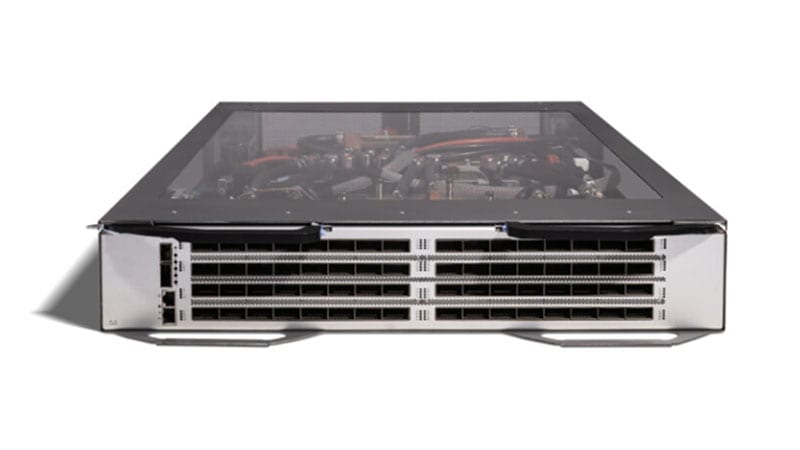
If a Cisco Nexus 5548P (PID N5K-C5548P) is still carrying production traffic in your data center, it is running well past every Cisco lifecycle milestone. The platform reached Last Day of Support on September 30, 2020. From that date Cisco provides no software fixes, no PSIRT security patches, and no TAC support or RMA hardware replacement for this switch. The box still forwards packets at line rate, which is precisely why 5548Ps quietly survive in racks years after they should have been retired. This guide explains what the end-of-life dates mean for a switch that is still in service, why the recommended Nexus 9300 (N9K-C93180YC-FX3) is a generational jump rather than a like-for-like swap, and how to plan a clean cutover with config and feature parity intact.
Nexus 5548P lifecycle at a glance: End of Sale: September 26, 2015. Last Day of Support (LDoS): September 30, 2020. Both dates have long passed. The full milestone record and replacement mapping live on the Cisco EoL hub.
What the Nexus 5548P actually was
The 5548P is a 1RU fixed data center access/aggregation switch from the Nexus 5500 series. It ships with 32 fixed SFP+ ports running 1/10 Gigabit Ethernet and a single expansion module slot. On the 5548P all 32 fixed ports are Ethernet/FCoE only; its sibling, the 5548UP, made those ports 'unified' so they could also run native Fibre Channel. With the GEM (Generic Expansion Module) populated, typically the 16-port unified-port module or an 8-port FC module, you could extend it for storage connectivity. The switch delivers roughly 960 Gbps of switching capacity, runs NX-OS, and was the workhorse top-of-rack for FCoE and converged 10GbE fabrics for the better part of a decade. Two things date it hard today: the fabric tops out at 10G with no native 25/40/100G path on the fixed ports, and it depends on a software train that Cisco froze years ago.
Why acting now matters
The risk with an end-of-support switch is not that it stops working. It is that it keeps working while the support floor disappears beneath it. After LDoS, three exposures stack up:
- No PSIRT security patches. When a new NX-OS vulnerability is disclosed, and the Nexus code base continues to receive advisories, the 5548P will not get a fixed image. Its software is frozen at the pre-2020 maintenance cutoff, so any CVE touching that code path on this hardware is permanent and unremediable.
- No TAC or RMA. A failed power supply, fan tray, or supervisor logic cannot be opened as a support case or swapped under a contract. Your only recovery is a cold spare you stockpiled before LDoS or a gray-market unit of the same dead-end platform.
- Audit and compliance exposure. The frameworks federal, DoD, SLED, and healthcare buyers operate under, FedRAMP, CMMC 2.0, the HIPAA Security Rule, PCI DSS, and CISA Binding Operational Directives, expect supported, patchable infrastructure. An unsupported switch that cannot receive a security fix is an audit finding waiting to be written, and 'the vendor no longer ships patches' is not a defensible remediation plan.
There is a software dead-end too. The Nexus 5500 line runs older NX-OS 7.x trains. Modern automation, telemetry, and security expectations, model-driven telemetry, NX-API, programmable interfaces, assume the NX-OS 9.x/10.x code that runs on the Nexus 9000. As you modernize toward streaming telemetry and intent-based operations, the 5548P simply cannot get there. The platform and its software age out together.
What each milestone means in practice
- End of Sale (2015-09-26): the last day Cisco accepted new orders for the 5548P. Everything after this date has been consuming the support tail.
- End of Software Maintenance: not separately published for this SKU, in practice maintenance and security images stopped well before LDoS, so even non-security NX-OS defects on this platform are unfixed.
- Last Day of Support / LDoS (2020-09-30): the hard wall. No TAC cases, no RMA, no software of any kind. From this date the hardware is entirely on its own.
The recommended replacement: Nexus 9300 (N9K-C93180YC-FX3)
Cisco's migration path points the Nexus 5500 series at the Nexus 9300 family, and the N9K-C93180YC-FX3 is the natural fixed top-of-rack successor to a 5548P. It is also a 1RU switch, so the rack footprint is familiar, but the silicon and feature set are two hardware generations newer. The headline difference is speed: where the 5548P caps out at 10G, the 93180YC-FX3 gives you 48 ports of 1/10/25 Gigabit Ethernet (SFP28) plus 6 uplink ports of 40/100 Gigabit Ethernet (QSFP28), for roughly 3.6 Tbps of throughput. That is a fabric upgrade of nearly 4x, with a per-server access speed bump from 10G to 25G and uplinks that jump from 10G to 100G.
- 25G access, 100G uplinks: 48x 25G SFP28 down to servers and 6x 100G QSFP28 up to the spine, replacing 10G-everywhere. 25G optics and DACs are cost-comparable to the old 10G generation, so the per-port economics actually favor the new platform.
- Dual operating modes: the 93180YC-FX3 runs either traditional NX-OS (standalone or vPC-paired, just like the 5548P deployment you have today) or Cisco ACI as a leaf when you are ready for an APIC-driven, policy-based fabric. You are not forced into ACI on day one, you can lift-and-shift NX-OS configs and adopt ACI later.
- Storage still covered: the FX3 supports FCoE and, for shops that ran the 5548 for converged storage, the 9000 series carries Fibre Channel/FCoE features forward so you do not strand your SAN edge in the migration.
- Modern operations: line-rate streaming telemetry, NX-API REST, Python on-box, and integration with Nexus Dashboard for fabric-wide visibility, none of which the 5548P could deliver.
- Smart Licensing: the 9300 uses Cisco Smart Licensing (Smart Licensing Using Policy) with NX-OS tiers (Essentials / Advantage), a cleaner, pooled model than the per-feature licenses of the 5500 era, and one that federal buyers can administer through a Smart Account or an on-prem Smart Software Manager satellite for air-gapped environments.
Put plainly: the 5548P was a 10G FCoE access switch built for 2011-era server fabrics. The 93180YC-FX3 is a 25G/100G leaf that drops into the same 1RU slot, speaks the same NX-OS you already operate, and leaves the door open to ACI and full automation. It is a true generational refresh, not a sidestep.
A practical migration plan
1. Assess and inventory
Start from the running state, not from a spreadsheet that may be stale. On each 5548P capture 'show version', 'show inventory', and 'show running-config' to document the NX-OS train, the populated GEM (Ethernet vs unified vs FC), every connected server and uplink, and any FCoE/FC zoning. Note vPC pairings, 5548Ps are almost always deployed as vPC peers, and you will rebuild that relationship on the new pair. Record optics and cable types per port so you can map 10G SFP+ runs onto 25G SFP28 or 10G-compatible ports on the FX3.
2. License transition
5500-era feature licenses do not transfer. Stand up (or reuse) a Cisco Smart Account, order the NX-OS Essentials or Advantage tier that matches the features you actually use, Advantage if you need advanced segmentation, VXLAN/EVPN, or analytics, and plan how the new switches will register. For disconnected or classified environments, deploy on-prem Smart Software Manager so the FX3 never needs to reach the cloud.
3. Config and feature parity
Do not hand-migrate blindly. NX-OS syntax carries forward well between 5500 and 9000, but defaults, command structure, and supported feature sets differ. Build the new config from the captured running-config, validate VLANs, SVIs, port-channels, vPC, QoS policies, and FCoE/storage settings against 9000 NX-OS, and lab-test it before touch day. This is where converged-fabric shops catch the gotchas, confirm FCoE and any FC zoning behave identically on the FX3 before you cut storage traffic over.
4. Physical: rack, power, uplinks, optics
Both platforms are 1RU, so rack space is rarely the constraint. Power and cooling are: confirm PSU wattage and airflow direction (port-side intake vs exhaust) match your hot/cold aisle, because the FX3 PSU and fan SKUs differ from the 5548P. Order 25G SFP28 optics/DACs for server-facing ports and 100G QSFP28 for uplinks; 10G SFP+ from the old switch will work in the 25G cages where you genuinely need to keep a port at 10G, but plan the optics BoM deliberately rather than assuming reuse.
5. Phased cutover and secure decommission
Because 5548Ps run as vPC pairs, you can migrate without a full outage: rack the new FX3 pair alongside the old one, build the vPC domain, and move server connections and uplinks rack-by-rack during maintenance windows, validating each before proceeding. Once traffic is fully on the new pair and stable, decommission the 5548Ps securely, wipe configuration and any stored credentials, and for federal/DoD assets follow NIST SP 800-88 media sanitization before the hardware leaves your custody. Browse current-generation Nexus 9300 inventory on our catalog to size the replacement BoM.
Procurement notes for regulated buyers
Buying the replacement is where compliance and lead time intersect. As an authorized Cisco partner, uniqcli sources the 93180YC-FX3 through legitimate channels with full warranty and Smart Net Total Care eligibility, not gray-market hardware that voids support and can fail supply-chain scrutiny. For federal and SLED buyers, confirm TAA (Trade Agreements Act) country-of-origin compliance on each unit, use Government-wide Commercial Purchase Card (GPC) or your contract vehicle as appropriate, and plan for current data-center switch lead times, which can stretch on high-density SKUs. Replacing a fleet of end-of-support 5548Ps is also the right moment to consolidate support contracts and standardize on a single NX-OS train across the new estate.
Ready to scope your refresh?: We will turn your 'show inventory' and port maps into a parity-checked Nexus 9300 bill of materials with TAA-compliant SKUs, optics, licensing, and lead times. Get a tailored migration quote at /get-a-quote, or see every Cisco end-of-life platform we cover at /cisco-eol.
Frequently asked questions
Is the Cisco Nexus 5548P still supported by Cisco?
No. The Nexus 5548P (N5K-C5548P) reached End of Sale on September 26, 2015 and Last Day of Support on September 30, 2020. Past LDoS, Cisco provides no software or security patches, no TAC support cases, and no RMA hardware replacement. Any unit still in production is running entirely without a vendor support floor.
What is the recommended replacement for the Nexus 5548P?
Cisco's migration path moves the Nexus 5500 series to the Nexus 9300 family. The N9K-C93180YC-FX3 is the natural 1RU fixed top-of-rack successor: 48x 1/10/25G SFP28 ports plus 6x 40/100G QSFP28 uplinks, roughly 3.6 Tbps of throughput, and operation in either standalone NX-OS or Cisco ACI mode.
How much faster is the Nexus 9300 93180YC-FX3 than the 5548P?
Substantially. The 5548P offered 32x 10G ports and about 960 Gbps of switching capacity. The 93180YC-FX3 delivers 25G to servers, 100G uplinks, and roughly 3.6 Tbps of throughput, close to a 4x fabric increase, with per-server access jumping from 10G to 25G and uplinks from 10G to 100G.
Do my FCoE and storage features carry over to the Nexus 9300?
Yes. Shops that ran the 5548/5548UP for converged FCoE storage can carry those features forward, the Nexus 9000 series supports FCoE and Fibre Channel features so the SAN edge is not stranded. Validate your specific FCoE settings and FC zoning on 9000-series NX-OS in a lab before cutting storage traffic over.
What should federal and DoD buyers check when ordering the replacement?
Confirm TAA country-of-origin compliance on each unit, buy through an authorized partner so the hardware retains warranty and Smart Net Total Care eligibility, and plan licensing through a Smart Account, or an on-prem Smart Software Manager for air-gapped sites. Budget for current data-center switch lead times and use your appropriate contract vehicle or GPC for purchase.
Uniqcli Team
The Uniqcli Team is an authorized Cisco partner specializing in Catalyst wireless, switching, datacenter fabric, licensing, and managed services for U.S. federal, state, local, and education customers. We scope Cisco bills of materials, validate procurement paths (TAA, FIPS, contract vehicles), and deliver design, deployment, and managed operations.
Ready to scope your Cisco build?
Build a quoteRelated reading
View all → Guides
Cisco Nexus 6001-64T EoL: Migrate to Nexus 93180YC-FX3
The Nexus 6001-64T (N6K-C6001-64T) passed Last Day of Support on April 30, 2022. Here is what each milestone means, why the 10GBASE-T top-of-rack switch has to come out, and how to refresh cleanly to the Cloud Scale Nexus 93180YC-FX3.
April 19, 2026 · 7 min readGuidesCisco Nexus 9396TX EoL: Migrate to the 93180YC-FX3
The Nexus 9396TX (N9K-C9396TX) passed its Last Day of Support on April 30, 2023. Here is a practical, spec-driven plan to refresh this 10GBASE-T leaf onto the Nexus 93180YC-FX3, covering the milestone dates, what is concretely better, and a phased migration that keeps your fabric supported and audit-clean.
April 1, 2026 · 8 min readGuidesNexus 5596UP (N5K-C5596UP) EoL: Migrate to Nexus 9300
The Nexus 5596UP hit Last Day of Support on May 31, 2024, no PSIRT patches, no TAC, no RMA. Here is what each EoL milestone means and how to migrate this 10GbE/FCoE aggregation switch to the Nexus 9300 series cleanly.
February 1, 2026 · 8 min readGuidesNexus 93128TX EoL: Migration to the Nexus 93108TC-FX3
The Nexus 93128TX (N9K-C93128TX) passed Last Day of Support on October 31, 2022. Here is what each milestone means, why the 93108TC-FX3 is the right copper-leaf successor, and a concrete, low-risk migration plan for federal, healthcare, and enterprise data centers.
April 4, 2026 · 9 min readGuidesNexus 3064 EoL: Migration to Nexus 9300 (93180YC-FX3)
The Nexus 3064 (N3K-C3064PQ-10GE) passed Last Day of Support on June 30, 2021. Here's why it must come out and how to migrate cleanly to the Nexus 9300 (N9K-C93180YC-FX3), 25G access, 100G uplinks, VXLAN/EVPN, and MACsec.
May 9, 2026 · 8 min readGuidesCisco Catalyst 4900M EoL: Migrate to Nexus 9300 (93180YC-FX3)
The Catalyst 4900M (WS-C4900M) passed Last Day of Support on October 5, 2021. Here's why it has to leave the rack and how to migrate cleanly to the Nexus 9300 N9K-C93180YC-FX3 top-of-rack switch.
May 5, 2026 · 8 min read