
Nexus 5596UP (N5K-C5596UP) EoL: Migrate to Nexus 9300
The Nexus 5596UP hit Last Day of Support on May 31, 2024, no PSIRT patches, no TAC, no RMA. Here is what each EoL milestone means and how to migrate this 10GbE/FCoE aggregation switch to the Nexus 9300 series cleanly.
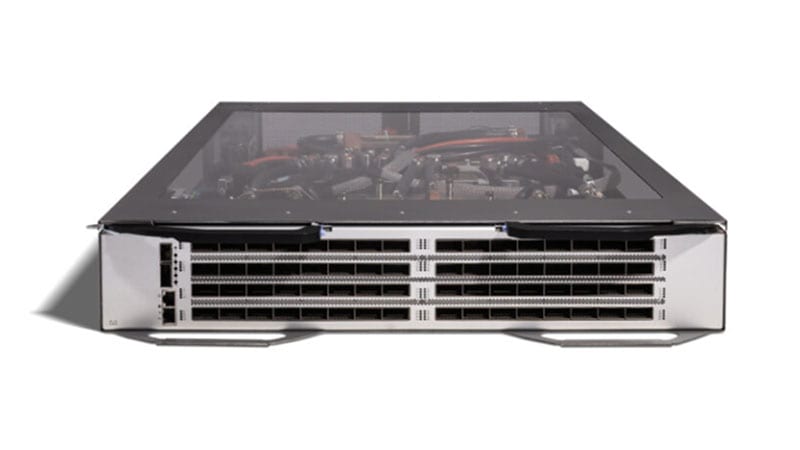
The Cisco Nexus 5596UP (N5K-C5596UP) earned its keep as a 2RU workhorse: 48 fixed unified ports plus three expansion-module slots, line-rate 10 Gigabit Ethernet, 1,920 Gbps of switching capacity, and the ability to flip any port between native Ethernet, FCoE, or 1/2/4/8G native Fibre Channel. For a decade it sat at the aggregation layer of data centers and FlexPod stacks, often paired with Nexus 2000 fabric extenders to scale top-of-rack 1G/10G access cheaply. That run is over. The 5596UP passed its Last Day of Support on May 31, 2024, which means every protection that made it safe to run in production has now expired. If a 5596UP is still carrying traffic in your environment, this guide explains exactly what you have lost, what the recommended path forward looks like, and how to migrate without taking an outage you cannot explain to an auditor.
Where the 5596UP stands today, and why the clock already ran out
Cisco published a clear end-of-life timeline for this platform, and all three milestones that matter are now behind us. Understanding what each one actually withdrew is the difference between a calm, planned refresh and an emergency replacement after a failure.
The milestone dates and what each one removed
- End of Sale: May 5, 2019. After this date you could no longer order a new N5K-C5596UP through Cisco. Everything still in service has been aging on the secondary market or in your own racks since then.
- End of Software Maintenance: May 4, 2020. The last maintenance NX-OS releases shipped. After this date there are no bug fixes, and critically, no new PSIRT security patches for the platform. Any CVE disclosed against Nexus 5500 NX-OS after this point will never be remediated on this hardware.
- Last Day of Support (LDoS): May 31, 2024. This is the hard wall. Cisco TAC will not open a support case for a 5596UP, and RMA/hardware replacement is gone. A failed power supply, a dead fabric ASIC, or a corrupt boot image is now your problem alone, sourced from whatever spares you can find.
There is no NX-OS patch coming, no TAC engineer to call, and no RMA to lean on. The risk is not theoretical degradation over years; it is the next single hardware fault or the next audit cycle, whichever arrives first. You can review the full milestone record and affected PIDs on our Nexus 5596UP end-of-life page.
The replacement path: from the 56128P to the Nexus 9300
Cisco's bulletin named the Nexus 56128P (N5K-C56128P) as the like-for-like successor to the 5596UP, and on paper it is a clean upgrade: a 2RU chassis with 48 fixed 10G SFP+ ports, four 40G QSFP+ uplinks built in, two expansion slots, and a jump to 2.56 Tbps of switching capacity, all while keeping the unified-port FCoE and native Fibre Channel story the 5596UP customers depended on. The problem is timing. The 56128P and the entire Nexus 5600 line have themselves reached end of life. Buying into a second already-retired platform just resets the same countdown.
For any deployment being designed in 2026, the real target is the Cisco Nexus 9300 series running NX-OS. This is where the architectural gains live, and they are substantial for a former 5596UP role:
- Port speed and density: 9300-FX/FX2/GX models deliver 10/25G access on SFP28 and 40/100/400G uplinks on QSFP-DD, versus the 5596UP's 10G-max ports and 8G Fibre Channel ceiling. A single 9300 supplants a 5596UP plus its FEX sprawl with far higher per-rack throughput.
- 25G server access for free: modern NICs and FlexPod refreshes assume 25G to the host. The 5596UP cannot do 25G at all; the 9300-FX2 makes it the default access speed with no media change beyond optics.
- Cloud Scale ASICs and deep buffers handle the incast and microburst patterns of virtualized and AI/ML east-west traffic that the original Nexus 5500 forwarding plane was never sized for.
- Operating model choice: a 9300 runs in standalone NX-OS or as an ACI leaf. That lets you keep a familiar CLI-driven aggregation design today and adopt intent-based fabric policy later without swapping hardware.
- Telemetry and automation: streaming telemetry, model-driven programmability (NETCONF/RESTCONF, gNMI), and Nexus Dashboard integration replace the SNMP-era operations the 5596UP was limited to.
Licensing: the shift you must plan for
The 5596UP used the old per-feature NX-OS license model (LAN Enterprise, FCoE, Layer 3 daughter card licenses, FabricPath, etc.) installed as PAK-based keys on the box. The Nexus 9300 uses Smart Licensing Using Policy (SLUP) with tiered subscriptions, typically Data Center Networking Essentials and Advantage, managed through your Smart Account on Cisco Smart Software Manager. Two consequences: your old PAK licenses do not transfer, and you need a Smart Account provisioned before the new switches come online. For air-gapped DoD and classified environments, plan for SLUP offline/reservation mode (SLR/PLR) up front rather than discovering the requirement at cutover.
A practical migration plan
A Nexus aggregation swap touches storage, compute, and the network simultaneously, so sequence matters more than speed. The phases below keep FCoE and dual-fabric designs intact through the transition.
1. Assess and inventory
Pull the running config, license state, and topology from each 5596UP. Document every FEX attached, every vPC peer-link and peer-keepalive, FCoE VLAN-to-VSAN mappings, zoning if the switch runs FC, and which ports are unified versus dedicated. Map physical dependencies: optics types in use (SFP+ SR/LR, FET for FEX, FC SFPs), DAC/twinax runs, and uplink fiber. This inventory is also your TAA and procurement worksheet later.
2. Design feature and config parity
Most 5500-era features map cleanly to NX-OS on the 9300 (vPC, port-channels, OSPF/BGP, HSRP), but verify the ones that do not translate one-to-one: FabricPath gives way to VXLAN/EVPN, and if you ran native Fibre Channel on unified ports, confirm whether the new design keeps FCoE on the 9300 or moves SAN traffic to a dedicated MDS fabric. Rebuild configs as templates rather than copy-paste; interface naming, licensing stanzas, and default behaviors differ between NX-OS trains.
3. Physical: rack, power, optics, uplinks
Both platforms are 2RU, so rack-for-rack swaps are usually feasible, but confirm power and cooling. The 9300-FX2 typically draws more under load and may use higher-wattage PSUs and different PDU receptacles; validate front-to-back vs back-to-front airflow against your hot/cold aisle. Reuse SFP+ optics where the new switch supports them, but budget for new 25G SFP28 and 40/100G QSFP optics for the uplinks and any host links you are upgrading. Stage the new switches alongside the old ones during the parallel-run phase rather than ripping and replacing in place.
4. Phased cutover
For a redundant pair, migrate one side of the vPC/dual-fabric at a time. Stand up the first 9300, bring up uplinks and a peer-link, migrate FEX or host connections in maintenance windows, validate forwarding and storage paths, then repeat on the redundant side. This keeps a live path throughout and gives you a clean rollback if something in the new NX-OS train behaves unexpectedly. Soak each side before moving on.
5. Secure decommission
Once traffic is fully cut over, wipe NX-OS configs and any stored credentials, certificates, and SNMP/TACACS secrets from the retired 5596UPs. For federal and DoD, follow NIST SP 800-88 media sanitization and retain a certificate of destruction or sanitization for the audit trail. Do not let a decommissioned aggregation switch leave the building with its config intact.
Procurement notes for regulated buyers
Lead times on current-generation Nexus 9300 hardware and matching optics fluctuate, so place orders against your maintenance-window calendar, not the other way around. For US federal, DoD, and SLED purchases, confirm TAA country-of-origin compliance and that the SKUs are eligible under your GPC, GSA, or contract vehicle. Buy from an authorized Cisco partner so warranty, Smart Account linkage, and Cisco services attach correctly from day one. As an authorized partner, uniqcli can validate the bill of materials, optics, and licensing for your specific 5596UP footprint and confirm TAA status before you commit. Browse current data center switching options in our catalog, or see related retirements on the Cisco end-of-life hub.
Frequently asked questions
Is it safe to keep running a Nexus 5596UP after May 31, 2024?
No. Past Last Day of Support there are no new NX-OS security patches, no Cisco TAC cases, and no hardware RMA. Any vulnerability disclosed against Nexus 5500 NX-OS after the May 2020 end of software maintenance will never be fixed on this platform, and a single failed PSU or ASIC has no Cisco replacement path. For regulated environments it is also a standing audit finding under controls like RMF SI-2, regardless of whether the box has been exploited.
Cisco listed the Nexus 56128P as the replacement, should I buy that?
For a 2026 design, no. The 56128P (N5K-C56128P) was the named successor and is a genuine upgrade over the 5596UP (48x10G SFP+, 4x40G QSFP+ uplinks, 2.56 Tbps), but the entire Nexus 5600 line is itself now end-of-life. Buying it restarts the same retirement clock. The current target for a former 5596UP aggregation role is the Nexus 9300 series running NX-OS.
What does the Nexus 9300 give me that the 5596UP cannot?
Native 10/25G server access on SFP28, 40/100/400G uplinks on QSFP-DD, Cloud Scale ASICs with deep buffers for east-west and incast traffic, streaming telemetry and model-driven programmability (gNMI/NETCONF), and the option to run standalone NX-OS today or as an ACI leaf later. The 5596UP topped out at 10G ports and 8G Fibre Channel with SNMP-era operations.
Do my existing NX-OS feature licenses transfer to the new switch?
No. The 5596UP used PAK-based per-feature licenses (LAN Enterprise, FCoE, L3, FabricPath). The Nexus 9300 uses Smart Licensing Using Policy with tiered Data Center Networking Essentials/Advantage subscriptions through a Smart Account. You need that Smart Account provisioned before cutover, and for air-gapped DoD sites you should plan offline/reserved licensing (SLR/PLR) in advance.
How do I migrate without an outage if I run vPC and FCoE?
Migrate one side of the redundant pair at a time. Stand up the first Nexus 9300, bring up its peer-link and uplinks, move FEX and host connections during a maintenance window, validate Ethernet and storage forwarding, then repeat on the redundant side. This keeps a live path throughout and preserves a clean rollback. Rebuild configs as templates rather than copy-paste, and verify FabricPath-to-VXLAN/EVPN and any native FC-to-MDS changes before cutover.
Uniqcli Team
The Uniqcli Team is an authorized Cisco partner specializing in Catalyst wireless, switching, datacenter fabric, licensing, and managed services for U.S. federal, state, local, and education customers. We scope Cisco bills of materials, validate procurement paths (TAA, FIPS, contract vehicles), and deliver design, deployment, and managed operations.
Ready to scope your Cisco build?
Build a quoteRelated reading
View all → Guides
Cisco Nexus 5548P EoL: Migrate to Nexus 9300 (93180YC-FX3)
The Nexus 5548P passed Last Day of Support on September 30, 2020, no patches, no TAC, no RMA. Here is why it must come out of the rack and how to migrate cleanly to the Nexus 9300 (N9K-C93180YC-FX3).
May 27, 2026 · 8 min readGuidesCisco Nexus 56128P EoL: Migrate to Nexus 9300 93360YC-FX2
The Nexus 56128P (N5K-C56128P) hit Last Day of Support on September 30, 2025. Here's what each lifecycle date means and how to refresh cleanly to the Nexus 9300 93360YC-FX2 with 25G/100G and MACsec.
February 3, 2026 · 8 min readGuidesNexus 3064 EoL: Migration to Nexus 9300 (93180YC-FX3)
The Nexus 3064 (N3K-C3064PQ-10GE) passed Last Day of Support on June 30, 2021. Here's why it must come out and how to migrate cleanly to the Nexus 9300 (N9K-C93180YC-FX3), 25G access, 100G uplinks, VXLAN/EVPN, and MACsec.
May 9, 2026 · 8 min readGuidesCisco Catalyst 4900M EoL: Migrate to Nexus 9300 (93180YC-FX3)
The Catalyst 4900M (WS-C4900M) passed Last Day of Support on October 5, 2021. Here's why it has to leave the rack and how to migrate cleanly to the Nexus 9300 N9K-C93180YC-FX3 top-of-rack switch.
May 5, 2026 · 8 min readGuidesNexus 93128TX EoL: Migration to the Nexus 93108TC-FX3
The Nexus 93128TX (N9K-C93128TX) passed Last Day of Support on October 31, 2022. Here is what each milestone means, why the 93108TC-FX3 is the right copper-leaf successor, and a concrete, low-risk migration plan for federal, healthcare, and enterprise data centers.
April 4, 2026 · 9 min readGuidesCisco Nexus 3524-X EoL: Migrate to Nexus 93180YC-FX3
The Nexus 3524-X (N3K-C3524P-10GX) hits Last Day of Support on January 31, 2027. Here is why the low-latency leaf has to come out and how to refresh cleanly to the Cloud Scale 93180YC-FX3.
February 23, 2026 · 8 min read