
Cisco Nexus 5548UP EoL: Migrate to the Nexus 93180YC-FX
The Nexus 5548UP passed Last Day of Support on May 31, 2024. Here is what each milestone means, why an unpatchable top-of-rack switch is an audit liability, and how to migrate cleanly to the Cloud Scale Nexus 93180YC-FX.
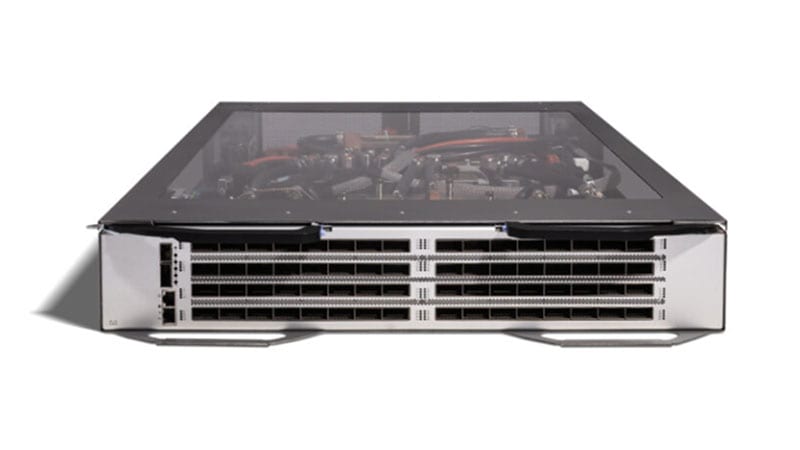
If you still have Cisco Nexus 5548UP switches (PID N5K-C5548UP) anchoring a top-of-rack or end-of-row position in a production data center, they are now past every Cisco lifecycle milestone that matters. The 5548UP reached its Last Day of Support on May 31, 2024. From that date forward Cisco provides no software fixes, no PSIRT security patches, and no TAC or RMA hardware replacement for this platform. The switch keeps forwarding frames at 10G, which is precisely why these 1RU units quietly persist in racks years after they should have been retired. This guide explains what the end-of-life dates actually mean for an operating fabric, why the recommended Nexus 93180YC-FX is a generational upgrade rather than a like-for-like swap, and how to plan a clean, low-risk migration.
What the Nexus 5548UP actually was
The 5548UP is a 1RU, 32-port unified-port top-of-rack switch built for the 10GbE/FCoE era. Every one of its 32 SFP+ ports is a 'unified port' (UP) that can be configured as 1/10 Gigabit Ethernet, FCoE, or native 2/4/8G Fibre Channel, which made it a flexible converged-access switch for racks that mixed Ethernet and storage. With a single GEM expansion module it scaled to 48 unified ports. Its switching fabric tops out around 960 Gbps, it forwards at cut-through latency in the roughly 2 microsecond range, and it acts as the parent switch for Fabric Extenders (Nexus 2000 FEX), letting one 5548UP aggregate top-of-rack FEX uplinks into a single managed point. For a 2011-era converged rack, it was a workhorse. For 25G/100G east-west traffic, NVMe-over-Fabric, and modern microservices density, it is a 10G ceiling that cannot be raised.
Why acting now matters
The hazard of an end-of-life data center switch is not that it fails. It is that it keeps working while the support floor disappears beneath it. After LDoS, three exposures stack up:
- No PSIRT security patches. When a new NX-OS vulnerability is disclosed, the 5548UP will not receive a fixed image. Its last maintenance build was frozen at the 2020 software cutoff. Any CVE that touches that code path on this hardware is permanent and unremediable except by removing the box.
- No TAC or RMA. A failed switch cannot be opened as a support case or swapped under a contract. Your only recovery is a cold spare you bought before LDoS or a gray-market unit of the same dead-end platform, a poor position for a switch sitting in the data path of a whole rack.
- Audit and compliance exposure. The frameworks federal, DoD, SLED, and healthcare buyers operate under (FedRAMP, CMMC, the HIPAA Security Rule, PCI DSS, and CISA directives) assume supported, patchable infrastructure. An unsupported top-of-rack switch that cannot be patched is an open finding, and 'the vendor no longer ships fixes' is not a defensible remediation plan.
There is also a software dead-end on the platform itself. NX-OS releases for the Nexus 5500 stopped advancing years ago, so the 5548UP is stranded on legacy 7.x code that lacks modern telemetry, automation hooks, and the security baselines current data center designs expect. As you modernize the spine and the management plane around it, the 5548UP ages out as the weakest, oldest link in the fabric.
What each milestone means in practice
- End of Sale (2019-05-05): the last day Cisco accepted new orders for the 5548UP. Everything after this date is consuming the support tail.
- End of Software Maintenance (2020-05-04): the last day Cisco released maintenance and bug-fix images. After this, even non-security defects go unfixed.
- Last Day of Support / LDoS (2024-05-31): the hard wall. No TAC, no RMA, no patches of any kind. The hardware is on its own from here forward.
The recommended replacement: Nexus 93180YC-FX
Cisco's EoL bulletin names the Nexus 9300 Cloud Scale platform as the unified-port migration path, with the N9K-C93180YC-FX as the direct successor (and the N5K-C5672UP-16G called out as an in-family alternative for shops that must stay on the Nexus 5000 line). The 93180YC-FX is the strategic choice, and the jump is genuinely generational, not incremental:
- Port density and speed: 48 ports of 1/10/25G SFP28 plus six 40/100G QSFP28 uplinks, versus 32 ports of 10G on the 5548UP. Access moves from 10G to 25G and uplinks move from 10G aggregation to native 40/100G, roughly 3.6 Tbps of switching capacity against the 5548UP's ~960 Gbps.
- Unified ports preserved: like the 5548UP, the 93180YC-FX supports unified ports, so its access ports can run as 8/16/32G Fibre Channel and the switch supports FCoE. Your converged storage design carries forward rather than being rebuilt from scratch.
- Line-rate MACsec: hardware MAC-layer encryption on every port, a feature the 5548UP never had, and increasingly a requirement for DoD and data-in-transit mandates between racks and rooms.
- Cloud Scale ASIC and telemetry: sub-microsecond cut-through latency, deep buffering, and streaming telemetry (model-driven, gRPC/NETCONF) for real-time visibility the 5500 simply cannot produce.
- NX-OS or ACI: the 93180YC-FX runs in standalone NX-OS mode or as an ACI leaf. That gives you an on-ramp into a Cisco ACI fabric and into intent-based automation, neither of which the 5548UP could ever join.
On licensing, plan for the modern Cisco data center model rather than the old per-feature N5500 licenses. The 9300 uses NX-OS smart/subscription licensing (Essentials and Advantage tiers via Cisco Smart Software Licensing, with the Nexus Dashboard or DCNM for fabric management). Budget the subscription alongside the hardware, and map which features you actually use (vPC, FEX, FCoE, telemetry) to the right tier so you neither under- nor over-buy.
A practical migration plan
1. Assess and inventory
Catalog every 5548UP by serial and rack location, and capture the running config, NX-OS version, vPC peerings, port-channels, FCoE/FC port roles, VSAN/zoning, attached FEX, and uplink topology. Note which ports are Ethernet versus Fibre Channel and what optics populate them. This inventory is both your parity checklist and your decommission manifest.
2. Plan license and feature parity
Move from N5500 feature licenses to the 9300's smart-licensing tiers, and re-implement the running config against current NX-OS rather than copying it. Both platforms run NX-OS, but the syntax, defaults, and ASIC features differ, so treat this as a rebuild for parity: VLANs, vPC, QoS, ACLs, and SAN config get re-validated, deprecated commands get dropped, and new capabilities (MACsec, telemetry) get enabled deliberately.
3. Physical: rack, power, optics, and uplinks
The 93180YC-FX is 1RU like the 5548UP, so rack space is rarely the constraint, but power and optics are. Plan power and cooling for the higher-capacity Cloud Scale platform, and audit optics carefully: 10G SFP+ links can re-home onto SFP28 ports, but moving access to 25G and uplinks to 40/100G means new SFP28/QSFP28 transceivers and the right fiber. Validate FC optics separately if you carry storage. If you run dual switches, build the new vPC pair before touching the old one.
4. Phased cutover
Stage the 93180YC-FX pair beside the live 5548UP, bring up uplinks and vPC, and migrate workloads rack-by-rack or service-by-service during change windows rather than in a single flag day. Pre-stage storage zoning and verify FCoE/FC paths before moving SAN-attached hosts. Keep the old switch powered and reachable until the new path is proven, then drain and remove it.
5. Secure decommission
After cutover, wipe the 5548UP configuration, remove credentials and certificates, and document the disposal chain. For federal and healthcare environments, follow your media-sanitization and asset-disposition policy so the retired hardware does not become its own compliance gap. Browse current data center options in our catalog as you build the bill of materials.
Procurement notes
Order through an authorized Cisco partner so the purchase carries documented provenance and is eligible for payment via GPC or your agency's own contract vehicle. Confirm the exact TAA-compliant PID and country of origin on the quote for federal, DoD, and SLED buys. Plan lead times early, because Cloud Scale switches and 25G/100G optics can carry extended lead times, and you want the new pair racked and validated well before you rely on it. For the full milestone record on this switch, see the Nexus 5548UP EoL detail page, and browse other affected platforms in the Cisco EoL library.
Acting before a failure or an audit puts you in control of the timeline instead of reacting to one. Start the conversation now: request a migration quote and we will turn your 5548UP inventory into a costed, phased refresh plan.
Frequently asked questions
When did the Cisco Nexus 5548UP reach end of life?
The 5548UP (N5K-C5548UP) went End of Sale on May 5, 2019, ended software maintenance on May 4, 2020, and reached Last Day of Support (LDoS) on May 31, 2024. Every milestone has now passed, so there are no more Cisco software fixes, PSIRT security patches, TAC cases, or RMA hardware replacements for this switch.
What is the recommended replacement for the Nexus 5548UP?
Cisco's migration path is the Nexus 9300 Cloud Scale switch, specifically the N9K-C93180YC-FX: 48 ports of 1/10/25G SFP28 plus six 40/100G QSFP28 uplinks, line-rate MACsec, and a unified-port mode that also supports native Fibre Channel and FCoE. The Nexus 5672UP-16G (N5K-C5672UP-16G) is the alternative when you must stay on the Nexus 5000 line, but the 93180YC-FX is the strategic choice.
Can the 93180YC-FX carry forward my FCoE and Fibre Channel storage from the 5548UP?
Yes. The 93180YC-FX supports unified ports, so its 25G access ports can run as 8/16/32G Fibre Channel and the switch supports FCoE. Storage traffic that the 5548UP carried over its 32 unified 10G ports can be re-homed onto the 9300 without abandoning your SAN design, though you should re-validate optics, VSANs, and zoning during cutover.
Will my running configuration port directly from NX-OS on the 5548UP to the 93180YC-FX?
No, not as a flat copy. Both run NX-OS, but the 9300 runs a current 9.x/10.x train with Cloud Scale ASIC features the 5500 never had. Treat it as a config re-build for parity: export VLANs, vPC, port-channels, QoS, and ACLs, then re-implement them against current syntax and validate. Budget time to retire deprecated commands and to enable new capabilities like MACsec and streaming telemetry.
Is the Nexus 93180YC-FX TAA-compliant for federal and DoD buyers?
Cisco offers TAA-compliant configurations of the Nexus 9300 Cloud Scale family suitable for federal, DoD, and SLED procurement. Confirm the exact TAA-compliant PID and country of origin on the quote, and order through an authorized partner so the purchase is GPC- and contract-vehicle-eligible with documented provenance.
Uniqcli Team
The Uniqcli Team is an authorized Cisco partner specializing in Catalyst wireless, switching, datacenter fabric, licensing, and managed services for U.S. federal, state, local, and education customers. We scope Cisco bills of materials, validate procurement paths (TAA, FIPS, contract vehicles), and deliver design, deployment, and managed operations.
Ready to scope your Cisco build?
Build a quoteRelated reading
View all → Guides
Cisco Nexus 5548P EoL: Migrate to Nexus 9300 (93180YC-FX3)
The Nexus 5548P passed Last Day of Support on September 30, 2020, no patches, no TAC, no RMA. Here is why it must come out of the rack and how to migrate cleanly to the Nexus 9300 (N9K-C93180YC-FX3).
May 27, 2026 · 8 min readGuidesCisco Nexus 9396PX EoL: Migrate to Nexus 93180YC-FX3
The Nexus 9396PX (N9K-C9396PX) passed Last Day of Support on February 19, 2023, here is why this original 9300 leaf has to come out and how to refresh cleanly to the Cloud Scale 93180YC-FX3.
April 2, 2026 · 10 min readGuidesNexus 5672UP-16G EoL: Migration to Nexus 9300 93180YC-FX
The Nexus 5672UP-16G reaches Last Day of Support on May 31, 2026, here's why it has to come out and how to migrate cleanly to the 25G/100G Nexus 9300 (N9K-C93180YC-FX).
February 5, 2026 · 10 min read Guides
Nexus 3064-T EoL: Migrate to Nexus 93108TC-FX3
The Nexus 3064-T (N3K-C3064TQ-10GT) passed Last Day of Support on June 30, 2021, here's why this 10GBASE-T top-of-rack switch must come out and how to refresh cleanly to the Nexus 9300 93108TC-FX3.
May 11, 2026 · 8 min readGuidesCisco Nexus 3524-X EoL: Migrate to Nexus 93180YC-FX3
The Nexus 3524-X (N3K-C3524P-10GX) hits Last Day of Support on January 31, 2027. Here is why the low-latency leaf has to come out and how to refresh cleanly to the Cloud Scale 93180YC-FX3.
February 23, 2026 · 8 min readGuidesCisco Catalyst 4900M EoL: Migrate to Nexus 9300 (93180YC-FX3)
The Catalyst 4900M (WS-C4900M) passed Last Day of Support on October 5, 2021. Here's why it has to leave the rack and how to migrate cleanly to the Nexus 9300 N9K-C93180YC-FX3 top-of-rack switch.
May 5, 2026 · 8 min read