

If you still have Cisco Meraki MX400 appliances (PID MX400-HW) anchoring a campus or datacenter edge, they are now past every lifecycle milestone that matters. The MX400 reached Last Date of Support on May 20, 2025, five years after it went End-of-Sale on May 20, 2020. From the LDoS date forward, Cisco delivers no firmware releases, no PSIRT security fixes, and no TAC support or RMA hardware replacement for this model. The appliance keeps inspecting traffic and keeps building AutoVPN tunnels, which is precisely why these units quietly survive in production long after they should have been retired. This guide explains what the dates actually mean for a running fleet, why the recommended Meraki MX250 is the right successor, and how to plan a low-risk cutover that preserves your Meraki dashboard configuration.
What the MX400 actually was
The MX400 was Meraki's high-end modular security and SD-WAN appliance, built for large campuses and datacenters. Unlike the fixed-port MX models, it shipped as a 1U chassis with two interface-module bays, so you could populate it with the uplink and access media your site needed: copper RJ45 modules, 1 Gigabit SFP modules, or 10 Gigabit SFP+ modules. It carried dual hot-swappable power supplies for redundancy. In Meraki terms its headline number was roughly 1 Gbps of stateful firewall throughput with a recommended ceiling of about 2,000 concurrent clients, and it ran the full MX feature set: stateful L3/L7 firewall, Advanced Security (IDS/IPS via Snort, Cisco AMP, content filtering, Cisco Talos threat intelligence), Auto VPN site-to-site SD-WAN, and full cloud management from the Meraki dashboard. For its 2014-era launch window it was a flexible, modular flagship. Today its silicon is the constraint.
Why acting now matters
The danger of an end-of-life security appliance is not that it stops working. It is that it keeps working while the support floor disappears beneath it, and on a firewall, that floor is your security posture. Three concrete exposures stack up after LDoS:
- No PSIRT security fixes. When a new vulnerability is disclosed in the MX firmware, Snort IPS engine, or the appliance's VPN/IKE stack, the MX400 will not receive a patched build. Its firmware train is frozen. Any CVE that touches that code path on this hardware is permanent and unpatchable, on the very device whose job is to stop attacks.
- No TAC or RMA. A failed unit cannot be opened as a support case or swapped under contract. Your only recovery is a cold spare you bought before LDoS or a secondary-market unit of the same dead-end model, itself unsupported.
- Dashboard and license risk. Because the MX is cloud-managed, an appliance that has aged off the supported list can also fall behind the dashboard's minimum firmware floor, leaving you unable to claim a clean compliance state even while the box is online.
- Audit and compliance exposure. The frameworks federal, DoD, SLED, and healthcare buyers live under, FedRAMP, CMMC 2.0, the HIPAA Security Rule, PCI DSS 4.0, and CISA directives, all expect supported, patchable perimeter security. An edge firewall that the vendor no longer patches is a finding waiting to happen, and 'the manufacturer stopped shipping fixes' is not a defensible remediation plan.
What each milestone means in practice
- End of Sale (2020-05-20): the last day Cisco accepted new MX400-HW orders. Everything after this date is drawing down the support tail.
- End of Software Maintenance: Meraki firmware is delivered centrally and was maintained through the support window rather than a separately published maintenance cutoff for this SKU. In practice, feature and security fixes wound down as the platform approached LDoS.
- Last Date of Support / LDoS (2025-05-20): the hard wall. No TAC, no RMA, no firmware or security fixes of any kind. The appliance is on its own from this date forward.
The recommended replacement: Meraki MX250
Cisco's migration path is the Meraki MX250 (PID MX250-HW). It is the direct successor on the current MX platform, and it is a real upgrade rather than a like-for-like swap. The MX250 trades the MX400's modular bays for a rich fixed-port layout and a much faster data plane, while staying inside the same Meraki dashboard you already operate.
- Roughly 4x the firewall throughput. The MX250 is rated at about 4 Gbps of stateful firewall throughput versus the MX400's ~1 Gbps, with substantially higher Advanced Security (NGFW/IPS-enabled) and Auto VPN throughput. That headroom matters because L7 inspection, IDS/IPS, and AMP all cost cycles the older silicon did not have to spare.
- Dense fixed connectivity, no modules to source. The MX250 ships with a fixed LAN/WAN layout: 2x 10G SFP+ WAN uplinks, plus a LAN side combining 10G SFP+, 1G SFP, and 1G RJ45 ports. You no longer depend on aging, separately-stocked interface modules, the optics flexibility is built in via the SFP/SFP+ cages.
- Dual redundant power. Like the MX400, the MX250 carries dual hot-swappable power supplies, so the redundancy your datacenter design assumed is preserved.
- Current, supported firmware. The MX250 is on the active MX firmware train, receiving feature updates and PSIRT fixes, the entire point of the migration.
- Same management model and feature parity-plus. Stateful and L7 firewall, Snort-based IDS/IPS, Cisco AMP, content filtering, Cisco Talos feeds, and Auto VPN SD-WAN all carry forward, configured from the same Meraki dashboard org. SD-WAN policy, traffic shaping, and templates migrate conceptually one-to-one.
A practical migration plan
Because the MX is cloud-managed, an MX400-to-MX250 migration is one of the cleaner refreshes in the Cisco portfolio, most of the work is configuration portability and physical cutover, not a ground-up redesign. A disciplined sequence keeps it low-risk:
1. Assessment and inventory
- Inventory every MX400-HW by serial, network/dashboard org, role (NAT/routed vs one-armed concentrator, VPN hub vs spoke), and the interface modules populated in each chassis.
- Capture the current data-plane reality: peak WAN throughput, number of Auto VPN tunnels terminated, IDS/IPS and content-filtering load, and uplink media (RJ45 vs 1G vs 10G). This is what sizes the MX250 vs MX450 decision.
- Record warranty/contract status and Meraki license type and expiry per device.
2. License transition
- Meraki is subscription-licensed per appliance and tier (Enterprise vs Advanced Security / Secure SD-WAN Plus). Plan to claim and license the new MX250 serials in the same dashboard org, then co-term or transfer licensing as appropriate.
- Match the new MX250 license tier to the features you actually run today, if the MX400 used Advanced Security (IPS, AMP, content filtering), the MX250 must be licensed at that tier to retain them.
- We handle license claiming, co-termination, and tier mapping as part of the quote so there is no coverage gap at cutover.
3. Configuration and feature parity
- Because both appliances live in the same Meraki dashboard, the bulk of policy, firewall rules, L7 rules, content filtering, IPS posture, Auto VPN topology, traffic shaping, VLANs/subnets, and SD-WAN policies, ports across cleanly. Configuration templates make this near-mechanical for multi-site fleets.
- Re-map physical port roles: the MX400's module ports become specific fixed ports on the MX250. Document which physical interfaces carry WAN1/WAN2, LAN trunks, and any DMZ before the swap.
- Validate optics: reuse compatible Meraki SFP/SFP+ transceivers where supported, or include the correct modules in the order so the MX250 lands with matching media on day one.
4. Physical: rack, power, uplinks, optics
- Both are 1U with dual PSUs, so rack and power planning is straightforward, confirm two feeds per appliance to preserve PSU redundancy.
- Pre-stage the MX250: claim it into the dashboard, license it, and pre-load the migrated config while the MX400 is still live.
- Stage transceivers and cabling for the new fixed port map so cutover is plug-and-verify, not improvise-at-the-rack.
5. Phased cutover
- For VPN spokes and branch edges, swap during a maintenance window: power the pre-configured MX250 into the same uplinks, confirm it registers and pulls config from the dashboard, then verify Auto VPN tunnels, internet egress, and inspection counters before declaring success.
- For VPN hubs and datacenter concentrators, stand the MX250 up alongside the MX400 where the topology allows, migrate spokes in batches, and retire the MX400 only after the new hub carries production cleanly.
- Keep the MX400 racked but offline as an immediate fallback for the first window or two.
6. Secure decommission
- Remove the retired MX400 from the dashboard org and unclaim it so it cannot rejoin or skew inventory.
- Wipe/reset the appliance and follow your data-sanitization standard (NIST SP 800-88 for federal and DoD environments) before disposal or trade-in.
- Update the asset register and any SSP/POA&M so the unsupported device is formally removed from your authorized boundary.
Procurement notes for regulated buyers
As an authorized Cisco partner, uniqcli sources the MX250 (and MX450, if you size up) through legitimate channels, important because secondary-market 'gray' Meraki units frequently carry licensing and claim problems that surface only after you try to add them to your dashboard. For federal, DoD, and SLED buyers we confirm Trade Agreements Act (TAA) compliance, accept the Government Purchase Card (GPC) for in-threshold orders, and quote current lead times so your cutover window does not slip waiting on hardware. Browse current Meraki MX models in our catalog, review the full milestone record on the MX400-HW EoL page, or see what else in your fleet is aging out on the Cisco EoL lookup.
The MX400 did its job for a decade, but past LDoS it is an unsupported, unpatchable firewall sitting at your edge, the worst place to carry that risk. The MX250 is the supported, faster, dashboard-native successor, and the migration is among the cleanest Cisco offers. Get a quote and we'll turn your end-of-life exposure into a low-risk, audit-ready refresh.
Frequently asked questions
When did the Cisco Meraki MX400 reach end of life?
The MX400 (MX400-HW) went End-of-Sale on May 20, 2020 and reached Last Date of Support (LDoS) on May 20, 2025. Past LDoS there are no firmware updates, no PSIRT security fixes, and no Cisco TAC support or RMA hardware replacement for the appliance.
What is the recommended replacement for the Meraki MX400?
Cisco's direct migration path is the Meraki MX250 (MX250-HW). It is the like-scale successor on the current MX platform, delivering roughly 4 Gbps of stateful firewall throughput (about 4x the MX400's ~1 Gbps) with active firmware support, while keeping the same Meraki dashboard management. Sites that have outgrown the ~2,000-user envelope should size up to the MX450 instead.
Can I keep running the MX400 after May 2025 if it still works?
It will keep passing traffic, but it is unsupported and unpatchable. As a perimeter firewall, an MX400 past LDoS cannot receive fixes for newly disclosed vulnerabilities in its firmware, IPS engine, or VPN stack, and it cannot be RMA'd if it fails. For FedRAMP, CMMC, HIPAA, and PCI DSS environments, an unsupported edge security device is a compliance finding waiting to happen.
How hard is the MX400-to-MX250 migration?
It is one of the cleaner Cisco refreshes because both appliances are cloud-managed in the same Meraki dashboard. Firewall rules, L7/content policy, IPS posture, Auto VPN/SD-WAN topology, VLANs, and traffic shaping port across cleanly, often via configuration templates. The main work is sizing, license transition, mapping the MX400's modular ports to the MX250's fixed ports/optics, and a phased physical cutover.
Is the MX250 TAA-compliant and GPC-payable for government buyers?
Yes. As an authorized Cisco partner, uniqcli supplies the MX250 through legitimate channels with TAA compliance confirmed for federal, DoD, and SLED buyers, and accepts the Government Purchase Card (GPC) for in-threshold orders. We also handle Meraki license claiming and co-termination so there is no coverage gap at cutover.
Uniqcli Team
The Uniqcli Team is an authorized Cisco partner specializing in Catalyst wireless, switching, datacenter fabric, licensing, and managed services for U.S. federal, state, local, and education customers. We scope Cisco bills of materials, validate procurement paths (TAA, FIPS, contract vehicles), and deliver design, deployment, and managed operations.
Ready to scope your Cisco build?
Build a quoteRelated reading
View all → Guides
Cisco MS220-24P End-of-Life: Migrate to MS225-24P Guide
The Meraki MS220-24P hit Last Date of Support on July 29, 2024. Here is what each milestone means, why the stackable MS225-24P is the right refresh, and a practical migration plan for federal, healthcare, and enterprise wiring closets.
January 1, 2026 · 8 min read Guides
Cisco 2960-48TC-L EoL: Migrate to Catalyst 9200L 48-Port
The Catalyst 2960-48TC-L (WS-C2960-48TC-L) passed Last Day of Support on October 31, 2019. Here is why this Fast Ethernet LAN Base switch has to come out of the wiring closet, and how to refresh cleanly to the Catalyst 9200L 48-port C9200L-48T-4X-A.
June 9, 2026 · 8 min readGuidesCisco Catalyst 4948 (WS-C4948-S) EoL: Migrate to Catalyst 9300
The WS-C4948-S passed Last Day of Support on Jan 31, 2020. Here is why this top-of-rack workhorse has to come out and how to refresh cleanly to a stackable Catalyst 9300 (C9300-48T-A).
June 5, 2026 · 8 min read Guides
Cisco UCS C420 M3 EoL: Migrate to UCS C240 M7
The four-socket UCS C420 M3 passed Last Day of Support on February 28, 2021. Here is why it has to come out of the rack and how to consolidate it onto the dual-socket UCS C240 M7 without losing capacity.
May 25, 2026 · 6 min read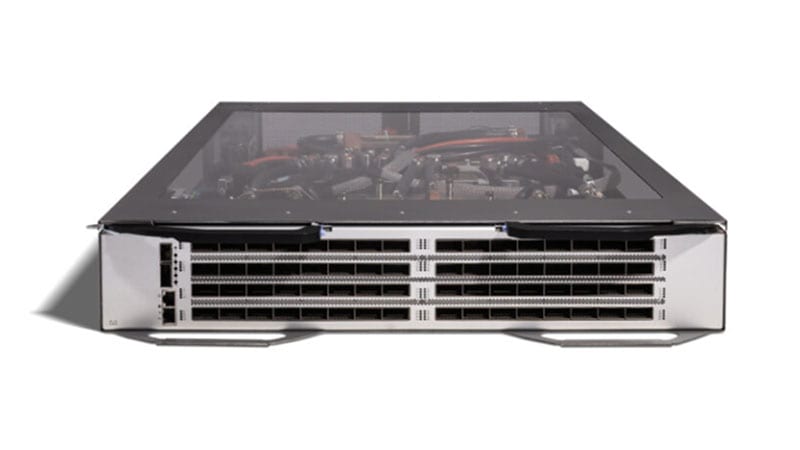 Guides
Cisco Nexus 6001-64T EoL: Migrate to Nexus 93180YC-FX3
The Nexus 6001-64T (N6K-C6001-64T) passed Last Day of Support on April 30, 2022. Here is what each milestone means, why the 10GBASE-T top-of-rack switch has to come out, and how to refresh cleanly to the Cloud Scale Nexus 93180YC-FX3.
April 19, 2026 · 7 min readGuidesCisco Meraki MX60 (MX60-HW) Replacement & MX67 Migration
The Meraki MX60 hit Last Day of Support on 2022-10-24, no firmware, no PSIRT fixes, no RMA. Here is exactly what that means and how to migrate a small branch to the MX67 cleanly.
April 8, 2026 · 7 min read