
Wi-Fi 7 in practice: what MLO and 320 MHz really change
Multi-Link Operation and 320 MHz channels are the two features that actually separate Wi-Fi 7 from Wi-Fi 6E. Here is what they do on real Cisco Catalyst hardware, where the gains evaporate, and how to plan a rollout that survives contact with a U.S. enterprise RF environment.

Key takeaways
- MLO lets a single client bond two or three bands at once, which cuts latency jitter and adds resilience far more than it raises headline throughput in a busy enterprise.
- 320 MHz channels double peak speed but only exist in 6 GHz, and U.S. spectrum and AFC rules mean you rarely get more than a couple of clean ones outdoors or near incumbents.
- The real-world benefit shows up at the edges: voice and video that stop stuttering, AR/VR and medical telemetry that hold steady, and roaming that recovers faster.
- Wi-Fi 7 APs like the Cisco Catalyst CW9176I and CW9178I are 6 GHz-centric, so the 2.4/5 GHz cabling, switching, and controller plan matters as much as the radio.
- Multi-gig uplinks and adequate PoE are now the gating factor, not the AP; a 1 Gbps switch port wastes most of what a Wi-Fi 7 radio can deliver.
- Client mix decides the payoff. Until laptops, phones, and IoT endpoints ship MLO-capable Wi-Fi 7 silicon, plan for a multi-year coexistence window.
What Wi-Fi 7 actually adds over Wi-Fi 6E
Wi-Fi 7, ratified under IEEE 802.11be, is often sold as a speed bump. That framing misses the point. The two features that genuinely change how a network behaves are Multi-Link Operation and 320 MHz channels, and only one of them is really about raw speed. Everything else in the spec, including 4096-QAM and improved multi-RU scheduling, is incremental tuning on top of what Wi-Fi 6 and 6E already delivered. The standardization work runs through the IEEE, with certification and interoperability handled by the Wi-Fi Alliance under the Wi-Fi CERTIFIED 7 program.
If you already deployed Wi-Fi 6E, you have the 6 GHz band, you have OFDMA, and you have a decent client experience in most density profiles. The honest question for an upgrade is narrower than a vendor pitch: do MLO and wider channels solve a problem you actually have? For high-density venues, latency-sensitive clinical and industrial traffic, and dense client populations, the answer is frequently yes. For a sparse branch office where five people check email, the answer is almost certainly no, and the budget belongs elsewhere in your networking roadmap.
Cisco positions Wi-Fi 7 across the Catalyst CW91xx access point line, with models such as the CW9176I, CW9178I, and the high-capacity CW9179F for stadium-class density. The capability is real and shipping. What follows is how those two headline features behave once they hit an enterprise RF environment, plus the wiring and licensing realities that decide whether you ever see the gains.
Multi-Link Operation: the feature that quietly matters most
Multi-Link Operation is the structural change in Wi-Fi 7. For the first time, a single client and a single AP can establish links across multiple bands at the same time, then move or duplicate traffic across them. A laptop can hold a session on 5 GHz and 6 GHz concurrently rather than associating with one radio and hoping it stays clean. That sounds like a throughput trick, and it can be, but the more durable win is reliability and latency consistency.
There are several MLO modes, and the distinction matters for planning. Simultaneous transmit and receive (STR) can genuinely aggregate two links for higher aggregate throughput when both bands are clean. Other modes duplicate or steer frames for resilience rather than raw speed, sending a packet on whichever link is free at that microsecond. In a congested enterprise where the 5 GHz band is half-full of legacy clients, the resilience modes are often where the value lives. You stop seeing the tail-latency spikes that wreck voice, video, and real-time control traffic, even if your peak Mbps number barely moves.
This is why MLO is the part of Wi-Fi 7 worth designing around for demanding verticals. In healthcare, the payoff is telemetry and barcode-scanning workflows that do not drop mid-procedure. In manufacturing, it is AGVs and machine-vision feeds that hold a stable link across an RF-hostile factory floor. The benefit is felt as 'it just stopped glitching,' which rarely shows up in a speed-test screenshot but shows up immediately in user complaints that disappear.
320 MHz channels: real doubling, with real-world limits
The 320 MHz channel is the speed story. Doubling the widest Wi-Fi 6E channel from 160 MHz to 320 MHz roughly doubles peak per-client throughput under ideal conditions, and combined with 4096-QAM it produces the multi-gigabit numbers on the spec sheet. The catch is that 320 MHz channels only exist in the 6 GHz band. There is no 320 MHz operation in 2.4 GHz or 5 GHz, so every benefit of this feature is gated by how much clean 6 GHz spectrum you can actually use in a given location.
In the United States, 6 GHz access is governed by the FCC, and the practical amount of usable spectrum depends on power class and location. The full 1200 MHz allocation can theoretically fit only a handful of non-overlapping 320 MHz channels, and that math collapses fast indoors where low-power operation competes with neighbors, or outdoors and near incumbents where Automated Frequency Coordination throttles what you can transmit. Plan for the realistic case of one or two genuinely clean 320 MHz channels in a dense building, not the brochure maximum.
The honest takeaway: 320 MHz is fantastic for a flagship client standing near an AP with the band to itself, and it is a legitimate reason to deploy Wi-Fi 7 in venues that need raw per-client speed. But channel width is a shared resource. The wider the channel, the fewer of them you have to reuse across a floor plan, which means co-channel interference rises as you scale. Most enterprise designs will run a mix of widths, reserving 320 MHz for the cells and clients that can exploit it rather than blanketing a campus with it.
The wiring catches up: multi-gig, PoE, and switching
A Wi-Fi 7 radio that can push multiple gigabits over the air is useless behind a 1 Gbps switch port. This is the most common and most expensive surprise in a Wi-Fi 7 project. The bottleneck moves off the AP and onto the cable plant, the access switch, and the power budget. If your edge is still 1G copper with older PoE, the AP will associate clients happily and then choke on its own uplink the moment real traffic flows.
Wi-Fi 7 access points generally want multi-gigabit uplinks, often 5 Gbps or higher per AP, and they draw more power than previous generations under full load. That points squarely at a switching refresh in the same project. Cisco's Catalyst 9300 line, with multi-gigabit and high-wattage PoE options, is the typical pairing; the Catalyst 9300 data sheet lays out the mGig and power-per-port figures you need to size against. Treat the AP and the switch as one purchase, not two, and validate the switching layer before you ever rack a single radio.
Power is its own line item. High-end Wi-Fi 7 APs can exceed the budget of older PoE and may need 802.3bt, which can force a stack or line-card decision at the closet. Walk the cable runs, confirm category and length, and confirm the per-port and total switch power budget early. Getting the structured deployment sequence right, switch first then AP, prevents the classic stall where new access points arrive and there is nothing in the rack that can feed them.
Controllers, licensing, and lifecycle realities
Cisco's enterprise Wi-Fi 7 access points are managed through the Catalyst 9800 wireless controller family and, increasingly, through cloud management. Before you commit to hardware, confirm the controller software train supports the specific Wi-Fi 7 AP models you are buying and the MLO features you intend to use, because feature support arrives over successive releases rather than all at once. A controller that runs your Wi-Fi 6E fleet today may need a code upgrade, and sometimes a hardware refresh, to drive Wi-Fi 7 radios at full capability. Plan that into the wireless controllers part of the design.
Licensing follows Cisco's subscription model, and the total cost of a wireless estate is the APs plus the controller capacity plus the per-AP licensing plus support. Folding all of it into one procurement avoids the unpleasant discovery that the radios shipped but the entitlements did not. It also lets you align renewal dates so the fleet does not fall out of coverage piecemeal. Cisco's Smart Net Total Care program is how most organizations keep that support consolidated and predictable.
Lifecycle is the unglamorous half of the decision. Buying Wi-Fi 7 now also means tracking the end-of-sale and end-of-life clock on whatever it replaces, because running production wireless on gear past its end-of-life milestones is a security and supportability liability, not a cost saving. A clean lifecycle plan ties the new deployment, the decommission of the old, and the support renewals into a single timeline instead of three separate fire drills.
Client reality: you are deploying for hardware that is still arriving
Wi-Fi is a two-sided system, and the AP is only half of it. MLO and 320 MHz deliver nothing to a client that cannot use them. As of this deployment window, Wi-Fi 7 silicon is in flagship phones and newer laptops, but the long tail of corporate endpoints, scanners, medical devices, badge readers, and IoT sensors will be Wi-Fi 6, 6E, or older for years. That is fine, because Wi-Fi 7 is backward compatible, but it reshapes the business case.
Practically, this means the first years of a Wi-Fi 7 network run as a mixed fleet. A handful of capable clients enjoy MLO and wide channels while the majority connect at prior-generation rates. The upgrade still pays off, because the airtime efficiency and resilience improvements help the whole cell, and because new APs raise the floor for everyone. But if your justification rests entirely on peak speeds that only Wi-Fi 7 clients can reach, audit your actual device inventory before you sign anything.
The strategic read is to deploy where the capable clients and the demanding traffic already concentrate. A clinical floor with new tablets, an engineering lab with current laptops, a high-density lecture hall, or a venue with bring-your-own flagship phones will show the gains first. Lower-density, legacy-client areas can stay on existing access points and migrate later. Stage the rollout to follow the value rather than carpeting every closet on day one.
Where Wi-Fi 7 earns its keep in regulated environments
For federal, defense, and other regulated buyers, the calculus includes more than RF performance. New wireless touches accreditation, configuration baselines, and procurement vehicles, and those processes move on their own timeline. A Wi-Fi 7 refresh in a government setting has to land its configuration against published security guidance, including the relevant DISA STIGs for wireless and the controls framework in NIST SP 800-53. Build the hardening and documentation work into the schedule rather than bolting it on after go-live.
Procurement is the other gate. Public-sector buyers who hold NASA SEWP or a GSA Schedule can buy against that vehicle, and Cisco maintains a portfolio of federal contract options to match. Uniqcli holds no such vehicle, so for buyers without one we structure the purchase as a GPC buy, Simplified Acquisition, or a direct FAR-based purchase order. Aligning the technical design with the contract vehicle up front avoids the all-too-common situation where the architecture is approved but the acquisition path is not, and the project sits idle while paperwork catches up. Our government and defense teams scope both halves together.
The same discipline benefits any regulated enterprise. Healthcare, education, and critical-infrastructure buyers all face baseline configuration, segmentation, and audit requirements that a new wireless layer must satisfy. Pulling the security architecture forward, tying it to identity and policy, and validating it before the fleet expands is what separates a Wi-Fi 7 deployment that passes review from one that gets held at the door. When that planning is done well, the gains from MLO and 320 MHz arrive on schedule instead of getting stuck behind a compliance backlog.
Cisco products involved
- Cisco Catalyst CW9176I Wi-Fi 7 Access Point
- Cisco Catalyst CW9178I Wi-Fi 7 Access Point
- Cisco Catalyst CW9179F Wi-Fi 7 Access Point
- Cisco Catalyst CW9172I Wi-Fi 7 Access Point
- Cisco Catalyst 9800 Series Wireless Controllers
- Cisco Catalyst 9300 Series Switches
- Cisco Identity Services Engine (ISE)
- Cisco Smart Net Total Care
To plan the upgrade, Uniqcli can scope a Wi-Fi 7 quote that accounts for MLO and 320 MHz channel planning.
Bottom line: MLO buys you resilience and steady latency, 320 MHz buys you peak speed where the spectrum and clients exist, and the wiring decides whether you ever see either. Get a scoped Wi-Fi 7 quote that sizes the APs, switching, and licensing as one plan.
Frequently asked questions
Is Wi-Fi 7 worth it if we just finished a Wi-Fi 6E rollout?
Often not yet, unless you have a specific problem MLO or 320 MHz solves. If your 6E network already handles density and latency, the upgrade budget is usually better spent elsewhere. The strongest cases for jumping early are latency-sensitive clinical and industrial traffic, very high-density venues, and areas already full of Wi-Fi 7 client devices.
Does Multi-Link Operation actually double my throughput?
Sometimes, but that is not its main value. Simultaneous transmit/receive modes can aggregate two clean bands for higher throughput, but in a busy enterprise the bigger win is resilience and consistent low latency. MLO can steer or duplicate frames across links so real-time traffic stops experiencing the jitter and drop-outs that plague single-band associations.
How many 320 MHz channels can I realistically use in the US?
Far fewer than the spec implies. 320 MHz channels exist only in 6 GHz, and FCC power-class rules plus Automated Frequency Coordination limit clean availability. In a dense building, plan for one or two genuinely usable 320 MHz channels, and reserve them for the cells and clients that can exploit the width rather than deploying them everywhere.
What has to change in my wired network before Wi-Fi 7?
Usually the access switches and power budget. Wi-Fi 7 APs want multi-gigabit uplinks, frequently 5 Gbps or more per AP, and can exceed older PoE budgets. A 1 Gbps port wastes most of the radio. Treat the switch refresh, cable plant, and power as part of the same project and validate them before the access points arrive.
Do my existing clients benefit, or only new Wi-Fi 7 devices?
MLO and 320 MHz only help Wi-Fi 7 clients, but the whole cell benefits from better airtime efficiency and a higher performance floor. Expect a multi-year mixed fleet as laptops, phones, and IoT endpoints catch up. Deploy first where capable clients and demanding traffic already concentrate, and audit your device inventory before justifying the buy on peak speeds alone.
What changes for federal or regulated deployments?
The technical design has to clear accreditation and procurement in parallel. Configurations must align with DISA STIGs and NIST SP 800-53 controls, and buyers who hold NASA SEWP or a GSA Schedule can acquire through those; Uniqcli sells through GPC purchases, Simplified Acquisition, and direct FAR-based purchase orders instead. Scope the security hardening, documentation, and purchase path up front so the architecture and the paperwork land together.
Uniqcli Team
The Uniqcli Team is an authorized Cisco partner specializing in Catalyst wireless, switching, datacenter fabric, licensing, and managed services for U.S. federal, state, local, and education customers. We scope Cisco bills of materials, validate procurement paths (TAA, FIPS, contract vehicles), and deliver design, deployment, and managed operations.
Ready to scope your Cisco build?
Build a quoteRelated reading
View all → Insights
Wi-Fi 7 over Wi-Fi 6: the real pros and cons
Wi-Fi 7 brings 320 MHz channels, 4K-QAM, and Multi-Link Operation, but the upgrade math depends on your 6 GHz strategy, client mix, and switching budget. Here is an honest pros-and-cons read for enterprise, healthcare, and public-sector buyers.
February 16, 2026 · 9 min read Guides
Wi-Fi 6 vs Wi-Fi 7: the complete comparison
Wi-Fi 7 is not a minor refresh of Wi-Fi 6. It reworks how spectrum, channels, and client connections are handled, and that changes how you plan a campus, a hospital floor, or a federal facility. Here is what actually differs, where the gains are real, and how to decide what to deploy.
January 22, 2026 · 11 min read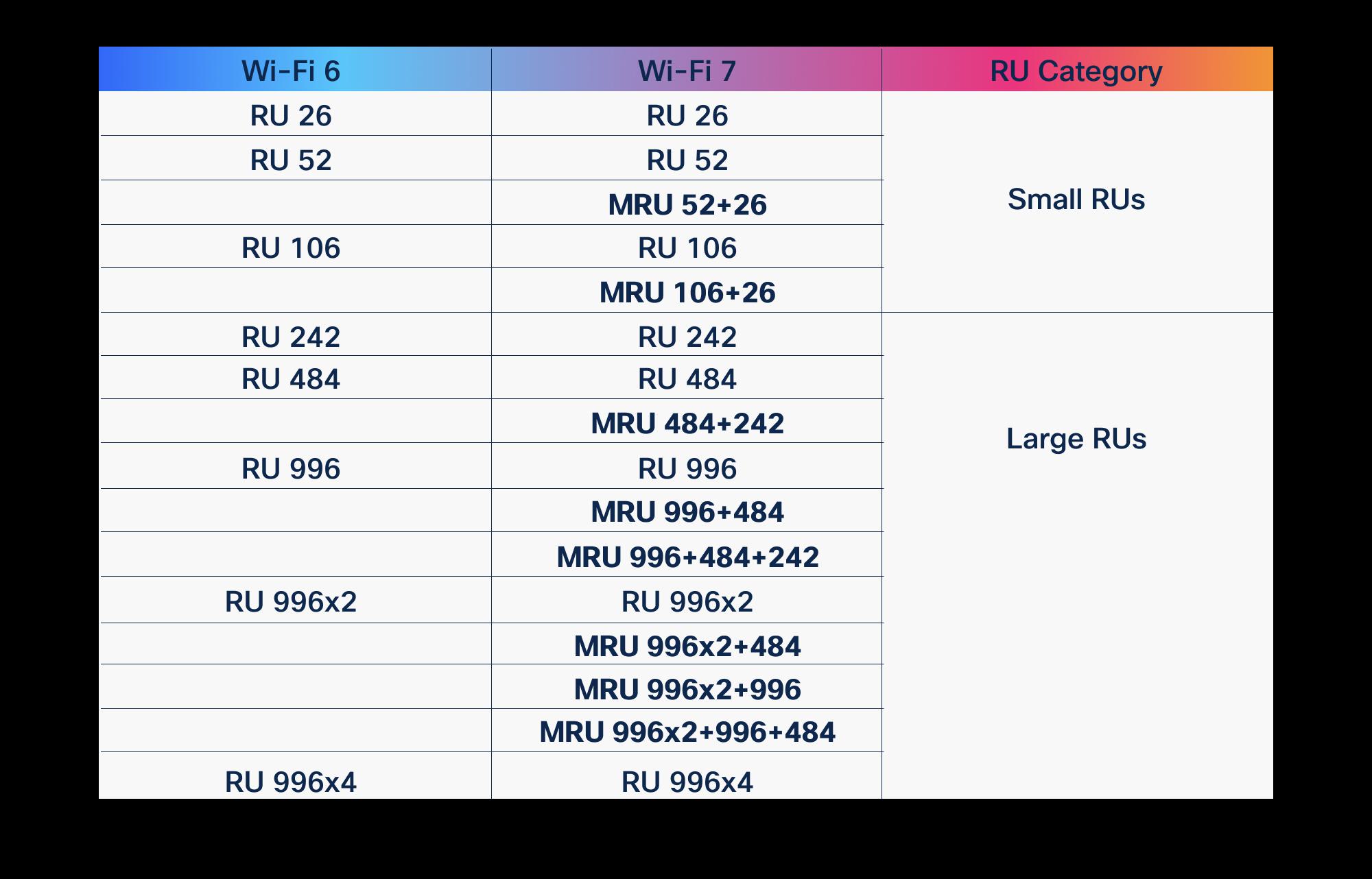 Guides
OFDMA in Wi-Fi 6 vs Wi-Fi 7: what improved
OFDMA arrived with Wi-Fi 6 to fix the airtime problem. Wi-Fi 7 didn't replace it, it gave it wider lanes, more granular scheduling, and a second radio to schedule across. Here is what actually changed, and why it matters for high-density enterprise and public-sector networks.
March 19, 2026 · 10 min read Insights
The cons of staying on Wi-Fi 6 instead of Wi-Fi 7
Wi-Fi 6 still carries most enterprise networks, and nobody is telling you it broke. But specifying it for new spend in 2026 quietly forfeits spectrum, density headroom, latency, and a full refresh cycle of economics. Here is what standing pat actually costs, in concrete terms.
February 22, 2026 · 12 min read Insights
Wi-Fi 7 client device support in 2026
By mid-2026 most new phones and laptops carry Wi-Fi 7 radios, but they use the standard differently than the spec sheets suggest. Here is what the client fleet really looks like, which features it leans on, and why upgrading access points pays off before every endpoint catches up.
April 9, 2026 · 12 min read Insights
Is Wi-Fi 6E worth it, or should you skip to Wi-Fi 7
Wi-Fi 6E opened the 6 GHz band and still ships in capable Cisco access points, but Wi-Fi 7 adds Multi-Link Operation, 320 MHz channels, and 4K-QAM. Here is how to decide which one belongs in your next refresh, and when waiting actually costs you.
February 27, 2026 · 10 min read