
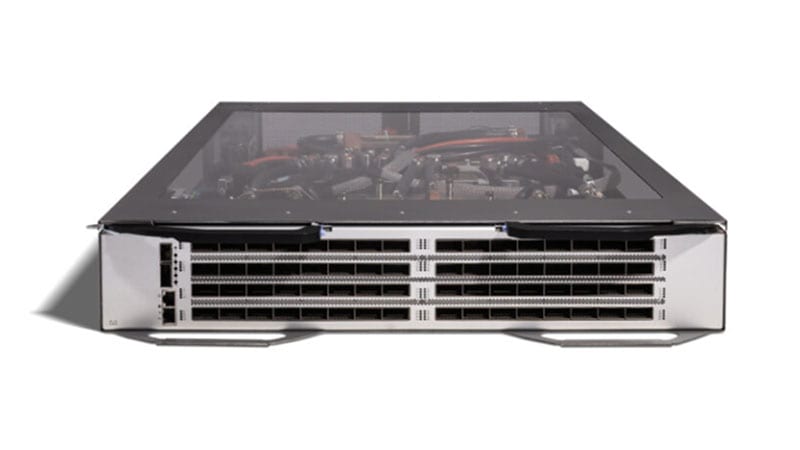
If you still have Cisco Nexus 2232PP 10GE Fabric Extenders (PID N2K-C2232PP-10GE) hanging off the top of your data center racks, the clock has already run out. The 2232PP passed its Last Day of Support on September 30, 2025. From that date forward Cisco provides no software maintenance, no PSIRT security fixes, and no TAC or RMA hardware replacement for this FEX. It still forwards frames, which is precisely why these units keep extending parent Nexus switches long after they should have been pulled. This guide explains what each lifecycle milestone actually means for a running fabric, why the recommended Nexus 2348UPQ is a genuine upgrade rather than a like-for-like swap, and how to plan a clean refresh with minimal cutover risk.
What the Nexus 2232PP actually was
The 2232PP is a 1RU Fabric Extender, not a standalone switch. It has no independent control plane: it acts as a remote line card for a parent Nexus 5500/5600, 6000, 7000 (with the right line cards), or 9300 switch, managed entirely from that parent over the FEX (NIF/HIF) fabric. The hardware layout is 32 host-facing ports at 1/10 Gigabit Ethernet (SFP+) plus 8 fabric uplink ports at 10G (SFP+) toward the parent. Crucially for its era, it was FCoE-capable: it supported lossless Ethernet (PFC/ETS) and Fibre Channel over Ethernet to converge LAN and SAN traffic on a single 10G fabric in unified-fabric racks. Its sweet spot was 10GbE server access with the cabling and policy concentrated up at the parent.
Why acting now matters
The danger of an end-of-life FEX is not that it dies. It is that it keeps working while the support floor disappears beneath it. After LDoS, three concrete exposures stack up:
- No PSIRT security fixes. Any NX-OS or FEX-related vulnerability disclosed after the software-maintenance cutoff will never get a fixed image for this hardware. The code is frozen, so any affected code path is a permanent exposure you cannot remediate by patching.
- No TAC or RMA. A failed 2232PP cannot be opened as a support case or swapped under a Smart Net contract. Your only recovery is a cold spare you bought before LDoS or a gray-market unit of the same dead-end model, neither of which a regulated environment should depend on.
- Audit and compliance exposure. FedRAMP, CMMC, HIPAA Security Rule, PCI DSS, and CISA directives all expect supported, patchable infrastructure. An unsupported, unpatchable FEX in the access layer is a finding waiting to happen, and 'the vendor no longer ships fixes' is not a defensible remediation plan.
There is also a software-lifecycle trap unique to the FEX model. Because the 2232PP is a slave of its parent, its supportability is tied to the NX-OS train running on that parent. As you modernize parent switches to current NX-OS 9.x/10.x and newer Nexus 9000 spines and leaves, older FEX SKUs get dropped from the supported-hardware matrix. The FEX and the parent age out together, so a 2232PP can block a parent-switch upgrade you actually want.
What each milestone means in practice
- End of Sale (2020-09-09): the last day Cisco accepted new orders. Everything after this is consuming the support tail.
- End of Software Maintenance (2021-09-09): the last day Cisco released maintenance and bug-fix software covering this FEX. After this, even non-security defects go unfixed.
- Last Day of Support / LDoS (2025-09-30): the hard wall. No TAC, no RMA, no software of any kind. The hardware is on its own.
The recommended replacement: Nexus 2348UPQ
Cisco's EoL bulletin names the Nexus 2348UPQ (N2K-C2348UPQ) as the migration product, and it is a meaningful step up on every axis that matters for a 10G access tier. It is still a 1RU FEX managed from a parent Nexus, so the operational model is familiar, but the port economics and fabric capacity are in a different class:
- More host density: 48 unified ports at 1/10GbE (SFP+) versus 32 on the 2232PP, 50% more servers per rack unit, which often lets two 2232PPs collapse into a single 2348UPQ.
- Far fatter uplinks: 6 x 40G QSFP+ fabric ports (240G of uplink) replace the 2232PP's 8 x 10G (80G). That tripled fabric capacity dramatically improves the host-to-uplink oversubscription ratio for east-west and storage traffic, and each 40G QSFP+ can break out to 4 x 10G if you want to keep 10G uplinks during transition.
- 'UP' = Unified Ports: the host ports are unified, so they support native 1/10GbE, FCoE, and (with the right parent and licensing) native Fibre Channel, a cleaner converged-fabric story than the 2232PP for racks still carrying SAN traffic.
- Lower latency and current NX-OS support: the 2348UPQ rides on supported NX-OS trains alongside modern Nexus 5600/9300 parents, so it does not strand a parent-switch upgrade the way the 2232PP does.
Note the licensing model is parent-driven: a FEX itself carries no feature license. What governs your features (FCoE, FC, advanced L3 on the parent) are the parent switch's NX-OS licenses and, where applicable, Cisco Smart Licensing on that parent. Plan the license posture at the parent, not at the FEX.
A practical migration plan
1. Assessment and inventory
Document every 2232PP by serial, the parent switch and FEX ID it associates to, the host ports in use, and which racks carry FCoE/SAN traffic versus pure LAN. Confirm the parent platform and NX-OS version: a 2348UPQ must associate to a supported parent (Nexus 5600/9300 families on current code). If the parent itself is also EoL, scope a combined parent-plus-FEX refresh rather than swapping FEXes under an unsupported parent.
2. Config and feature parity
FEX configuration lives on the parent (fex N / fex associate, port-channel or static pinning, and the host-port config). Pre-stage the new FEX ID and interface config so it is ready before the hardware lands. Map 32 ports to the 48-port chassis, decide pinning-max versus port-channel uplink mode, and re-validate QoS/PFC/ETS policy if you carry FCoE, the lossless config must be re-applied on the new unified ports.
3. Physical, power, uplinks, and optics
This is where teams get surprised. The 2348UPQ's fabric uplinks are 40G QSFP+, not 10G SFP+, so you need QSFP+ transceivers or 40G DAC/AOC and matching ports on the parent (or use breakout cables to land on 10G parent ports during transition). Verify rack power and airflow direction (port-side exhaust vs intake) matches your hot/cold aisle, confirm dual-PSU redundancy, and reuse host-side SFP+ optics/DACs where the coding and reach are compatible.
4. Phased cutover
Migrate rack by rack, not all at once. Stand up the 2348UPQ on a new FEX ID alongside the existing 2232PP, move dual-homed servers one NIC at a time so each host keeps a path up, validate LACP/vPC and storage multipath, then drain and remove the old FEX. This keeps every server reachable throughout and gives you a clean rollback per rack.
5. Secure decommission
Once a 2232PP is drained, remove its config from the parent, physically pull it, and follow your media-sanitization and asset-disposal process. For federal and DoD environments, dispose through a TAA-compliant channel with documented chain of custody and certificate of destruction or wipe.
Procurement notes
Buy the 2348UPQ and its 40G optics through an authorized Cisco partner so units arrive with valid warranty and Smart Net eligibility, and so federal buyers get TAA-compliant sourcing with documented provenance suitable for GPC, Simplified Acquisition, or FAR-based purchase paths. Lead times on data center hardware and 40G QSFP+ optics fluctuate, order optics and breakout cables with the chassis, not after. You can browse current Nexus FEX and parent-switch inventory in our catalog, and we can quote a like-for-like or consolidated refresh against your existing 2232PP footprint.
Frequently asked questions
Is the Cisco Nexus 2232PP still supported?
No. The Nexus 2232PP (N2K-C2232PP-10GE) reached End of Sale on September 9, 2020, End of Software Maintenance on September 9, 2021, and its Last Day of Support (LDoS) on September 30, 2025. After LDoS Cisco provides no software updates, no PSIRT security fixes, and no TAC support or RMA hardware replacement for this FEX.
What replaces the Nexus 2232PP?
Cisco's EoL bulletin names the Nexus 2348UPQ (N2K-C2348UPQ) as the migration product. It offers 48 unified 1/10GbE SFP+ host ports (versus 32 on the 2232PP) and 6 x 40G QSFP+ fabric uplinks (versus 8 x 10G), tripling uplink capacity and improving oversubscription, while still operating as a FEX managed from a parent Nexus switch.
Do I need new optics and cabling to move to the 2348UPQ?
For the fabric uplinks, yes. The 2348UPQ uses 40G QSFP+ uplinks instead of the 2232PP's 10G SFP+, so you need QSFP+ optics or 40G DAC/AOC and matching ports on the parent, or 40G-to-4x10G breakout cables during transition. Host-side SFP+ optics and DACs can often be reused if coding and reach are compatible.
Does the FEX itself need a license?
No. A Nexus Fabric Extender carries no independent feature license. Features such as FCoE, native Fibre Channel, and advanced Layer 3 are governed by the parent switch's NX-OS licensing and, where applicable, Cisco Smart Licensing on the parent. Plan license posture at the parent switch, not at the FEX.
What's the compliance risk of keeping a 2232PP past LDoS?
Frameworks like FedRAMP, CMMC, HIPAA, PCI DSS, and CISA directives expect supported, patchable infrastructure. An end-of-support FEX cannot receive security fixes, so it becomes an unremediable audit finding. It can also block a parent-switch NX-OS upgrade, since older FEX SKUs drop off the supported-hardware matrix on current code.
Uniqcli Team
The Uniqcli Team is an authorized Cisco partner specializing in Catalyst wireless, switching, datacenter fabric, licensing, and managed services for U.S. federal, state, local, and education customers. We scope Cisco bills of materials, validate procurement paths (TAA, FIPS, contract vehicles), and deliver design, deployment, and managed operations.
Ready to scope your Cisco build?
Build a quoteRelated reading
View all →GuidesCisco Nexus 2248TP EoL: Migrate to the 2248TP-E FEX
The Nexus 2248TP (N2K-C2248TP-1GE) passed Last Day of Support on November 30, 2021. Here is why it must come out of the rack and how to refresh cleanly to the enhanced Nexus 2248TP-E Fabric Extender.
January 27, 2026 · 9 min readGuidesCisco Nexus 9396TX EoL: Migrate to the 93180YC-FX3
The Nexus 9396TX (N9K-C9396TX) passed its Last Day of Support on April 30, 2023. Here is a practical, spec-driven plan to refresh this 10GBASE-T leaf onto the Nexus 93180YC-FX3, covering the milestone dates, what is concretely better, and a phased migration that keeps your fabric supported and audit-clean.
April 1, 2026 · 8 min read Guides
Nexus 3064 EoL: Migration to Nexus 9300 (93180YC-FX3)
The Nexus 3064 (N3K-C3064PQ-10GE) passed Last Day of Support on June 30, 2021. Here's why it must come out and how to migrate cleanly to the Nexus 9300 (N9K-C93180YC-FX3), 25G access, 100G uplinks, VXLAN/EVPN, and MACsec.
May 9, 2026 · 8 min readGuidesNexus 93128TX EoL: Migration to the Nexus 93108TC-FX3
The Nexus 93128TX (N9K-C93128TX) passed Last Day of Support on October 31, 2022. Here is what each milestone means, why the 93108TC-FX3 is the right copper-leaf successor, and a concrete, low-risk migration plan for federal, healthcare, and enterprise data centers.
April 4, 2026 · 9 min readGuidesNexus 9372PX EoL: Migrate to the Nexus 93180YC-FX
The Nexus 9372PX (N9K-C9372PX) passed Last Day of Support on February 28, 2023. Here is what each milestone means, why a first-gen 10G leaf has to come out, and how to refresh cleanly to the Cloud Scale Nexus 93180YC-FX.
February 12, 2026 · 8 min readGuidesCisco Nexus 5548P EoL: Migrate to Nexus 9300 (93180YC-FX3)
The Nexus 5548P passed Last Day of Support on September 30, 2020, no patches, no TAC, no RMA. Here is why it must come out of the rack and how to migrate cleanly to the Nexus 9300 (N9K-C93180YC-FX3).
May 27, 2026 · 8 min read