
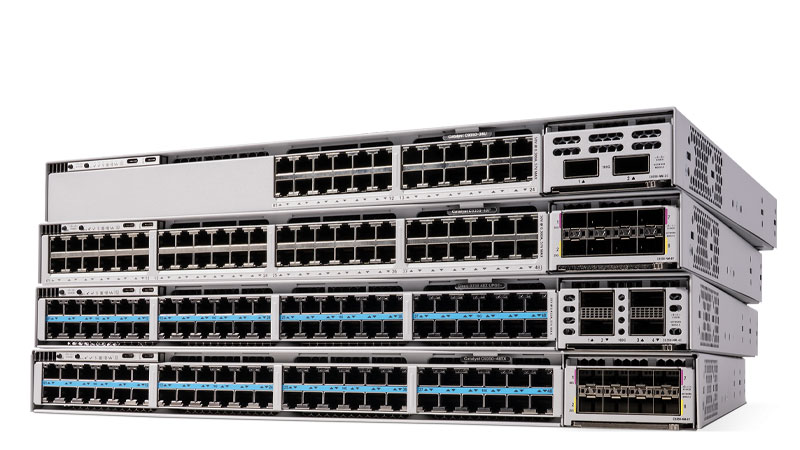
The Catalyst 9300 and 9300X do not have built-in optics ports on the base switch. All SFP, SFP+, SFP28 and QSFP uplinks come from a hot-swappable C9300-NM (or C9300X-NM) network module, so which transceivers you can use depends entirely on which module you install. A standard C9300 supports 1G SFP, 10G SFP+, 25G SFP28 and 40G QSFP+ modules; the 9300X adds 25G and 40G/100G QSFP28. QSFP (40G/100G) is only available on the C9300X-NM-2C and C9300X-NM-4C modules.
First, the rule that trips up most buyers
The Catalyst 9300 family is built around a modular uplink. The fixed front-panel ports are your access ports (copper RJ-45 or, on the 24S/48S SFP models, fixed 1G SFP), and the optics-based uplinks live in a separate network module that slides into the rear slot. That single design fact answers most compatibility questions: a transceiver is supported when it matches the slot you actually have.
So the real question is never just "does GLC-TE work in a 9300?" It's "which network module is installed, and does that module take a 1G, 10G, 25G or 40G/100G optic?" Get the module right and the optics follow. The modules are field-replaceable and hot-swappable, so you can change uplink speed later without replacing the switch, Cisco's stated reason for the design is non-disruptive migration from 10G to 25G and beyond.
The C9300-NM and C9300X-NM network modules
Here are the current network modules and the optics class each one accepts. The base C9300-NM modules fit any Catalyst 9300; the C9300X-NM modules are only supported in C9300X chassis (C9300X-24Y, C9300X-48HX, C9300X-48TX, etc.). The two QSFP modules are what give you 40G and 100G, there is no QSFP option on a base 9300.
| Network module | Ports | Optic type | Speeds | Fits |
|---|---|---|---|---|
| C9300-NM-4G | 4 | SFP | 1G | C9300 + C9300X |
| C9300-NM-8X | 8 | SFP+ | 1G / 10G | C9300 + C9300X |
| C9300-NM-2Y | 2 | SFP28 | 1G / 10G / 25G | C9300 + C9300X |
| C9300-NM-2Q | 2 | QSFP+ | 40G | C9300 + C9300X |
| C9300-NM-4M | 4 | mGig RJ-45 (copper) | 100M / 1G / 2.5G / 5G / 10G | C9300 + C9300X |
| C9300X-NM-8Y | 8 | SFP+ / SFP28 | 1G / 10G / 25G | C9300X only |
| C9300X-NM-8M | 8 | mGig RJ-45 (copper) | 100M / 1G / 2.5G / 5G / 10G | C9300X only |
| C9300X-NM-2C | 2 | QSFP+ / QSFP28 | 40G / 100G | C9300X only |
| C9300X-NM-4C | 4 | QSFP+ / QSFP28 | 40G / 100G | C9300X only |
Common supported part numbers by speed
Below are widely deployed Cisco-branded optics for each module class. These are real Cisco PIDs, not the exhaustive list, Cisco's authoritative source is the TMG Optics Compatibility Matrix, but the parts below cover the large majority of 9300/9300X deployments.
| Speed / module | Copper option | Fiber option | Reach |
|---|---|---|---|
| 1G (NM-4G / NM-8X / NM-2Y) | GLC-TE (1000BASE-T, RJ-45) | GLC-SX-MMD (SX, MMF) / GLC-LH-SMD (LX/LH, SMF) | 100m copper; 550m MMF; 10km SMF |
| 10G (NM-8X / NM-2Y / NM-8Y) | SFP-H10GB-CU1M/3M/5M (DAC) | SFP-10G-SR (SR, MMF) / SFP-10G-LR (LR, SMF) | up to 5m DAC; 300-400m OM3/OM4; 10km SMF |
| 25G (NM-2Y / NM-8Y) | SFP-H25G-CU1M/3M (DAC) | SFP-25G-SR-S / SFP-10/25G-CSR-S | up to 3m DAC; 70-400m MMF |
| 40G (NM-2Q / NM-2C / NM-4C) | QSFP-H40G-CU1M..5M (DAC) | QSFP-40G-SR4 (MPO) / QSFP-40G-LR4 (LC) | up to 5m DAC; 150m MMF; 10km SMF |
| 100G (NM-2C / NM-4C, X only) | QSFP-100G-CU1M..3M (DAC) | QSFP-100G-SR4-S (MPO) / QSFP-100G-LR4-S (LC) | up to 3m DAC; 100m OM4; 10km SMF |
Copper vs fiber: how to choose
Copper and fiber on the 9300 are not interchangeable choices for the same job, each fits a distance and cost band.
How to verify what's installed (and what's supported) on the switch
Before you order, confirm exactly which module and ports you have. The 9300/9300X run IOS-XE, and three commands tell you everything:
- show inventory, lists the installed network module PID (for example C9300-NM-8X) and any inserted transceiver PIDs and serial numbers. This is the fastest way to confirm the slot type.
- show interfaces transceiver, shows real-time physical data (temperature, optical Tx/Rx power, current) for installed optics, which is also how you confirm a module is seated and recognized. Add detail for DOM thresholds.
- show interfaces transceiver supported-list, returns the optics the running IOS-XE image recognizes, so you can confirm a specific PID will be accepted before deployment.
For EEPROM-level vendor and part data on a single port, show idprom interface reads the transceiver's onboard identity. If a non-Cisco or unrecognized optic is rejected, that's the service-unsupported transceiver behavior, Cisco optics are validated against the platform, which matters for TAC support and for US public-sector buyers who need a clean, supported BOM.
Buying the right combination
The cleanest way to avoid a mismatch is to specify the switch model, the network module, and the optics together as one bill of materials. Browse current options on our Cisco switches and optics and transceivers pages, or send us your port count, reach, and fiber type and we'll map it to verified Cisco PIDs. As an authorized partner we quote genuine Cisco modules and optics with full TAA-compliance and SmartNet eligibility, no surprise rejected transceivers at install. If you're standardizing across a fleet or planning a 10G-to-25G/100G migration, our BOM builder keeps the module and optic choices consistent.
Frequently asked questions
Does the Catalyst 9300 have built-in SFP ports?
Only the dedicated SFP access models (the 9300-24S/48S) have fixed 1G SFP front ports. On every other 9300 and on all 9300X models, SFP/SFP+/SFP28/QSFP optics come from a hot-swappable network module (C9300-NM or C9300X-NM) in the rear slot, the base switch has no fixed optics uplink until a module is installed.
Can I use 40G or 100G QSFP optics in a standard Catalyst 9300?
40G QSFP+ is available on the base 9300 via the C9300-NM-2Q module. 100G (QSFP28) is only available on the 9300X, using the C9300X-NM-2C or C9300X-NM-4C modules, which are dual-rate 40G/100G. A standard (non-X) 9300 cannot run 100G.
Will a 1G SFP work in the 10G C9300-NM-8X module?
Yes. The C9300-NM-8X accepts 1G SFP optics such as GLC-TE or GLC-LH-SMD and they link at 1G. The ports still appear as TenGigabitEthernet in the CLI because that's the slot's maximum speed, but the SFP negotiates down to 1G normally.
Do I have to use Cisco-branded optics, or will third-party SFPs work?
Third-party optics may physically link, but the platform validates transceivers and can flag or reject ones it doesn't recognize as service-unsupported, which complicates TAC support. For a clean, supportable, TAA-compliant build, especially for US federal, SLED, and DoD buyers, use genuine Cisco optics matched to the module. We supply verified Cisco PIDs so optics aren't rejected at install.
How do I confirm which network module and optics are in a 9300 right now?
Run show inventory to see the installed module PID and any transceiver PIDs/serials, and show interfaces transceiver to confirm optics are seated and reporting optical power. Use show interfaces transceiver supported-list to check whether a specific optic PID is recognized by your IOS-XE image before you order.
Uniqcli Team
The Uniqcli Team is an authorized Cisco partner specializing in Catalyst wireless, switching, datacenter fabric, licensing, and managed services for U.S. federal, state, local, and education customers. We scope Cisco bills of materials, validate procurement paths (TAA, FIPS, contract vehicles), and deliver design, deployment, and managed operations.
Ready to scope your Cisco build?
Build a quoteRelated reading
View all →GuidesCisco transceiver & optics compatibility guide (SFP, SFP+, QSFP, QSFP-DD)
How Cisco optics compatibility actually works: form factors by speed (1G–400G), platform and IOS-XE/NX-OS support, transceiver coding, and genuine vs third-party SFPs. Part-number mapping from an…
June 23, 2026 · 7 min readGuidesDo Third-Party SFPs Work in Cisco Catalyst Switches?
Yes, third-party SFPs can work in Cisco Catalyst switches via the service unsupported-transceiver command, but it affects warranty and TAC support. When genuine optics matter.
June 23, 2026 · 6 min readGuidesQSFP-100G AOC vs DAC: When to Use Active Optical Cables vs Direct-Attach Copper
Cisco QSFP-100G AOC vs DAC compared: reach, cost, power, and weight. DAC for top-of-rack under 5m, AOC for cross-rack runs to 30m. Real part numbers and platform notes.
June 23, 2026 · 6 min readGuidesQSFP-100G-SR4 vs QSFP-100G-LR4 for Nexus 9000
SR4 (MMF/MPO, 100m) vs LR4 (SMF/LC, 10km) 100G optics for Nexus 9000 leaf/spine: reach, breakout, NX-OS support, and exact Cisco part numbers. Get a quote.
June 23, 2026 · 5 min readGuidesSFP-10G-SR vs SFP-10G-LR: Which 10G Optic to Choose
SFP-10G-SR vs SFP-10G-LR explained: distance, fiber type, cost, and Cisco platform support. Choose the right 10G transceiver and matching fiber the first time.
June 23, 2026 · 5 min readGuidesGLC-T vs GLC-TE: 1000BASE-T Copper SFP Differences and Replacement
GLC-T vs GLC-TE: the only real difference is temperature range. GLC-T is End-of-Sale; GLC-TE is the drop-in replacement. Specs, supported platforms, and which to buy.
June 23, 2026 · 5 min read