
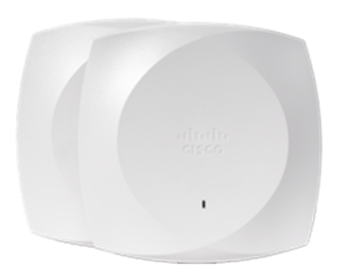
This is a line-sizing question, not a benchmark question. The Catalyst 9100 Wi-Fi 6 family is tiered by the site it's meant to serve, not by one model simply beating another on every spec. The 9115 is the compact, branch-and-small-office tier; the 9120 is the mainstream, general-purpose workhorse most deployments default to; the 9130 is positioned for higher-density spaces that need more headroom than a typical office floor. Pick based on the room, not the model number.
We're deliberately not going to hand you a table of spatial-stream counts or throughput numbers here, exact specifications vary by variant and change across firmware and hardware revisions, and a number copied into a blog post goes stale the moment Cisco updates a data sheet. What holds up over time is family positioning: which tier a site actually needs. Confirm exact current specifications for your shortlist with a validated quote before finalizing a design.
At a glance
| Model | Positioned for | Typical site examples | Design priority |
|---|---|---|---|
| Catalyst 9115 | Compact / branch tier | Branch offices, small retail, classrooms, low-to-moderate device density | Lowest cost per AP, tighter mounting footprint |
| Catalyst 9120 | Mainstream / general-purpose tier | Typical open-plan offices, mixed-use floors, standard enterprise spaces | Balanced feature set, the default choice absent a specific driver |
| Catalyst 9130 | Higher-density tier | Large open floors, auditoriums, lecture halls, warehouses with many concurrent clients | More headroom per AP, fewer units needed to cover dense spaces |
How Cisco tiers the 9100 family
The 9100 series isn't one access point sold in different colors, it's a deliberate range, with each model positioned for a different combination of space, density, and budget. That positioning is the useful signal for a buyer, more useful than any single spec line, because it tells you where Cisco expects each model to earn its cost. A 9115 in a wide-open warehouse floor and a 9130 in a two-person branch closet are both technically functional and both the wrong choice for the money, one under-serves the room, the other over-pays for headroom nobody will use.
When the 9115 is the right call
The 9115 is the compact end of the family, sized and priced for branch offices, small retail locations, individual classrooms, and any site where device density stays low to moderate and budget pressure is real. If you're refreshing a chain of small branch closets where the previous-generation AP already covered the space comfortably, the 9115 is very often the correct like-for-like replacement rather than an upsell to a higher tier you won't use.
When the 9120 is the right call
The 9120 is the mainstream tier and the most common default across the family, general-purpose office floors, mixed-use spaces, and standard enterprise environments that don't have a specific reason to size up or down. When a design has no unusual density constraint and no unusual budget constraint pulling it toward the 9115 or the 9130, the 9120 is the sensible starting assumption, and it's the tier we stock the deepest variant range of for exactly that reason.
When the 9130 is the right call
The 9130 is positioned for higher-density spaces: large open floors, auditoriums, big lecture halls, and warehouses or venues where many clients associate to the same AP at once. The economics here work differently than at the 9115/9120 end, a higher per-unit cost can still be the cheaper design overall if it means fewer total access points, less cabling, and less mounting labor to cover the same dense space adequately. Don't evaluate the 9130 on unit price alone; evaluate it on total access points needed to cover the room.
Licensing and management are shared across all three
All three tiers live under the same Catalyst management model, a 9800 Series wireless LAN controller on-premises, or Catalyst Center for centralized automation and assurance, so mixing tiers within a single deployment is completely normal and often the most cost-effective design pattern. A campus can run 9115s in branch closets, 9120s across general office floors, and 9130s in the auditorium, all under one controller and one policy set, rather than standardizing the whole estate on a single tier that overspends in some spaces and underserves others. That shared management layer is also what makes phased refreshes practical: you can replace one building's access points at a time, on whichever tier that building needs, without fragmenting policy or standing up a second management system in the interim.
Let the site survey confirm the tier, not the brochure
Family positioning is a starting point for a design, not a substitute for a site survey. Building materials, ceiling height, access point placement constraints, and the actual device mix in a space all shift how much headroom a given tier needs to deliver. Two rooms of identical square footage can land in different tiers once construction material and obstruction are accounted for, a 9120 covering a floor with heavy concrete and metal partitioning may need supplementing sooner than the same model in an open, drywall-partitioned space of the same size.
That's the practical argument for validating placement and access point count with a real design pass before committing to a bill of materials, rather than sizing an entire floor from a family-tier assumption alone. The 9115/9120/9130 split tells you where to start; a proper survey tells you where to finish, and it's the difference between a network that meets expectations on day one and one that needs a change order three months in, once real users and real devices show up and the assumptions get tested.
Which should you choose?
- Small branch office, individual classroom, low-to-moderate device count: 9115, don't pay for headroom you won't use.
- Typical open-plan office or mixed-use floor with no unusual density: 9120, the sensible default absent a specific driver either way.
- Auditorium, large lecture hall, warehouse, or any space with many concurrent clients on one AP: 9130, priced to reduce total AP count in dense spaces.
- Multi-site estate with a mix of branch closets and larger hubs: mix tiers by site under one controller rather than standardizing on a single model.
- Not sure which tier a specific room needs: get a site-by-site design reviewed rather than guessing from a spec sheet alone.
Frequently asked questions
What's the real difference between the 9115, 9120, and 9130 besides price?
The core difference is which site each is positioned for: the 9115 targets compact branch and small-office spaces, the 9120 is the mainstream general-purpose tier, and the 9130 is positioned for higher-density spaces that need more headroom per access point. Exact specification differences vary by variant and firmware, confirm current data sheets for your shortlist with a validated quote rather than relying on a generic comparison.
Can I mix 9115, 9120, and 9130 access points on the same wireless network?
Yes. All three run under the same Catalyst management model, a 9800 Series controller or Catalyst Center, so mixing tiers by site or by room within one deployment is normal and often the most cost-effective design, rather than standardizing the whole estate on a single model.
Which Catalyst 9100 access point should a small branch office buy?
The 9115 in most cases. It's positioned specifically for compact, branch-and-small-office deployments with low-to-moderate device density, and paying for a higher tier's density headroom in a small closet-served space rarely pays back.
Is the 9130 overkill for a normal office floor?
Usually, yes, unless that floor has unusually high device density. For typical open-plan or mixed-use office space, the 9120 is the more common and more cost-appropriate default. The 9130 earns its higher unit cost in genuinely dense spaces where it reduces the total number of access points needed.
Are the Catalyst 9115, 9120, and 9130 Wi-Fi 6, 6E, or Wi-Fi 7?
This generation of the 9100 family is Wi-Fi 6 (802.11ax). Cisco's Wi-Fi 6E and Wi-Fi 7 access points sit in separate, newer product lines, including the CW-series hardware, see our Wi-Fi 7 page if you're evaluating a newer-generation refresh instead of a like-for-like 9100 replacement.
Do all three models use the same licensing?
Yes, they share the same Catalyst licensing structure tied to the 9800 controller or Catalyst Center tier you run, rather than each model having its own separate licensing scheme. The tier you choose affects which automation and assurance features are available, not which access point models are eligible to use them.
Uniqcli Team
The Uniqcli Team is an authorized Cisco partner specializing in Catalyst wireless, switching, datacenter fabric, licensing, and managed services for U.S. federal, state, local, and education customers. We scope Cisco bills of materials, validate procurement paths (TAA, FIPS, contract vehicles), and deliver design, deployment, and managed operations.
Ready to scope your Cisco build?
Build a quoteRelated reading
View all → Guides
Aironet 2602i (AIR-CAP2602I-A-K9) to Catalyst 9120AX Migration
The Aironet 2602i reached Last Day of Support on December 31, 2021. Here's what each milestone means and how to refresh cleanly onto the Wi-Fi 6 Catalyst 9120AXI, feature parity, licensing, and a phased cutover.
April 21, 2026 · 8 min read Guides
Wi-Fi 6 vs Wi-Fi 6E: Is the 6 GHz Band Worth It
Wi-Fi 6E adds the 6 GHz band on top of everything Wi-Fi 6 already does. Here is when that extra spectrum earns its place in a Cisco campus, and when standard Wi-Fi 6 is still the smarter buy.
February 1, 2026 · 10 min read Guides
Aironet 3802i to Catalyst 9130AX: EoL Migration Guide
The Aironet 3802i is past software maintenance and hits Last Date of Support in October 2027, here's why the Catalyst 9130AX Wi-Fi 6 AP is the right refresh and how to migrate cleanly.
September 11, 2025 · 7 min readGuidesCisco Aironet 3702i (AIR-CAP3702I-A-K9) Refresh Guide
The Aironet 3702i hit Last Day of Support on April 30, 2024, here is how to migrate this Wave 1 flagship AP to the Wave 2 3802i or Wi-Fi 6 Catalyst 9130AX without breaking your WLC or your compliance posture.
September 10, 2025 · 8 min readGuidesAironet 2802i (AIR-AP2802I-A-K9) to Catalyst 9120AX Migration
A practical refresh guide for moving from the end-of-life Aironet 2802i Wave 2 access point to the Wi-Fi 6 Catalyst 9120AX, with milestone dates, feature parity, and a phased cutover plan.
September 8, 2025 · 6 min readGuidesAironet 2702i (AIR-CAP2702I-A-K9) Replacement & Migration Guide
The Aironet 2702i hit Last Day of Support on April 30, 2024, here is what each milestone means and how to refresh cleanly onto the Aironet 2802i or Catalyst 9120AX.
September 6, 2025 · 8 min read