
Wi-Fi 6 vs Wi-Fi 7: the complete comparison
Wi-Fi 7 is not a minor refresh of Wi-Fi 6. It reworks how spectrum, channels, and client connections are handled, and that changes how you plan a campus, a hospital floor, or a federal facility. Here is what actually differs, where the gains are real, and how to decide what to deploy.

Key takeaways
- Wi-Fi 7 (802.11be) adds 320 MHz channels, 4096-QAM, and Multi-Link Operation, roughly doubling the theoretical ceiling over Wi-Fi 6/6E while cutting latency for real-time traffic.
- The biggest practical win is not raw speed but consistency: MLO lets a client use multiple bands at once, so a single congested channel no longer drags down the session.
- Wi-Fi 7's headline features depend on clean 6 GHz spectrum and modern clients; in a mixed device fleet, much of the upside is deferred until endpoints catch up.
- Wired backhaul, PoE budgets, and controller capacity often gate a Wi-Fi 7 rollout more than the radios do. mGig switching and multi-gigabit uplinks are part of the project, not an afterthought.
- For regulated environments, the decision is also a lifecycle and compliance question: TAA sourcing, STIG hardening, and a controller path that survives the next refresh.
- Wi-Fi 6 remains the right call for many edge, IoT, and budget-constrained sites; Wi-Fi 7 earns its premium in high-density, low-latency, and future-proofing scenarios.
The short version of a long argument
Every few years the wireless industry ships a new generation and the marketing insists it changes everything. Most of the time the truth is duller: incremental gains, a higher number on the box, and a long tail before clients catch up. Wi-Fi 7 is genuinely different in places, and genuinely oversold in others. The job of a network team is to tell the two apart before signing a purchase order.
Wi-Fi 6 (802.11ax) was about efficiency. It took the same spectrum and made it carry more clients gracefully, using OFDMA to slice channels among many devices and Target Wake Time to let battery-powered endpoints sleep. Wi-Fi 6E extended that into the 6 GHz band, opening a wide stretch of clean spectrum for the first time in years. Wi-Fi 7 (802.11be) builds directly on that foundation and pushes three levers harder: wider channels, denser modulation, and the ability for one client to ride multiple links at once.
The result is not a different kind of Wi-Fi. It is the same architecture with more headroom and a smarter way of using the air. Whether that headroom matters to you depends entirely on what your clients are, how dense your environment is, and how much latency your applications can tolerate. We help teams work through exactly that tradeoff when they scope an access point refresh, and the answer is rarely the same twice.
What changed under the hood: the three levers
Start with channel width. Wi-Fi 6E topped out at 160 MHz channels in the 6 GHz band. Wi-Fi 7 doubles that to 320 MHz, which on paper doubles the data you can push through a single channel. That extra width only exists in 6 GHz, which is why a clean 6 GHz allocation is the real prerequisite for Wi-Fi 7 performance. The amount of usable 6 GHz spectrum is set by regulators, and in the United States that means the rules published by the FCC govern how much of that band you can actually light up.
Next, modulation. Wi-Fi 6 used 1024-QAM, packing 10 bits into each transmitted symbol. Wi-Fi 7 moves to 4096-QAM, packing 12 bits per symbol for roughly a 20 percent throughput bump at the physical layer. The catch is that denser modulation needs a cleaner signal. 4096-QAM only delivers its full benefit at close range with strong signal-to-noise, so it rewards good RF design and dense AP placement rather than sparse coverage. The underlying standards work that defines these schemes comes out of the IEEE, and the certification program that guarantees interoperability across vendors runs through the Wi-Fi Alliance.
The third lever is the one that actually changes behavior: Multi-Link Operation. For the first time a single client and AP can use 5 GHz and 6 GHz simultaneously, aggregating throughput across bands or steering traffic to whichever link is least congested. In practice MLO is less about peak speed and more about reliability and latency. If one band is noisy, the session does not stall, because the other link absorbs the traffic. For voice, video conferencing, AR/VR, and real-time clinical or industrial systems, that consistency is worth more than a bigger top-line number.
Speed numbers vs. real-world experience
The theoretical ceiling for Wi-Fi 7 is often quoted around 46 Gbps, against roughly 9.6 Gbps for Wi-Fi 6. Those figures are almost meaningless on the floor. They assume maximum channel width, maximum spatial streams, ideal signal conditions, and a client capable of using all of it at once. No real device hits those numbers, and your switching and WAN would choke long before the radio did.
What you actually feel is different. In a crowded conference center or a packed lecture hall, Wi-Fi 7's combination of wider channels and MLO means more clients get served quickly and fewer sessions stutter. In a hospital, it means a real-time imaging stream and a nurse's barcode scanner can share the same airspace without fighting each other. The gain shows up as fewer retries, lower jitter, and a flatter latency curve under load, not as a single dramatic speed test result. That is precisely the kind of density and uptime problem we plan for in healthcare network design.
This is also why client mix matters so much. Wi-Fi 7's flagship features are only available to Wi-Fi 7 clients. A campus full of Wi-Fi 5 and Wi-Fi 6 laptops will see the APs operate mostly in backward-compatible modes, and the headline benefits stay on the shelf until the endpoint fleet refreshes. Buying Wi-Fi 7 infrastructure ahead of the client wave is a legitimate future-proofing strategy, but it should be a conscious decision, not an assumption that the network instantly gets twice as fast.
Where Cisco's lineup sits today
Cisco's Wi-Fi 7 access points live in the Catalyst 9100 family. The Catalyst 9176, 9178, and 9172 are 802.11be platforms built for high-density enterprise and campus deployments, while the Catalyst 9166 anchors the Wi-Fi 6E tier for sites that do not yet need the newest standard. Exact spatial-stream counts, radio configurations, and power requirements vary by model, so the right move is to check the specs on our own Catalyst 9176 Series page rather than rely on a generic spec table.
On the control plane, both Wi-Fi 6 and Wi-Fi 7 APs run against the Catalyst 9800 wireless controller line, which means an existing Wi-Fi 6 environment usually has a clear upgrade path without a forklift of the management stack. That continuity is one of the underrated advantages of staying within a single vendor architecture: the wireless controller you standardize on today can typically carry the next AP generation, and policy, segmentation, and RF management follow along. We map that controller and licensing path as part of any Wi-Fi 7 evaluation.
Management and assurance tie it together. Catalyst Center provides RF optimization, client analytics, and AP lifecycle visibility across mixed-generation fleets, which matters because most real networks run Wi-Fi 6 and Wi-Fi 7 side by side for years. If you want to see how the assurance layer fits, our Catalyst Center overview walks through the operational model that keeps a hybrid deployment healthy.
The hidden cost: backhaul, power, and switching
A Wi-Fi 7 AP that can move multiple gigabits over the air is useless if it hangs off a 1 Gbps copper run. Multi-link, 320 MHz radios can saturate a single gigabit uplink, so multi-gigabit (mGig) switch ports become part of the conversation. Planning a wireless refresh without budgeting for the wired side is the most common way these projects come up short, which is why we scope Catalyst switching and uplink capacity in the same pass as the radios.
Power is the second constraint. The newest high-end APs can ask for more than standard PoE delivers, pushing toward PoE++ (802.3bt) on the access switch. That can mean new line cards, new switches, or a phased plan that prioritizes the densest areas first. Getting the PoE budget wrong forces APs into reduced-power modes that quietly cap radio performance, which then gets misdiagnosed as an RF problem months later.
Finally there is the controller and the WAN. More capable APs generate more client throughput, which lands on your distribution layer and eventually your branch or data center uplinks. For multi-site organizations, that is where an SD-WAN design and a sober look at transport capacity keep the new wireless experience from bottlenecking the moment traffic leaves the building. The radio is the visible part of the upgrade; the backhaul is where the project actually succeeds or fails. If you want a sized bill of materials that includes all three layers, our team builds that during design and architecture so nothing surprises you at install.
Compliance, lifecycle, and the regulated buyer
For federal, DoD, SLED, and healthcare buyers, the Wi-Fi 6 vs Wi-Fi 7 decision is never purely technical. Sourcing has to be Trade Agreements Act compliant, configurations often need to meet the hardening baselines published as DISA STIGs, and the whole environment is measured against control families like those in NIST SP 800-53. A newer standard does not waive any of that; it simply changes which models and software trains you can put in scope.
Lifecycle is the other half. Buying near the start of a generation buys you more years before end-of-sale and end-of-support milestones force another refresh, and Cisco publishes those dates under its end-of-life policy. Pairing that with active coverage through Smart Net Total Care keeps software updates and TAC support flowing for the life of the deployment. For agencies, aligning the buy to a vehicle such as NASA SEWP or a GSA schedule turns a sound technical choice into a clean, auditable procurement.
This is where the generation question often resolves itself. If a site is being refreshed anyway and will live for seven or more years, Wi-Fi 7 hardware protects that investment even if the clients arrive later. If the requirement is to extend a recently modernized environment or stand up cost-sensitive edge coverage, Wi-Fi 6 or 6E is frequently the more defensible spend. We handle that sourcing and compliance packaging through our procurement practice and contract-vehicle support.
A decision framework you can actually use
Skip the spec-sheet duel and start with three questions. First, what are your clients? If your fleet is mostly Wi-Fi 6 and will be for a couple of years, Wi-Fi 7's marquee features sit idle, and Wi-Fi 6E may deliver most of the benefit for less money. If you are deploying alongside a hardware refresh that will bring Wi-Fi 7 laptops and phones, the math flips. Second, how dense and latency-sensitive is the environment? Lecture halls, arenas, trading floors, ORs, and conference centers are where MLO and 320 MHz channels earn their premium.
Third, what is the lifecycle horizon? A network you expect to run untouched for the better part of a decade should lean toward the newer standard, because the cost of a second forklift inside that window dwarfs the price delta today. A tactical, short-lived, or heavily IoT-weighted site usually does not. IoT and OT endpoints in particular rarely need anything past Wi-Fi 6, and forcing premium APs into rugged or industrial corners is often wasted budget, something we flag when scoping industrial and IoT networking.
Most real organizations land on a blend: Wi-Fi 7 in the high-density, high-value cores and Wi-Fi 6/6E at the edges, all on a common Catalyst 9800 controller and managed as one fabric. That hybrid is not a compromise; it is the cost-disciplined answer. If you want that translated into a model with current pricing and lead times, request a quote and we will build the sizing around your floor plans and client inventory rather than a generic template. Keeping a generation of headroom through lifecycle support is what makes the blend durable.
So which one should you buy?
There is no single winner, and any vendor who tells you otherwise is selling, not advising. Wi-Fi 7 is the stronger long-term platform: more spectrum headroom, lower latency under load, and a longer runway before it ages out. Wi-Fi 6 and 6E remain entirely valid where clients, density, or budget do not justify the premium, and they are mature, well-understood, and broadly supported.
The honest answer for most buyers in 2026 is a portfolio decision rather than a binary one. Put Wi-Fi 7 where density and latency are punishing and where the deployment must last. Use Wi-Fi 6E to extend recent investments and Wi-Fi 6 for cost-sensitive or IoT-heavy coverage. Unify them under one controller and one assurance platform so the network operates as a single system. That approach captures the real gains of the new standard without overpaying for headroom you cannot yet use.
Cisco products involved
- Cisco Catalyst 9176 Series access points
- Cisco Catalyst 9178 access points
- Cisco Catalyst 9172 access points
- Cisco Catalyst 9166 (Wi-Fi 6E) access points
- Cisco Catalyst 9800 wireless controllers
- Cisco Catalyst Center
- Cisco Catalyst mGig switching
- Cisco Smart Net Total Care
Frequently asked questions
Is Wi-Fi 7 backward compatible with Wi-Fi 6 and older devices?
Yes. Wi-Fi 7 access points serve Wi-Fi 6, 6E, 5, and older clients, falling back to whatever standard each device supports. The catch is that older clients do not get Wi-Fi 7 features like Multi-Link Operation or 320 MHz channels, so a mixed fleet only sees the full benefit on the devices that are themselves Wi-Fi 7 capable.
Do I need new switches and cabling for Wi-Fi 7?
Often, yes. High-end Wi-Fi 7 APs can move more than a single gigabit, so multi-gigabit (mGig) switch ports and adequate PoE++ (802.3bt) power become part of the project. Existing Category 6/6A cabling is usually fine, but the access switch and PoE budget frequently need attention to avoid capping radio performance.
Will my existing Cisco wireless controller support Wi-Fi 7 APs?
In most cases the Catalyst 9800 controller line supports both Wi-Fi 6 and Wi-Fi 7 access points, subject to the software train and AP model. That continuity means many organizations can add Wi-Fi 7 APs without replacing the management stack. Confirm the specific controller model, software version, and licensing against current Cisco documentation before you plan the rollout.
What is Multi-Link Operation and why does it matter more than speed?
Multi-Link Operation (MLO) lets a single client and AP use multiple bands, such as 5 GHz and 6 GHz, at the same time. It can aggregate throughput, but its real value is reliability and lower latency: if one band gets congested, the session keeps moving on the other link. For voice, video, AR/VR, and real-time clinical or industrial traffic, that consistency usually matters more than a higher peak speed.
Is Wi-Fi 7 worth it for federal and other regulated buyers?
It can be, especially when a site is being refreshed anyway and must last many years, since buying earlier in the generation extends the runway before end-of-life. The decision still has to clear TAA sourcing, STIG hardening, and NIST 800-53 control requirements, and it should be aligned to a contract vehicle. The newer standard does not change those obligations; it changes which models and software trains land in scope.
Should I just wait for Wi-Fi 8?
Waiting indefinitely means never deploying, because there is always a next standard. Wi-Fi 8 is still early and far from broadly available in shipping enterprise gear, while Wi-Fi 7 is shipping in Cisco's Catalyst lineup now. If your network needs a refresh in the current planning window, Wi-Fi 7 is the forward-looking choice; if your existing wireless is healthy and clients are mostly Wi-Fi 6, there is no penalty to running it longer.
Uniqcli Team
The Uniqcli Team is an authorized Cisco partner specializing in Catalyst wireless, switching, datacenter fabric, licensing, and managed services for U.S. federal, state, local, and education customers. We scope Cisco bills of materials, validate procurement paths (TAA, FIPS, contract vehicles), and deliver design, deployment, and managed operations.
Ready to scope your Cisco build?
Build a quoteRelated reading
View all →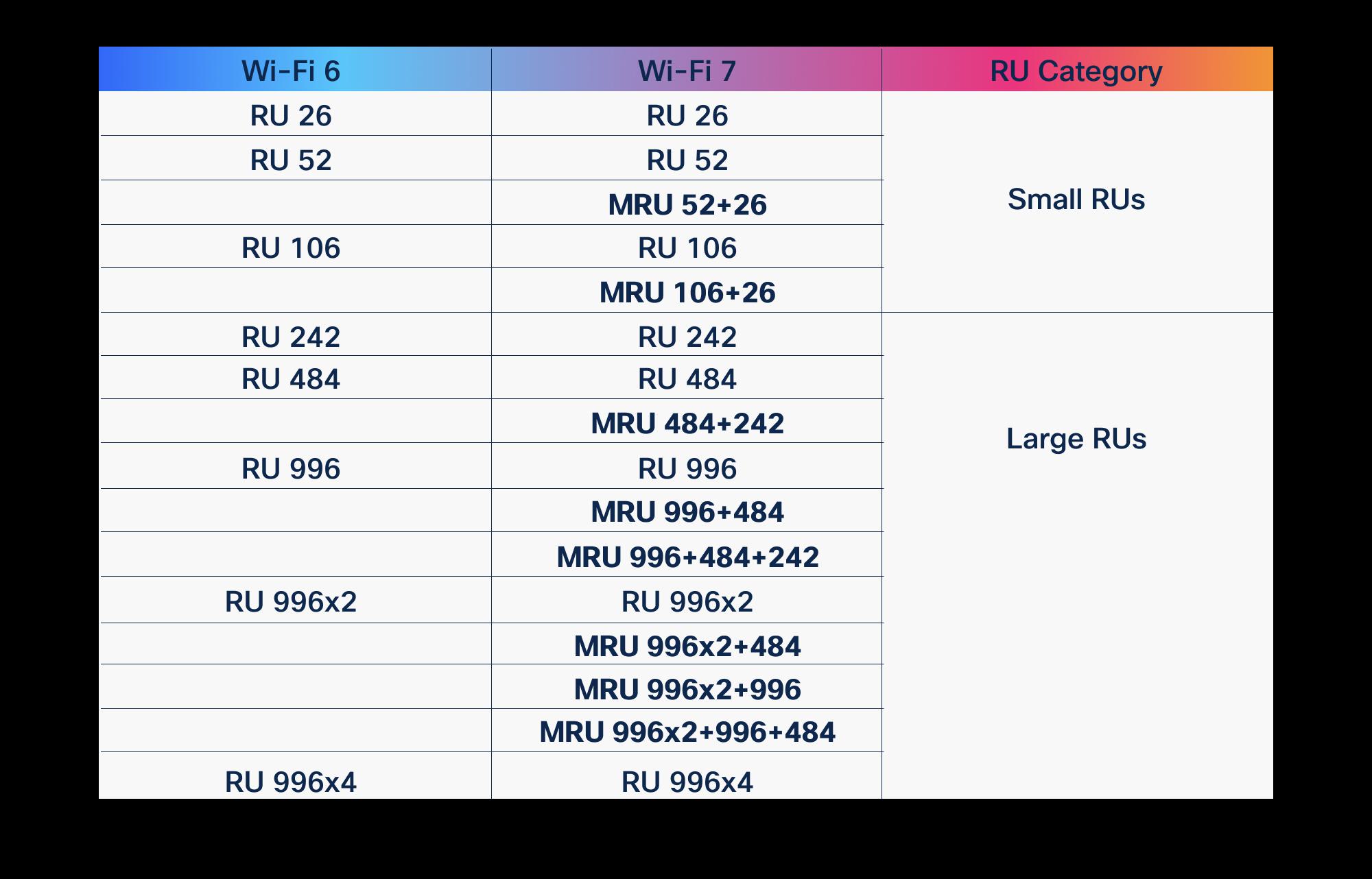 Guides
OFDMA in Wi-Fi 6 vs Wi-Fi 7: what improved
OFDMA arrived with Wi-Fi 6 to fix the airtime problem. Wi-Fi 7 didn't replace it, it gave it wider lanes, more granular scheduling, and a second radio to schedule across. Here is what actually changed, and why it matters for high-density enterprise and public-sector networks.
March 19, 2026 · 10 min read Insights
Wi-Fi 7 over Wi-Fi 6: the real pros and cons
Wi-Fi 7 brings 320 MHz channels, 4K-QAM, and Multi-Link Operation, but the upgrade math depends on your 6 GHz strategy, client mix, and switching budget. Here is an honest pros-and-cons read for enterprise, healthcare, and public-sector buyers.
February 16, 2026 · 9 min read Insights
Wi-Fi 7 in practice: what MLO and 320 MHz really change
Multi-Link Operation and 320 MHz channels are the two features that actually separate Wi-Fi 7 from Wi-Fi 6E. Here is what they do on real Cisco Catalyst hardware, where the gains evaporate, and how to plan a rollout that survives contact with a U.S. enterprise RF environment.
June 6, 2026 · 10 min read Guides
What is Wi-Fi 7? The 802.11be standard explained
Wi-Fi 7 is the IEEE 802.11be standard, and it changes how wireless behaves at the radio layer. Here is what the technology actually does, why MLO and wider channels matter for dense enterprise sites, and how to plan a Cisco deployment that holds up under load.
January 6, 2026 · 10 min read Insights
Wi-Fi 7 client device support in 2026
By mid-2026 most new phones and laptops carry Wi-Fi 7 radios, but they use the standard differently than the spec sheets suggest. Here is what the client fleet really looks like, which features it leans on, and why upgrading access points pays off before every endpoint catches up.
April 9, 2026 · 12 min read Insights
The cons of staying on Wi-Fi 6 instead of Wi-Fi 7
Wi-Fi 6 still carries most enterprise networks, and nobody is telling you it broke. But specifying it for new spend in 2026 quietly forfeits spectrum, density headroom, latency, and a full refresh cycle of economics. Here is what standing pat actually costs, in concrete terms.
February 22, 2026 · 12 min read