
What is Wi-Fi 7? The 802.11be standard explained
Wi-Fi 7 is the IEEE 802.11be standard, and it changes how wireless behaves at the radio layer. Here is what the technology actually does, why MLO and wider channels matter for dense enterprise sites, and how to plan a Cisco deployment that holds up under load.
Key takeaways
- Wi-Fi 7 is the marketing name for IEEE 802.11be, finalized in July 2025, with Wi-Fi Certified 7 interoperability testing running since January 2024.
- The headline gains come from three additions: 320 MHz channels, 4096-QAM modulation, and Multi-Link Operation, which lets a client use 5 GHz and 6 GHz at the same time.
- Real throughput depends on clean 6 GHz spectrum and client capability, not the data-rate number on the box. Plan around what your devices and RF environment can actually use.
- Cisco fields a full Wi-Fi 7 access point lineup under the CW91xx family, from the CW9172 for moderate density to the CW9178I for ultra-high-density venues.
- Power and switching matter. Quad-radio Wi-Fi 7 APs lean on UPOE, so the wired closet and uplinks have to be sized alongside the radios.
- Federal, SLED, and healthcare buyers need to confirm TAA origin, lifecycle status, and FIPS posture against exact SKUs before any Wi-Fi 7 order ships.
Wi-Fi 7 is 802.11be, and the name hides the real story
Wi-Fi 7 is the consumer-friendly label the Wi-Fi Alliance puts on the IEEE 802.11be amendment. The two terms point at the same thing, but they live on different timelines. The IEEE finalized 802.11be in mid-2025, while the Alliance launched its Wi-Fi Certified 7 interoperability program back in January 2024 so vendors could ship and test gear before the spec was fully locked. That gap is normal for wireless standards, and it is the reason you could buy a Wi-Fi 7 access point well before the ink dried on the document.
The standards body that owns the underlying engineering is the IEEE, and 802.11be is officially titled Extremely High Throughput, or EHT. That name is a tell. Every prior generation chipped away at speed and efficiency, but 802.11be was scoped from the start to push raw throughput, cut latency, and make a single connection more reliable. The goal was not a small bump over Wi-Fi 6E. It was a structural change in how a radio link is built and how a client talks to an access point.
For a network buyer, the practical takeaway is simple. When a data sheet says Wi-Fi 7, it is claiming conformance to 802.11be features and, ideally, Wi-Fi Certified 7 testing. Treat those as two separate checkboxes, because a device can implement parts of the standard without carrying the certification, and certification is what gives you confidence the gear interoperates with the mixed client fleet already on your floor.
320 MHz channels: more lanes, but only where the road is clear
The most quoted Wi-Fi 7 number is the 320 MHz channel, double the 160 MHz ceiling of Wi-Fi 6E. Channel width is the wireless equivalent of lane count on a highway. Wider channels move more data per unit of time, and 320 MHz is a large jump that, on paper, roughly doubles peak throughput before any other improvement is counted. This is the single biggest contributor to the multi-gigabit figures on Wi-Fi 7 marketing material.
The catch is spectrum. A 320 MHz channel only fits in the 6 GHz band, which the FCC opened for unlicensed use in the United States. The 2.4 GHz and 5 GHz bands are too crowded and too narrow to host channels that wide without overlap. So the headline width is real, but it is conditional. If your site has clean 6 GHz spectrum, few legacy interferers, and clients with 6 GHz radios, you can use it. If you are in a dense urban tower sharing spectrum with neighbors, your effective channel width will be smaller and your real-world gains more modest.
This is why a Wi-Fi 7 design starts with an RF assessment, not a SKU. The width is a capability, not a guarantee. Planning a wide-channel deployment without a survey is how teams end up disappointed by numbers that looked great in the brochure. When you scope Wi-Fi 7 access points for a real building, the spectrum picture decides how much of that 320 MHz you will ever actually touch.
4096-QAM: squeezing more bits into every transmission
The second pillar is denser modulation. Wi-Fi 6 topped out at 1024-QAM, where each transmitted symbol carries 10 bits. Wi-Fi 7 introduces 4096-QAM, often written 4K-QAM, which packs 12 bits into the same symbol. That is a 20 percent lift in raw data rate at the same symbol rate, layered on top of the wider channels. Stack the two improvements and the theoretical ceiling climbs fast.
Denser modulation comes with a cost that the spec cannot wish away. Cramming more bits into each symbol means the constellation points sit closer together, so the receiver needs a cleaner signal to tell them apart. In practice, 4096-QAM only kicks in for clients with a strong, low-noise link, typically close to the access point with little interference. A device at the edge of coverage falls back to a lower modulation, exactly as it did in prior generations. The peak rate is for the best conditions, not the average ones.
For enterprise planning, this reinforces the same lesson as channel width. The fastest numbers assume ideal RF, capable clients, and short range. A healthy Wi-Fi 7 design uses 4096-QAM where it can be earned and degrades gracefully everywhere else, which is why access point placement and density still matter more than the spec sheet headline. The radio is only as fast as the link it can actually sustain to a given client.
Multi-Link Operation: the feature that actually changes behavior
If 320 MHz and 4096-QAM are about going faster, Multi-Link Operation is about going smarter. MLO lets a single client and access point form one logical connection that spans multiple bands at once, most usefully 5 GHz and 6 GHz together. Before Wi-Fi 7, a client picked one band and stayed there until it roamed. With MLO, a multi-link device can send and receive across both bands simultaneously, or steer traffic to whichever link is cleaner at that instant. Cisco's own engineers walk through the mechanics in their breakdown of Wi-Fi 7 Multi-Link Operation.
The payoff is not just more speed. It is lower latency and better reliability, which matter as much as throughput in modern environments. If one band hits interference, MLO can shift traffic to the other without dropping the session. For latency-sensitive workloads like voice, video conferencing, AR and VR, and real-time clinical or industrial applications, that resilience is the headline feature, not the gigabit figure. It is the difference between a link that degrades gracefully and one that stalls.
MLO is also the feature most dependent on the full stack working together. Both the access point and the client must support it, the controller must be configured for it, and the bands must be available. This is where the wireless controller and management plane earn their keep, because MLO behavior is orchestrated, not automatic. Pairing capable APs with a properly tuned controller is what turns the marketing promise into measured performance on the floor.
Cisco's Wi-Fi 7 access point lineup, mapped to real sites
Cisco fields a complete 802.11be portfolio under the CW91xx naming, and the model you pick should follow the density and environment of the space, not the biggest number on the list. At the moderate-density end, the CW9172 family suits branch offices, classrooms, and similar spaces that need Wi-Fi 7 without ultra-high-density radios. Step up to the CW9176 series, available in internal omnidirectional and directional variants, for high-density enterprise floors and campuses. At the top, the CW9178I targets ultra-high-density venues like stadiums, lecture halls, and large public spaces where client counts spike.
Choosing among them is a sizing exercise, and the inputs are device density per square foot, the mix of 6 GHz-capable clients, ceiling height, and the physical environment. A directional model earns its place in a high-ceiling warehouse or an open atrium, while an omnidirectional unit fits a standard office grid. The exact radio chains, supported channel widths, and power draw live on our own Wi-Fi 7 access point pages, and those numbers should drive the model choice rather than a generic recommendation.
Because the data sheet figures are load-bearing, we host the full set natively and gate them behind a short lead form so you get the exact PDF for the SKU you are evaluating. When you are comparing variants across the access points catalog, match the antenna pattern and density rating to the floor plan first, then confirm power and uplink needs against the wired tier. The right answer is usually a mix of models across a campus, not one SKU everywhere.
The wired network has to keep up: power, switching, and uplinks
A Wi-Fi 7 access point is only as good as the closet behind it. Quad-radio APs draw real power, often beyond standard PoE and into UPOE territory, so the access switch has to supply it. This is a common scoping miss. Teams approve a wireless refresh, then discover the existing switches cannot power the new radios at full capability, and the project stalls on a hardware gap nobody priced. Plan the switching tier and the wireless tier as one design, not two purchase orders.
Uplinks matter just as much as power. When a single Wi-Fi 7 AP can push multi-gigabit traffic to capable clients, a 1G uplink to the closet becomes the bottleneck the radios were supposed to remove. Multigigabit ports and higher-speed uplinks from access to aggregation are part of the same conversation, which is why a Wi-Fi 7 refresh so often pulls a switching refresh along with it. The Catalyst access switches that feed these APs, and their UPOE and mGig options, are documented on our own Catalyst 9300 page.
The honest way to scope this is to treat the AP, the switch port, the uplink, and the controller as one chain. The slowest link sets the ceiling. A correctly sized Wi-Fi 7 deployment confirms PoE budget per port, total power per switch, uplink speed to aggregation, and controller capacity before any AP is ordered, so the wireless gains are not quietly capped by the wired path. Get one link wrong and the whole upgrade underdelivers.
Procurement, lifecycle, and federal compliance
For regulated buyers, the Wi-Fi 7 decision does not end at radio features. Federal, defense, SLED, and healthcare customers have to verify TAA country of origin, confirm the current lifecycle status of each SKU against the Cisco End-of-Life and End-of-Sale policy, and check the FIPS and security posture for their environment. Hardening guidance for federal deployments flows from controls like NIST SP 800-53 and the DoD STIGs, and those requirements should shape the configuration before a single unit ships.
The buying vehicle matters as much as the bill of materials. Agencies commonly purchase through NASA SEWP or off GSA schedules, and Cisco documents the relevant paths in its overview of federal contracts and funding vehicles. Buying the right SKU on the wrong vehicle, or a SKU that is near end-of-sale, creates audit and support headaches that are entirely avoidable with a few checks up front. This is routine work for an authorized partner and a minefield for a first-time buyer.
As an Authorized Cisco Partner serving federal and government customers, Uniqcli builds the access point and switching bill of materials together, validates licensing and lifecycle, wraps production gear in Smart Net Total Care, and quotes it for purchase via GPC, Simplified Acquisition, a FAR-based purchase order, or through your existing contract vehicle. If you would rather hand off the design and rollout entirely, our deployment services cover the survey, install, and turn-up so the network performs the way the data sheet implied. When the design is set, a Wi-Fi 7 quote puts a configured number against it.
Cisco products involved
- Cisco Catalyst Wireless CW9172 Series Access Points
- Cisco Catalyst Wireless CW9176 Series Access Points
- Cisco CW9178I Access Point
- Cisco Wireless Controllers
- Cisco Catalyst 9300 Series Switches
- Cisco UPOE
- Cisco Catalyst Center
- Cisco Smart Net Total Care
Frequently asked questions
Is Wi-Fi 7 the same as 802.11be?
Yes. Wi-Fi 7 is the Wi-Fi Alliance marketing name, and 802.11be is the IEEE engineering standard behind it, officially titled Extremely High Throughput. The IEEE finalized 802.11be in mid-2025, while the Alliance launched its Wi-Fi Certified 7 interoperability program in January 2024 so devices could ship and be tested ahead of final ratification.
What are the three main features Wi-Fi 7 adds over Wi-Fi 6E?
Wider 320 MHz channels in the 6 GHz band, denser 4096-QAM modulation that carries 12 bits per symbol instead of 10, and Multi-Link Operation, which lets a client use multiple bands such as 5 GHz and 6 GHz at the same time. The first two raise peak speed, while MLO improves latency and reliability, which often matters more in practice.
Will Wi-Fi 7 actually deliver the speeds on the data sheet?
Only under ideal conditions. The headline figures assume clean 6 GHz spectrum, clients capable of 320 MHz and 4096-QAM, and a short, low-noise link to the access point. In real buildings with interference, mixed clients, and distance, throughput is lower. That is why an RF survey and proper AP placement matter more than the peak number.
Which Cisco access point should I choose for Wi-Fi 7?
Match the model to density and environment. The CW9172 family fits moderate-density spaces like branches and classrooms, the CW9176 series suits high-density enterprise floors with internal omnidirectional or directional options, and the CW9178I targets ultra-high-density venues like stadiums and large halls. Confirm radio chains, channel support, and power draw on each Cisco data sheet before ordering.
Do I need to upgrade my switches for Wi-Fi 7?
Often, yes. Quad-radio Wi-Fi 7 access points can require UPOE-class power and can push multi-gigabit traffic, so the access switch needs adequate PoE budget, multigigabit ports, and fast enough uplinks to aggregation. Scope the wired tier and the wireless tier together, because the slowest link in the chain caps the gains the new radios are meant to deliver.
What should a federal or healthcare buyer verify before a Wi-Fi 7 order?
Confirm TAA country of origin, the current lifecycle status of each SKU, and the FIPS and STIG posture for the environment, then buy the right configuration on an approved vehicle like NASA SEWP or a GSA schedule. An Authorized Cisco Partner cross-checks the bill of materials, attaches Smart Net Total Care, and validates compliance before anything ships.
Uniqcli Team
The Uniqcli Team is an authorized Cisco partner specializing in Catalyst wireless, switching, datacenter fabric, licensing, and managed services for U.S. federal, state, local, and education customers. We scope Cisco bills of materials, validate procurement paths (TAA, FIPS, contract vehicles), and deliver design, deployment, and managed operations.
Ready to scope your Cisco build?
Build a quoteRelated reading
View all → Guides
Wi-Fi 6 vs Wi-Fi 7: the complete comparison
Wi-Fi 7 is not a minor refresh of Wi-Fi 6. It reworks how spectrum, channels, and client connections are handled, and that changes how you plan a campus, a hospital floor, or a federal facility. Here is what actually differs, where the gains are real, and how to decide what to deploy.
January 22, 2026 · 11 min read Insights
Wi-Fi 7 client device support in 2026
By mid-2026 most new phones and laptops carry Wi-Fi 7 radios, but they use the standard differently than the spec sheets suggest. Here is what the client fleet really looks like, which features it leans on, and why upgrading access points pays off before every endpoint catches up.
April 9, 2026 · 12 min read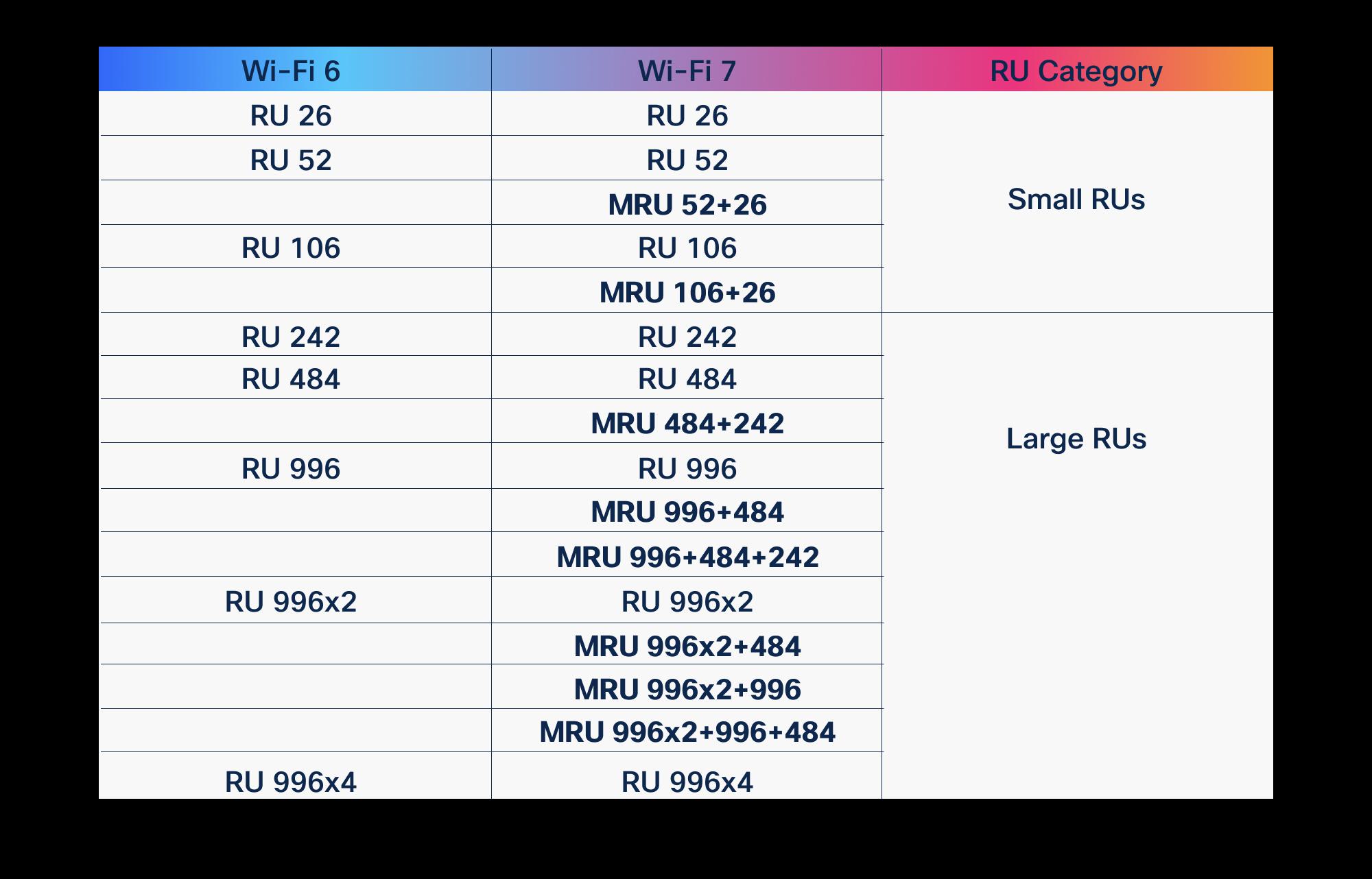 Guides
OFDMA in Wi-Fi 6 vs Wi-Fi 7: what improved
OFDMA arrived with Wi-Fi 6 to fix the airtime problem. Wi-Fi 7 didn't replace it, it gave it wider lanes, more granular scheduling, and a second radio to schedule across. Here is what actually changed, and why it matters for high-density enterprise and public-sector networks.
March 19, 2026 · 10 min read Insights
Wi-Fi 7 over Wi-Fi 6: the real pros and cons
Wi-Fi 7 brings 320 MHz channels, 4K-QAM, and Multi-Link Operation, but the upgrade math depends on your 6 GHz strategy, client mix, and switching budget. Here is an honest pros-and-cons read for enterprise, healthcare, and public-sector buyers.
February 16, 2026 · 9 min read Insights
Wi-Fi 7 in practice: what MLO and 320 MHz really change
Multi-Link Operation and 320 MHz channels are the two features that actually separate Wi-Fi 7 from Wi-Fi 6E. Here is what they do on real Cisco Catalyst hardware, where the gains evaporate, and how to plan a rollout that survives contact with a U.S. enterprise RF environment.
June 6, 2026 · 10 min read Insights
The cons of staying on Wi-Fi 6 instead of Wi-Fi 7
Wi-Fi 6 still carries most enterprise networks, and nobody is telling you it broke. But specifying it for new spend in 2026 quietly forfeits spectrum, density headroom, latency, and a full refresh cycle of economics. Here is what standing pat actually costs, in concrete terms.
February 22, 2026 · 12 min read