
OFDMA in Wi-Fi 6 vs Wi-Fi 7: what improved
OFDMA arrived with Wi-Fi 6 to fix the airtime problem. Wi-Fi 7 didn't replace it, it gave it wider lanes, more granular scheduling, and a second radio to schedule across. Here is what actually changed, and why it matters for high-density enterprise and public-sector networks.
Key takeaways
- OFDMA is the same core idea in both standards: split a channel into resource units (RUs) so the AP can serve many clients in one transmission instead of one client per turn.
- Wi-Fi 7's headline OFDMA gains come from 320 MHz channels and 4096-QAM, which roughly double the data each scheduled slot can carry compared to Wi-Fi 6's 160 MHz and 1024-QAM ceiling.
- The bigger structural change is Multi-Link Operation (MLO): Wi-Fi 7 schedules OFDMA across 2.4, 5, and 6 GHz at once, so the scheduler is no longer boxed into a single band.
- Preamble puncturing and more flexible RU combinations let Wi-Fi 7 use channels that have interference or DFS gaps that Wi-Fi 6 would have abandoned.
- Real gains depend on Wi-Fi 7 clients, 6 GHz spectrum, and controller-side scheduling, an AP swap alone does not deliver the theoretical numbers.
- Cisco's path runs through Catalyst 9176-series Wi-Fi 7 APs and Catalyst 9800 controllers, managed in Catalyst Center, with sizing that should be modeled before you buy.
What OFDMA actually solved in Wi-Fi 6
Before Wi-Fi 6, a wireless channel worked like a single-lane road with a strict turn-taking rule. One client transmitted, everyone else waited, and a tiny packet from a barcode scanner consumed the same airtime slot as a 4K video stream. In a conference room with forty laptops, that turn-taking overhead is where capacity quietly disappears. Throughput on a spec sheet looked fine. The room still felt slow.
Orthogonal Frequency-Division Multiple Access (OFDMA) changed the model. It carves a single channel into smaller frequency chunks called resource units, then lets the access point hand different RUs to different clients inside one transmission. Instead of forty sequential turns, the AP packs several small clients into one trip and reclaims the airtime that used to evaporate in contention and inter-frame gaps. The technique is borrowed from cellular, which is why anyone who has worked with LTE scheduling will recognize the shape of it. The IEEE wrote it into the 802.11ax amendment, and you can trace the lineage of that work through the IEEE standards body that governs the 802.11 family.
The practical win was never raw speed for one device. It was efficiency under load. Wi-Fi 6 made dense rooms behave better: lower latency for small frames, less jitter on voice, and more predictable behavior when client counts spiked. That matters more in a hospital corridor or a lecture hall than another headline megabit number, which is exactly why high-density verticals adopted it first.
Wi-Fi 7 didn't reinvent OFDMA, it widened the lanes
Wi-Fi 7, the marketing name for IEEE 802.11be, keeps OFDMA as a foundation rather than throwing it out. The scheduler still divides the channel into resource units and still serves multiple clients per transmission. What changed is how much each scheduled slot can carry and how flexibly the AP can build those slots. If Wi-Fi 6 turned one lane into several, Wi-Fi 7 made the whole road wider and repaved it.
Two numbers drive most of the gain. Wi-Fi 7 doubles the maximum channel width from 160 MHz to 320 MHz, which means each OFDMA transmission spans twice the spectrum and can hold more or larger resource units. It also raises the modulation ceiling from 1024-QAM to 4096-QAM, packing more bits into every symbol for clients with a clean signal. Stack those together and a single scheduled opportunity moves substantially more data than its Wi-Fi 6 equivalent, without changing the underlying OFDMA concept at all. The 6 GHz spectrum that makes 320 MHz channels practical exists because the FCC opened that band for unlicensed use, and the interoperability rules that keep multi-vendor clients honest come from the Wi-Fi Alliance certification program.
There is a caveat worth stating plainly. 4096-QAM only helps clients close to the AP with excellent signal-to-noise. At the cell edge, you fall back to lower modulation just as you always did. So the doubled-QAM headline is real but conditional, and any honest capacity model has to treat it as a best-case band rather than a floor. Vendors that quote only the peak number are selling the brochure, not the deployment.
Multi-Link Operation: the real structural shift
The most consequential change in Wi-Fi 7 is not a wider channel. It is Multi-Link Operation, or MLO. A Wi-Fi 6 access point scheduled OFDMA inside one band at a time. A Wi-Fi 7 AP with MLO can establish links across 2.4, 5, and 6 GHz simultaneously and move a client's traffic across them, which means the OFDMA scheduler is no longer trapped in a single block of spectrum.
This solves a problem OFDMA alone never could. If your 6 GHz channel hits interference or a client roams into a noisier corner, MLO lets the AP keep traffic flowing on another band instead of degrading on the congested one. For latency-sensitive workloads, clinical telemetry, voice, AR headsets on a manufacturing floor, that ability to dodge congestion in real time is often worth more than the peak throughput figure everyone quotes. It turns band selection from a one-time decision into a continuous, packet-by-packet choice.
MLO also reshapes how you plan capacity. Instead of treating each band as an isolated pool, you start thinking about aggregate capacity across bands and how the controller steers clients between them. That is a meaningful change in design philosophy, and it is the reason a Wi-Fi 7 refresh is an architecture conversation rather than a like-for-like swap. Our Wi-Fi 7 planning page walks through AP sizing, RF, and the controller path for exactly this reason, and the broader wireless access point lineup shows where Wi-Fi 7, 6E, and 6 hardware fit together during a phased migration.
Smarter resource units and preamble puncturing
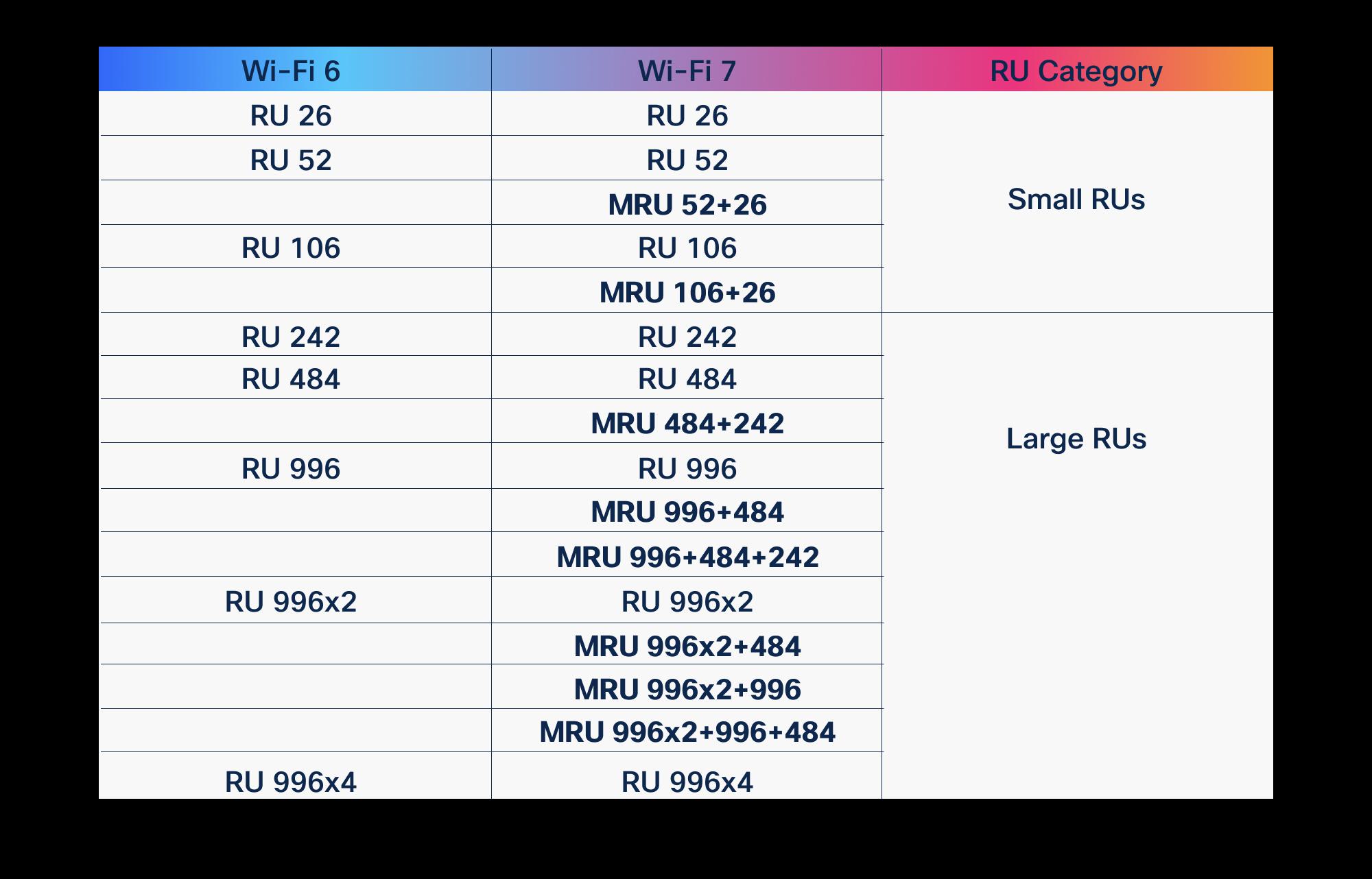
Wi-Fi 6's resource-unit scheme was already flexible, but it had limits in how RUs could be combined and assigned. Wi-Fi 7 introduces Multi-RU support, letting a single client be assigned more than one resource unit in a transmission, including non-contiguous chunks of spectrum. That gives the scheduler finer control: it can fit a demanding client into whatever fragments of the channel are actually clean, instead of forcing a one-size block.
Paired with that is preamble puncturing. In the real world, a wide channel often has a slice of interference sitting in the middle of it, a legacy device, a neighboring network, a DFS radar event. Wi-Fi 6 frequently had to fall back to a narrower channel to avoid that slice, surrendering the bandwidth on either side. Wi-Fi 7 can puncture out the bad sub-channel and keep using the rest of the wide channel around it. In dense, messy RF environments, which is to say most enterprise buildings, this is one of the most practically valuable improvements in the standard.
The takeaway for anyone sizing a network is that Wi-Fi 7 wastes less spectrum. Between Multi-RU flexibility and puncturing, the AP holds onto usable airtime that a Wi-Fi 6 radio would have abandoned. You will not see this on a spec sheet's peak-throughput line, but you feel it in a crowded building where clean, uninterrupted spectrum is the scarcest resource. It is the difference between a lab number and a Tuesday-at-9am number.
What this means for high-density and public-sector deployments
For the environments we work in most, federal and DoD facilities, healthcare campuses, K-12 and higher ed, large enterprise, the OFDMA improvements in Wi-Fi 7 line up well with the actual pain points. These are places with hundreds of clients per floor, a mix of tiny IoT sensors and bandwidth-hungry endpoints, and zero tolerance for the network feeling congested during peak hours. Wider channels and MLO directly address that profile.
Compliance and lifecycle realities shape the rollout, though. Public-sector buyers have to weigh TAA-compliant sourcing, configuration against the relevant DISA STIGs for wireless, and security controls that map to NIST SP 800-53. Spectrum availability matters too: the full benefit of Wi-Fi 7 OFDMA depends on 6 GHz, and 6 GHz power and outdoor rules still vary by region and use case. None of that is a reason to wait, but it is a reason to plan the design before the purchase order. For regulated buyers, our government and defense practice and the healthcare networking page outline how we scope density, segmentation, and clinical uptime together.
There is also an honest sequencing point. Most organizations will not have a fleet of Wi-Fi 7 clients on day one, so the early value of a Wi-Fi 7 AP is forward compatibility plus the puncturing and RF improvements that help even mixed client populations. Build for where the device fleet is going, not only where it is, and you avoid a second refresh in three years. That is the kind of trade-off worth modeling explicitly rather than guessing at.
The Cisco hardware and management path
On the Cisco side, Wi-Fi 7 lands in the Catalyst 9176-series access points, which bring 320 MHz channels, 4096-QAM, and MLO to the enterprise. The specifics on radios, spatial streams, and power draw belong in the official document rather than a blog, so the right reference is our Wi-Fi 7 product page. Treat any exact spec you need for a BOM as something to confirm against that sheet or a quote, not memory.
The access point is only half the story. OFDMA scheduling, MLO steering, and RF management are controller and management functions, which means the Catalyst 9800 wireless controllers and Catalyst Center are where Wi-Fi 7's intelligence actually runs. Our wireless controllers page covers the 9800 family, and the Catalyst Center overview shows the assurance and automation layer that turns raw OFDMA capability into a network you can operate and troubleshoot at scale.
Lifecycle is the part buyers underestimate. Wi-Fi 7 hardware should be paired with the right software licensing and a support posture like Cisco Smart Net Total Care, and older APs being displaced need to be checked against Cisco's end-of-life policy so you are not stranding gear mid-cycle. Our lifecycle services and design practice handle that planning so the refresh is sequenced, not scrambled. If you want a number to anchor a budget conversation, you can start a Wi-Fi 7 quote and we will model it against your floor plans.
How to read the spec sheets without getting fooled
Vendor marketing loves the peak figure, the single-client, perfect-conditions, all-spatial-streams number that almost no real deployment will see. OFDMA improvements specifically do not show up in that number, because OFDMA is about serving many clients efficiently, not making one client faster. So if you compare Wi-Fi 6 and Wi-Fi 7 by peak rate alone, you will miss the part of the standard that actually changes how a busy building feels.
Ask different questions instead. How many clients does the design assume per AP, and at what offered load? How much of the benefit depends on 6 GHz spectrum you may or may not have? Are the clients on the floor capable of MLO and 4096-QAM, or are most of them Wi-Fi 6 devices that will use the new AP at old speeds? The answers determine whether a refresh delivers a real improvement or just a newer label on the ceiling. A good RF design models those inputs before anyone signs a purchase order.
This is where partner-led design earns its keep. The right BOM, channel plan, and controller configuration come from modeling your environment, not from copying a reference design. Our network design services and deployment practice exist to turn the standard's theoretical gains into measured outcomes on your floors, with a capacity model you can actually defend in a budget review.
Cisco products involved
- Cisco Catalyst 9176 Series Access Points
- Cisco Catalyst 9800 Series Wireless Controllers
- Cisco Catalyst Center
- Wi-Fi 6 (802.11ax)
- Wi-Fi 7 (802.11be)
- Cisco Smart Net Total Care
- 6 GHz spectrum
Frequently asked questions
Does Wi-Fi 7 replace OFDMA or build on it?
It builds on it. OFDMA remains the core multi-user scheduling mechanism in Wi-Fi 7 (802.11be) exactly as it was in Wi-Fi 6 (802.11ax). Wi-Fi 7 widens what each scheduled slot can carry with 320 MHz channels and 4096-QAM, adds Multi-RU flexibility and preamble puncturing, and lets the scheduler operate across bands through Multi-Link Operation. The concept is the same; the headroom and flexibility are larger.
What is the single biggest improvement from Wi-Fi 6 to Wi-Fi 7?
For most real deployments it is Multi-Link Operation (MLO). Where Wi-Fi 6 scheduled OFDMA within one band, MLO lets a Wi-Fi 7 AP use 2.4, 5, and 6 GHz simultaneously and move traffic across them, which improves both capacity and the ability to dodge congestion in real time. Wider 320 MHz channels matter, but MLO changes the design model itself.
Do I need Wi-Fi 7 client devices to benefit from a Wi-Fi 7 access point?
To get the full OFDMA, MLO, and 4096-QAM gains, yes, those require Wi-Fi 7 clients and, in most cases, 6 GHz spectrum. A Wi-Fi 7 AP still helps a mixed fleet through better RF handling, preamble puncturing, and forward compatibility, but a mostly Wi-Fi 6 client population will use the new AP largely at Wi-Fi 6 behavior. Plan for where your device fleet is heading.
Which Cisco access points support Wi-Fi 7 and OFDMA?
Cisco's current enterprise Wi-Fi 7 platform is the Catalyst 9176 series, which supports 320 MHz channels, 4096-QAM, and MLO alongside OFDMA. For exact radio, spatial-stream, and power specifications, confirm against the official Cisco Catalyst 9176 data sheet or request a quote rather than relying on summarized figures.
Why doesn't OFDMA show up in peak throughput numbers?
Because OFDMA is about serving many clients efficiently in shared airtime, not making a single client faster. The peak-rate figure on a spec sheet is a single-client, best-conditions measurement. The OFDMA benefit appears as lower latency, less jitter, and better behavior under heavy client load, which is exactly what high-density environments care about and what a peak number hides.
What should public-sector buyers consider before a Wi-Fi 7 refresh?
TAA-compliant sourcing, configuration against the relevant wireless DISA STIGs, security controls mapped to NIST SP 800-53, and 6 GHz spectrum availability for the intended use and region. Lifecycle planning matters too: pair new hardware with appropriate licensing and support, and check displaced APs against Cisco's end-of-life policy so nothing is stranded mid-cycle.
Uniqcli Team
The Uniqcli Team is an authorized Cisco partner specializing in Catalyst wireless, switching, datacenter fabric, licensing, and managed services for U.S. federal, state, local, and education customers. We scope Cisco bills of materials, validate procurement paths (TAA, FIPS, contract vehicles), and deliver design, deployment, and managed operations.
Ready to scope your Cisco build?
Build a quoteRelated reading
View all → Guides
Wi-Fi 6 vs Wi-Fi 7: the complete comparison
Wi-Fi 7 is not a minor refresh of Wi-Fi 6. It reworks how spectrum, channels, and client connections are handled, and that changes how you plan a campus, a hospital floor, or a federal facility. Here is what actually differs, where the gains are real, and how to decide what to deploy.
January 22, 2026 · 11 min read Guides
AP density and counts: Wi-Fi 6 vs Wi-Fi 7
Wi-Fi 7 changes the math on how many access points a high-density space actually needs. Here is how AP counts shift between Wi-Fi 6 and Wi-Fi 7, why the answer is rarely "fewer APs," and how to size a Cisco Catalyst deployment that holds up under real load.
April 19, 2026 · 12 min read Insights
Wi-Fi 7 in practice: what MLO and 320 MHz really change
Multi-Link Operation and 320 MHz channels are the two features that actually separate Wi-Fi 7 from Wi-Fi 6E. Here is what they do on real Cisco Catalyst hardware, where the gains evaporate, and how to plan a rollout that survives contact with a U.S. enterprise RF environment.
June 6, 2026 · 10 min read Insights
Wi-Fi 7 over Wi-Fi 6: the real pros and cons
Wi-Fi 7 brings 320 MHz channels, 4K-QAM, and Multi-Link Operation, but the upgrade math depends on your 6 GHz strategy, client mix, and switching budget. Here is an honest pros-and-cons read for enterprise, healthcare, and public-sector buyers.
February 16, 2026 · 9 min read Guides
What is Wi-Fi 7? The 802.11be standard explained
Wi-Fi 7 is the IEEE 802.11be standard, and it changes how wireless behaves at the radio layer. Here is what the technology actually does, why MLO and wider channels matter for dense enterprise sites, and how to plan a Cisco deployment that holds up under load.
January 6, 2026 · 10 min read Guides
320 MHz channels: how Wi-Fi 7 doubles channel width
Wi-Fi 7 widens the maximum channel from 160 MHz to 320 MHz. Here is the physics behind the jump, why it lives only in 6 GHz, the spectrum math that limits how many wide channels you really get, and how to design a Cisco wireless network that can use them.
March 9, 2026 · 11 min read