
Cisco Nexus 9300 vs 9500 for Data Center Fabric
A practical, no-nonsense breakdown of where the fixed Nexus 9300 fits as a leaf and where the modular Nexus 9500 earns its place as a spine, so you size your data center fabric for the next decade instead of the next quarter.

Key takeaways
- The Nexus 9300 is a fixed-configuration top-of-rack switch built for leaf and small-spine roles; the Nexus 9500 is a modular chassis built for high-density spine and aggregation. They are complements in a spine-leaf fabric, not strict either/or choices.
- Port density, oversubscription, and uplink speed (10/25/40/100/400G) drive the decision far more than raw price. Buy the throughput your east-west traffic actually demands, then leave headroom.
- Both lines run NX-OS and operate in either standalone NX-OS mode or Cisco ACI mode, so your management model (Nexus Dashboard vs. CLI/automation) should be settled before you pick hardware.
- The 9500 wins on investment protection: you swap line cards and fabric modules instead of forklifting the chassis, which matters for multi-year federal and healthcare refresh cycles.
- Power, cooling, rack units, and redundancy (N+1 power, redundant supervisors and fabric modules) are real selection criteria, not afterthoughts, especially in space-constrained or colo environments.
- For most enterprises, the winning pattern is 9300 leaves at the rack and 9500 spines in aggregation; smaller sites can collapse to an all-9300 fabric and grow into 9500 later.
Stop comparing them as rivals: 9300 and 9500 play different positions
The first mistake teams make is treating the Cisco Nexus 9300 and 9500 like two trims of the same car. They are not. In a modern spine-leaf data center fabric, these switches occupy different layers and solve different problems. The 9300 is a fixed-configuration, mostly 1RU or 2RU top-of-rack switch. The 9500 is a modular chassis that accepts line cards, fabric modules, and redundant supervisors. One is a workhorse you rack at every cabinet. The other is the high-density core that ties those cabinets together.
Cisco built both families to run the same NX-OS software and to slot cleanly into our Cisco Nexus data center portfolio, which is why the question is rarely "which one" and more often "how many of each, and where." A two-tier Clos fabric expects leaf switches at the edge and spine switches in the middle. The 9300 is your default leaf. The 9500 is your default spine once port counts climb past what a fixed switch can carry. If you keep that positioning in mind, the rest of the decision gets a lot simpler.
Where it gets nuanced is the overlap zone. A smaller environment can absolutely run an all-9300 fabric, using one 9300 model as leaf and a higher-uplink 9300 as a compact spine. That works, it saves capital, and it is a legitimate design. The 9500 enters the conversation when you outgrow that, when redundancy requirements harden, or when you want to add capacity without re-cabling the room. We help teams map this out on our data center and switching practice pages, because the right answer depends on your traffic, not on a spec sheet.
What the Nexus 9300 actually is, and where it shines
The Nexus 9300 series is the fixed-form-factor member of the family. Models span a wide range of port configurations, from dense 10/25G server-facing ports with 100G uplinks to platforms that push 400G for high-bandwidth leaf and small-spine duty. Because it is fixed, you buy the port layout you need up front. There are no line cards to add later, which keeps the unit simple, lower-cost per port at the edge, and fast to deploy. For a top-of-rack role serving a cabinet of servers, that simplicity is a feature, not a limitation.
The 9300 earns its keep in a few clear scenarios. It is the natural choice for leaf switches in a Clos fabric, where every rack gets one or a redundant pair. It works well in smaller data centers and edge sites that will never need a full chassis. It is also a strong fit for environments standardizing on Cisco ACI, since 9300 platforms operate as ACI leaf nodes under the same policy model. And in dense compute racks feeding Cisco UCS servers or fabric interconnects, the 9300's low latency and line-rate forwarding keep east-west traffic moving.
Standardizing on identical 9300 leaves across racks also pays off in ways that never show up on a quote: a single spares pool, one golden image to maintain, and automation that treats every rack the same. That operational uniformity is half the reason fixed leaf switches dominate the edge of well-run fabrics.
- Lower acquisition cost and per-port cost at the leaf, ideal when you are buying many of them.
- 1RU/2RU footprint that fits tight racks and colo cages where rack units are billable.
- Fast standardization: identical leaf switches across racks simplify spares, imaging, and automation.
- Flexible speeds, with models supporting 10/25/40/100G and 400G-capable variants for modern uplinks.
What the Nexus 9500 actually is, and where it shines
The Nexus 9500 is a modular chassis, available in multiple slot counts, that you populate with line cards, fabric modules, supervisor engines, power supplies, and fans. That architecture is the whole point. You are not buying a fixed bundle of ports; you are buying a backplane and the ability to grow into it. As your fabric expands, you add line cards rather than replacing the box. For organizations on multi-year refresh cycles, that investment protection is often the deciding factor, and it pairs well with Cisco's published end-of-life and end-of-sale policy so you can plan the chassis lifecycle around line-card upgrades.
The 9500 is built for the spine and aggregation layer, where every leaf in the fabric connects and where total bandwidth is highest. High line-card density lets a single chassis terminate dozens or hundreds of high-speed links, which is exactly what a growing Clos design needs at its core. Redundancy is the other half of the story. Dual supervisors, redundant fabric modules, and N+1 power give the 9500 the resilience profile that mission-critical workloads in healthcare, finance, and federal environments demand. When an outage at the spine takes down the whole fabric, paying for redundancy stops being optional.
There is also a planning benefit that is easy to undervalue. Because capacity grows by populating slots, you can buy a chassis sized for three years from now and fill it as budget and demand arrive. That decoupling of footprint from immediate spend is exactly what makes the 9500 friendly to phased rollouts, and it is why our AI infrastructure practice leans on it when 100G and 400G spine uplinks are on the roadmap.
- Spine and aggregation roles in medium-to-large fabrics with many leaf switches.
- Investment protection through line-card and fabric-module upgrades instead of chassis replacement.
- Carrier-grade redundancy: redundant supervisors, fabric modules, power, and cooling.
- Headroom for 100G and 400G spine uplinks as traffic and AI/ML east-west demand grows.
The decision framework: density, oversubscription, and uplink speed
Price is the loudest input and usually the wrong one to lead with. The numbers that actually decide between a 9300-only fabric and a 9300/9500 fabric are port density, oversubscription ratio, and uplink speed. Start with how many server ports each rack needs and at what speed (10G, 25G, or higher). That sets your leaf count and leaf model. Then look at the aggregate uplink bandwidth those leaves push toward the spine. If the spine port count and bandwidth exceed what a fixed 9300 can cleanly carry, you are in 9500 territory.
Oversubscription is the metric people skip and regret. A leaf with far more downlink than uplink capacity will choke during heavy east-west traffic, which is precisely the traffic pattern that virtualization, storage replication, and AI training generate. The IEEE Ethernet standards that govern these higher speeds are maintained by the IEEE, and the broader interoperability and certification ecosystem around the networking stack is anchored by groups like the Wi-Fi Alliance on the access side, so the underlying transport you choose has a long, well-supported roadmap. The point: design the uplink-to-downlink ratio for your real traffic, not a vendor default, and leave room to add uplinks later.
None of this should happen in a spreadsheet vacuum. Power draw, heat output, and rack-unit budget can quietly veto an otherwise sound design, especially in a leased cage where every U and every kilowatt is metered. Validate those physical constraints before you lock the bill of materials. Our networking design services team runs exactly this sizing exercise with clients so the hardware list matches the workload instead of the wish list.
- Count server ports per rack and pick the leaf speed (this picks your 9300 model).
- Sum the per-rack uplink bandwidth to size spine throughput.
- Choose an oversubscription target (often 3:1 or better for general compute, closer to 1:1 for storage/AI).
- If spine port count or redundancy needs exceed a fixed switch, move the spine to a 9500.
- Validate power, cooling, and rack-unit budget before you commit.
NX-OS, ACI, and how you plan to operate the fabric
Hardware is only half the decision. Both the 9300 and 9500 can run in standalone NX-OS mode or in Cisco ACI mode, and that choice shapes your entire operations model. NX-OS mode gives you a familiar CLI plus rich automation hooks through APIs and tools your team likely already uses. ACI mode shifts you to an intent-based, policy-driven fabric managed centrally. Neither is universally better, but switching models after deployment is painful, so settle it before you order hardware.
Your management plane should be settled in the same conversation. Cisco's controller-led approach for these fabrics centers on platforms like Nexus Dashboard and, for campus-adjacent operations, Catalyst Center. If you are leaning into telemetry, assurance, and closed-loop operations, that controller story influences whether you run ACI and how you license. Teams that want day-two operations handled for them lean on our managed operations and observability offerings so the fabric stays healthy without burning internal headcount.
Security and compliance ride along with the operating model, especially in regulated environments. Federal and DoD fabrics are typically held to hardening baselines published in the DISA STIGs and control families defined in NIST SP 800-53. Whether you run NX-OS or ACI changes how you implement and audit those controls, so loop in your security stakeholders early. We align fabric builds to these baselines through our security services and defense practice.
Real-world patterns: how organizations actually deploy these
The most common enterprise pattern is the clean two-tier split: 9300 leaves at every rack, 9500 spines in aggregation. This scales predictably. You add racks by adding leaf pairs, and you add fabric capacity by populating spine line cards. It gives operations a simple mental model, simplifies sparing, and keeps the upgrade path obvious. For a growing organization that expects to keep expanding, this is the default we recommend and the one our deployment services team installs most often.
Smaller sites tell a different story. A regional hospital data center, a single-building campus, or a branch compute room may never justify a chassis. An all-9300 fabric, with one model as leaf and a higher-uplink model as a compact spine, delivers a full Clos design at a fraction of the cost and rack footprint. The trade is headroom: when that site grows, you migrate the spine role to a 9500 rather than re-architecting. Planning that migration path up front is what separates a clean upgrade from a forklift. Our healthcare and government teams see both ends of this spectrum constantly.
A third pattern is the AI and high-performance build, where oversubscription targets tighten toward 1:1 and 400G uplinks become the baseline. Here the 9500 spine is rarely optional, and leaf selection skews to the highest-bandwidth 9300 variants. This is where east-west traffic engineering, buffer behavior, and lossless transport options matter most, and where rushing the design is most expensive. If your roadmap includes GPU clusters or large-scale storage, treat the fabric as a first-class part of the platform, not an afterthought.
Lifecycle, support, and total cost over the contract
The sticker price of a switch is a small slice of what you actually spend over its life. Support, software, power, cooling, and the eventual upgrade all add up, and they tilt the 9300-versus-9500 math in ways a quote alone never shows. The 9500's modularity is a long-game advantage: when a new generation of line cards ships, you slot them into the existing chassis instead of replacing the whole box, which spreads capital out and protects your earlier investment. The 9300's advantage is the opposite kind of efficiency, with lower up-front cost and dead-simple replacement when a unit ages out.
Support coverage is non-negotiable for production fabrics. Cisco's Smart Net Total Care program backs both lines with hardware replacement, OS updates, and TAC access, and aligning your coverage tiers to the criticality of each layer (often higher on the spine than the leaf) keeps spend rational. Lapsed contracts are a common and avoidable risk; if yours are drifting, our team can true them up through a SmartNet renewal quote and fold lifecycle tracking into our lifecycle services.
Procurement vehicles matter just as much for public-sector buyers. Federal and SLED customers frequently acquire Nexus hardware through established channels, and Cisco documents the relevant federal contracts and funding vehicles used across agencies. As an Authorized Cisco Partner supporting US federal, DoD, SLED, and healthcare, we handle that acquisition complexity on our procurement team so the contract mechanics never slow down the build.
Cisco products involved
- Cisco Nexus 9300 Series
- Cisco Nexus 9500 Series
- Cisco NX-OS
- Cisco ACI
- Cisco Nexus Dashboard
- Cisco UCS Servers
- Cisco Fabric Interconnects
- Cisco Smart Net Total Care
Bottom line: Choose by position, not price: 9300 leaves at the rack, 9500 spines at the core, sized to your real east-west traffic and refresh horizon. Request a Cisco Nexus data center quote and we will spec the fabric to your workload.
Frequently asked questions
Is the Nexus 9500 just a bigger Nexus 9300?
No. The 9300 is a fixed-configuration switch with a set port layout, typically used as a leaf or compact spine. The 9500 is a modular chassis you populate with line cards, fabric modules, and redundant supervisors, built for spine and aggregation. They serve different layers of a spine-leaf fabric and most large designs use both together.
Can I build a data center fabric with only Nexus 9300 switches?
Yes, and for smaller sites it is often the right call. You can run a full Clos design with one 9300 model as leaf and a higher-uplink 9300 as a compact spine. The trade-off is headroom and redundancy; when the site grows or resilience requirements harden, you migrate the spine role to a 9500. Planning that path up front avoids a forklift later.
Do the 9300 and 9500 run the same software?
Both run Cisco NX-OS and can operate in standalone NX-OS mode or in Cisco ACI mode. That consistency simplifies operations across the fabric, but you should decide between NX-OS and ACI before buying, since changing the operating model after deployment is disruptive. Your choice also shapes the management plane, including whether you use Nexus Dashboard.
Which is better for AI and high-performance workloads?
AI and HPC builds push oversubscription toward 1:1 and make 400G uplinks the baseline, which almost always calls for a 9500 spine and the highest-bandwidth 9300 leaf variants. East-west traffic engineering, buffering, and lossless transport matter most here, so treat the fabric as a core part of the platform rather than an afterthought.
How should federal and healthcare buyers think about compliance?
Both lines can be hardened to baselines like the DISA STIGs and mapped to NIST SP 800-53 control families, but how you implement those controls depends on whether you run NX-OS or ACI. Settle the operating model and security stakeholders early, and acquire through the appropriate federal or SLED contract vehicles. We align builds to these requirements through our security and procurement teams.
What drives the cost difference between the two?
Up front, the 9300 is cheaper per port at the edge and simple to replace. Over the contract, the 9500's modularity protects your investment because you upgrade line cards instead of the whole chassis. Factor in Smart Net Total Care support tiers, power, cooling, and rack units; the total cost over several years often looks very different from the initial quote.
Uniqcli Team
The Uniqcli Team is an authorized Cisco partner specializing in Catalyst wireless, switching, datacenter fabric, licensing, and managed services for U.S. federal, state, local, and education customers. We scope Cisco bills of materials, validate procurement paths (TAA, FIPS, contract vehicles), and deliver design, deployment, and managed operations.
Ready to scope your Cisco build?
Build a quoteRelated reading
View all → Guides
How Much Does a Cisco Nexus Switch Cost?
A Cisco Nexus switch can start from about $5,000, but the data center fabric you actually deploy almost always costs far more once optics, licensing, subscription term, and SmartNet are counted. Here is how the real number is built, and why a partner quote is the only accurate figure.
February 19, 2026 · 9 min read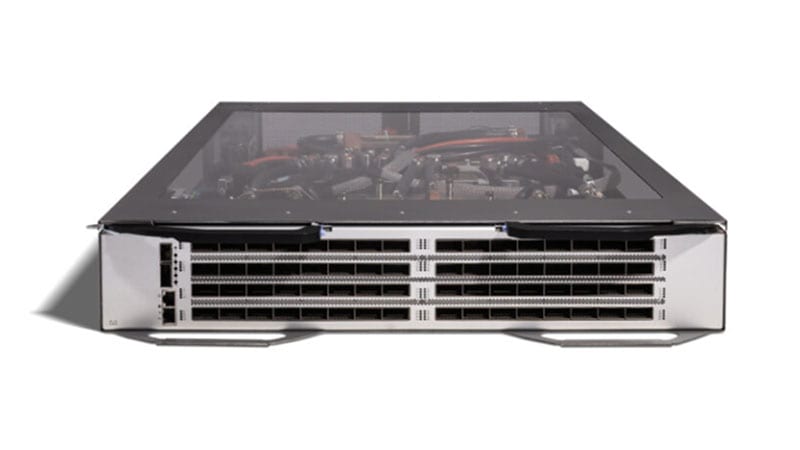 Guides
Cisco Nexus 9396TX EoL: Migrate to the 93180YC-FX3
The Nexus 9396TX (N9K-C9396TX) passed its Last Day of Support on April 30, 2023. Here is a practical, spec-driven plan to refresh this 10GBASE-T leaf onto the Nexus 93180YC-FX3, covering the milestone dates, what is concretely better, and a phased migration that keeps your fabric supported and audit-clean.
April 1, 2026 · 8 min readGuidesNexus 9372PX EoL: Migrate to the Nexus 93180YC-FX
The Nexus 9372PX (N9K-C9372PX) passed Last Day of Support on February 28, 2023. Here is what each milestone means, why a first-gen 10G leaf has to come out, and how to refresh cleanly to the Cloud Scale Nexus 93180YC-FX.
February 12, 2026 · 8 min read Guides
Cisco Catalyst 9300 vs 9300X: The Differences and Which to Buy for a Wi-Fi 7 / High-PoE Access Refresh
The 9300X is not simply a quicker 9300. It is the headroom tier of the same family, and the gaps in uplink speed, multigigabit density, UPOE+ power, and stack bandwidth are exactly the ones a Wi-Fi 7 and high-PoE refresh will expose. Here is how to read the split and size each closet honestly.
May 12, 2026 · 9 min read Guides
AI-ready data centers for government: sizing the GPU network with Cisco Silicon One and Nexus
Standing up a GPU cluster for a federal mission is a network-sizing problem before it is a compute problem. Here is how to size the AI back-end fabric with Cisco Silicon One and Nexus 9000, keep it lossless, and buy it through a purchase path that clears review.
May 30, 2026 · 11 min read Guides
Front-end vs back-end AI networks: scoping Cisco Nexus fabric for GPU workloads
An AI cluster runs two networks with two completely different jobs. Sizing the Cisco Nexus front-end and back-end fabrics separately is how you hit GPU performance targets without paying 800G prices for traffic that never needed them.
May 24, 2026 · 11 min read