
Key takeaways
- MU-MIMO divides space, OFDMA divides frequency, and the two work together; judging an access point on MU-MIMO alone misses how modern Wi-Fi actually moves traffic.
- Wi-Fi 6 added uplink MU-MIMO on top of the downlink capability inherited from Wi-Fi 5, so multiple clients can talk back to the AP at the same time.
- Wi-Fi 6E does not change MU-MIMO mechanics; its value is the clean 6 GHz band, where wide channels and less legacy interference let MU-MIMO actually deliver.
- Wi-Fi 7 raises the ceiling with up to 16 spatial streams, 320 MHz channels, 4096-QAM, and Multi-Link Operation, but real gains still depend on client capability and RF design.
- Client mix, antenna count, and physical separation between devices govern whether MU-MIMO helps; in mixed fleets the benefit is partial, not universal.
- Cisco access points such as the Catalyst 9166, Catalyst 9136, and Wireless 9176 implement these features differently, so spec-matching to the room and the device fleet matters more than chasing the newest standard.
What MU-MIMO actually solves
Wireless used to be a polite single-file line. An access point talked to one client, finished, then moved to the next, and every device waited its turn even when the radio had capacity to spare. That model held up when a conference room had a laptop and a phone. It falls apart in a lecture hall, an emergency department, or a logistics floor where hundreds of devices fight for airtime at once. MU-MIMO, short for multi-user multiple input multiple output, is the fix that lets an access point serve several clients in the same instant rather than one after another.
The trick is spatial separation. An AP with multiple antennas can shape distinct beams and send independent data streams to physically separated devices simultaneously, reusing the same channel. Cisco frames it plainly in its own primer on what MU-MIMO is: more antennas mean more concurrent conversations, which means higher aggregate throughput and lower latency under load. The keyword is aggregate. MU-MIMO rarely makes a single device dramatically faster. It makes the whole cell more efficient when many devices are active.
This distinction matters when you read a data sheet. A 4x4 radio advertising MU-MIMO is describing how many spatial streams it can split across clients, not a guaranteed speed for any one of them. For density-driven environments, that ceiling on concurrency is the number worth caring about, and it is the lens we will use across all three Wi-Fi generations below.
MU-MIMO and OFDMA are not the same thing
The single most common mistake buyers make is treating MU-MIMO and OFDMA as competing features, or worse, as synonyms. They are complementary, and the best access points lean on both. If MU-MIMO divides space, OFDMA divides frequency. Where MU-MIMO carves a channel into spatial streams aimed at separated devices, OFDMA slices a channel into smaller subcarrier groups called resource units, so the AP can hand a sliver of spectrum to many small transmissions at once.
The practical split is about traffic shape. MU-MIMO shines when several clients each have a meaningful chunk of data to move, like video streams or large file transfers, and they sit far enough apart for the AP to separate their beams. OFDMA shines for lots of small, latency-sensitive packets, which is exactly what you get from IoT sensors, voice handsets, barcode scanners, and chatty mobile apps. A well-designed cell uses MU-MIMO for the heavy lifters and OFDMA for the long tail of tiny talkers, often inside the same slice of time.
Both technologies arrived together in Wi-Fi 6, and both depend on the access point coordinating clients intelligently. That coordination overhead is real, which is why MU-MIMO gains in the field are usually more modest than the marketing peak numbers suggest. When you size a deployment with our access points team, the question is never which feature to use, but how the client fleet's traffic actually breaks down between bulk and bursty.
Wi-Fi 6: where uplink MU-MIMO arrived
Wi-Fi 5 introduced downlink MU-MIMO, letting the access point transmit to multiple clients at once. But the reverse direction stayed single-file. Devices still took turns sending data back up to the AP, which became a bottleneck as uplink-heavy workloads like video calls, cloud backups, and telemetry grew. Wi-Fi 6, the 802.11ax standard ratified through the IEEE, closed that gap by adding uplink MU-MIMO. For the first time, several clients could transmit to the AP simultaneously on their own spatial streams.
This is a bigger deal than it sounds. Real networks are increasingly uplink-bound, especially in healthcare imaging, push-to-talk fleets, and any environment full of cameras and sensors pushing data out. Wi-Fi 6 also raised the spatial stream count and paired MU-MIMO with OFDMA, target wake time for battery savings, and improved modulation. Cisco's Catalyst 9100 line, including the Catalyst 9136 Series with its two 4x4 radios and one 8x8 radio, was built to take advantage of exactly these mechanics in dense campus settings.
The catch, then and now, is the client. Uplink MU-MIMO requires client devices with multiple antennas to participate fully, and much of a typical fleet, phones, badges, single-antenna IoT, cannot. So Wi-Fi 6 MU-MIMO delivers partial gains scaled to how capable your endpoints are. That reality is why a thoughtful design weighs the device inventory as heavily as the AP spec sheet, a balance our Wi-Fi 7 and Wi-Fi 6 planning conversations always start from.
Wi-Fi 6E: the same engine, a much cleaner road
Here is the part that trips people up. Wi-Fi 6E does not introduce new MU-MIMO behavior. Under the hood, 6E is Wi-Fi 6 extended into the 6 GHz band, opened in the United States by the FCC and governed for interoperability by the Wi-Fi Alliance. The MU-MIMO and OFDMA mechanics are identical to standard Wi-Fi 6. What changes is the environment those mechanics get to run in, and that change is enormous.
The 6 GHz band is greenfield spectrum. There are no legacy 802.11a/b/g/n clients dragging the cell down, far fewer overlapping networks, and enough room for many non-overlapping wide channels. MU-MIMO depends on clean spatial separation to keep streams from interfering, and OFDMA depends on having channel width to slice. In congested 2.4 and 5 GHz bands, both features spend effort fighting interference. In 6 GHz, they get to do what they were designed to do. The result is that the same MU-MIMO engine simply performs closer to its potential.
Cisco's Catalyst 9166 Series packages three 4x4 radios with 6 GHz support plus integrated environmental and IoT radios, making it a common choice for hospitals and schools that need headroom without a full Wi-Fi 7 forklift. The strategic point for buyers is this: if your pain is congestion and contention rather than raw per-client peak speed, 6E often solves more of the problem than people expect. Our switching and wireless teams frequently pair 6E APs with multigigabit access switches so the wired side does not become the new bottleneck.
Wi-Fi 7: raising the ceiling with more streams and MLO
Wi-Fi 7, the 802.11be standard, is where MU-MIMO scales up meaningfully again. The headline is capacity. Enterprise Wi-Fi 7 designs push toward 16 spatial streams, doubling the Wi-Fi 6 and 6E maximum and giving the access point far more room to serve concurrent users. Wi-Fi 7 also improves the channel sounding that MU-MIMO relies on, so the AP can build more accurate beams and separate clients more cleanly. More streams plus better sounding is a direct upgrade to multi-user efficiency.
Around that core sit the features that get the attention: 320 MHz channels in 6 GHz, 4096-QAM for higher peak modulation, and multi-resource-unit allocation with preamble puncturing that lets OFDMA work around interference instead of avoiding whole channels. The genuinely new architectural idea, though, is Multi-Link Operation. MLO lets a single client maintain one logical connection across 2.4, 5, and 6 GHz at the same time, aggregating bands for throughput or steering traffic to the lowest-latency link. Unlike old band steering, which broke and re-established connections, MLO coordinates links in real time, and field testing has shown large uplink latency and throughput improvements under interference.
Cisco's Wi-Fi 7 hardware, including the tri-band Wireless 9176 Series with 4x4:4 on all radios for twelve spatial streams, is built to exploit these capabilities. But the same caveat carries through every generation: MLO and high stream counts only pay off with clients that support them, and 320 MHz channels need 6 GHz spectrum to exist. Wi-Fi 7 raises the ceiling dramatically. Whether you reach it depends on your device fleet and your RF design, which is why our wireless controllers and design teams model client capability before recommending a stream count.
What governs real-world MU-MIMO gains
The gap between brochure numbers and deployed performance comes down to a handful of physical and practical limits that hold across Wi-Fi 6, 6E, and 7. Understanding them keeps a project from over-buying capacity that the environment can never use, or under-buying and blaming the standard. The biggest variables are client capability, spatial geometry, and the mix of traffic the cell actually carries.
Client antenna count caps participation, because uplink MU-MIMO needs multi-antenna clients and many endpoints have one or two. Physical separation matters too, since MU-MIMO leans on devices being far enough apart for distinct beams; a cluster of phones in one seat is hard to separate spatially. And the coordination the AP performs to schedule multiple users adds overhead, so gains are best with steady, parallel demand rather than sporadic bursts. None of these are flaws. They are the reason design beats default settings.
These levers are exactly the modeling work our network design services handle before a single AP ships, and where the difference between a good and a great wireless project is usually decided. Right-sizing radios to the room, steering traffic to the right feature, and validating the real device inventory all matter more than the badge on the box.
- Right-size radio count and stream count to the room, so a dense lecture hall and a sparse warehouse do not get the same AP.
- Steer bulk traffic toward MU-MIMO-friendly bands and small, chatty traffic toward OFDMA.
- Plan channels so 6 GHz gets the wide, clean channels that MU-MIMO and wide-channel OFDMA need.
- Validate the actual device inventory, since the slowest common denominator in the fleet often sets real throughput.
Choosing the right generation for your environment
The newest standard is not automatically the right purchase. The honest question is which bottleneck you are solving. If your problem is contention and interference in crowded bands, Wi-Fi 6E's clean 6 GHz spectrum may resolve more pain per dollar than chasing Wi-Fi 7 peak rates that your current clients cannot reach. If you are building or refreshing for the next several years and expect a fleet of Wi-Fi 7 devices, the higher stream count and MLO future-proof the investment. Both can be correct, in different buildings, sometimes in the same campus.
Regulated environments add another layer. Federal, DoD, and SLED buyers have to weigh procurement vehicles, supply-chain compliance, and configuration hardening against standards like the NIST SP 800-53 controls and the relevant DISA STIGs. The wireless generation you pick interacts with all of that, because newer hardware availability, controller software support, and lifecycle timelines vary. For agencies, acquisition often flows through vehicles such as SEWP or a GSA Schedule that the program itself holds; Uniqcli does not hold either, so our procurement and defense practices quote through GPC, FAR Part 13 simplified acquisition, or a FAR-based purchase order, or the program's own vehicle where one exists.
Whatever generation fits, the access point is only one part of the system. Controllers, switching, identity and policy through tools like Cisco Identity Services Engine, and ongoing assurance all shape whether MU-MIMO's promise shows up in daily use. If you want a concrete recommendation tied to your floor plans and device list, request a Cisco wireless quote and we will model the options with you, including for the demanding density of healthcare and government sites.
Cisco products involved
- Cisco Catalyst 9166 Series
- Cisco Catalyst 9136 Series
- Cisco Wireless 9176 Series
- Cisco Catalyst 9800 Wireless Controllers
- Cisco Catalyst Center
- Cisco Identity Services Engine
Frequently asked questions
Is MU-MIMO the same as OFDMA?
No. MU-MIMO divides a channel across space, sending separate data streams to physically separated clients at once, while OFDMA divides a channel across frequency into resource units for many small transmissions. They are complementary: MU-MIMO suits heavy, parallel traffic like video and file transfers, OFDMA suits lots of small latency-sensitive packets from IoT, voice, and sensors. Strong Cisco access points use both together.
Does Wi-Fi 6E change how MU-MIMO works compared to Wi-Fi 6?
Not the mechanics. Wi-Fi 6E is Wi-Fi 6 extended into the 6 GHz band, so the MU-MIMO and OFDMA behavior is identical. What changes is the environment: 6 GHz is clean, greenfield spectrum with no legacy clients and room for wide non-overlapping channels, which lets the same MU-MIMO engine perform much closer to its potential.
How many spatial streams does Wi-Fi 7 support versus Wi-Fi 6 and 6E?
Wi-Fi 6 and 6E top out around 8 spatial streams. Enterprise Wi-Fi 7 designs scale toward 16, roughly doubling concurrency, alongside improved channel sounding for cleaner beamforming. Cisco's Wireless 9176 Series, for example, runs 4x4:4 on all radios for twelve spatial streams. Real-world benefit still depends on how many of your clients can use those streams.
What is Multi-Link Operation and why does it matter?
Multi-Link Operation (MLO) is the defining new feature in Wi-Fi 7. It lets a single client hold one logical connection across 2.4, 5, and 6 GHz simultaneously, aggregating bands for throughput or shifting traffic to the lowest-latency link in real time. Unlike legacy band steering, which dropped and re-established connections, MLO coordinates links continuously, improving reliability and uplink latency under interference.
Should I buy Wi-Fi 7 or is Wi-Fi 6E enough?
It depends on your bottleneck. If your pain is congestion and contention, Wi-Fi 6E's clean 6 GHz spectrum can resolve a lot of it without paying for peak rates your current clients cannot reach. If you are refreshing for several years and expect Wi-Fi 7 devices, the higher stream count and MLO future-proof the investment. We model both against your device fleet and floor plans before recommending.
Why don't all my devices benefit from MU-MIMO?
MU-MIMO gains are capped by the client. Uplink MU-MIMO needs multi-antenna devices, and many endpoints like phones, badges, and single-antenna IoT cannot fully participate. Devices clustered closely together are also hard to separate spatially, and the access point's scheduling adds coordination overhead. So MU-MIMO improves aggregate cell efficiency under steady parallel demand more than it speeds up any single device.
Uniqcli Team
The Uniqcli Team is an authorized Cisco partner specializing in Catalyst wireless, switching, datacenter fabric, licensing, and managed services for U.S. federal, state, local, and education customers. We scope Cisco bills of materials, validate procurement paths (TAA, FIPS, contract vehicles), and deliver design, deployment, and managed operations.
Ready to scope your Cisco build?
Build a quoteRelated reading
View all → Guides
AP density and counts: Wi-Fi 6 vs Wi-Fi 7
Wi-Fi 7 changes the math on how many access points a high-density space actually needs. Here is how AP counts shift between Wi-Fi 6 and Wi-Fi 7, why the answer is rarely "fewer APs," and how to size a Cisco Catalyst deployment that holds up under real load.
April 19, 2026 · 12 min read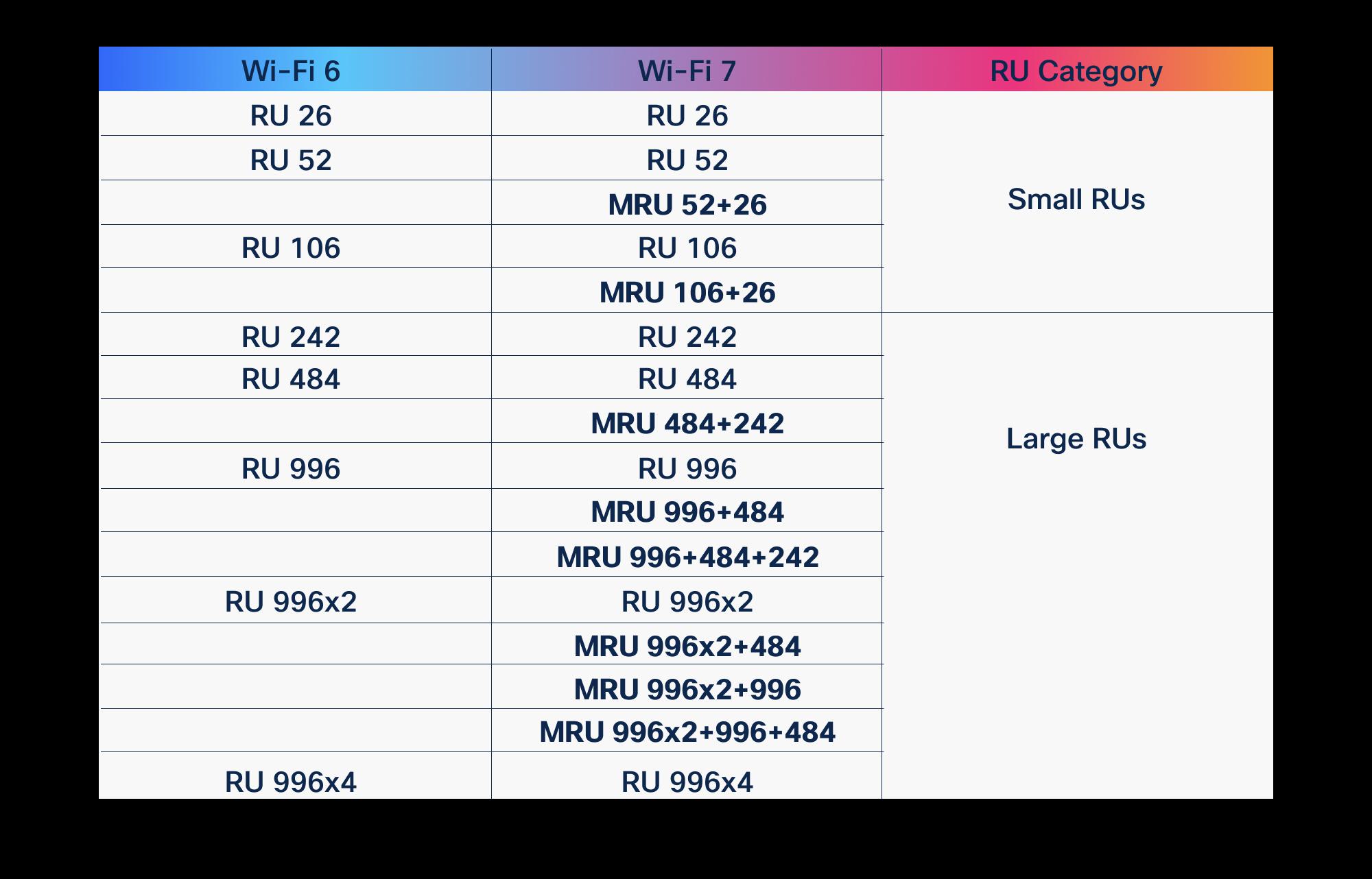 Guides
OFDMA in Wi-Fi 6 vs Wi-Fi 7: what improved
OFDMA arrived with Wi-Fi 6 to fix the airtime problem. Wi-Fi 7 didn't replace it, it gave it wider lanes, more granular scheduling, and a second radio to schedule across. Here is what actually changed, and why it matters for high-density enterprise and public-sector networks.
March 19, 2026 · 10 min read Guides
Wi-Fi 6E vs Wi-Fi 7: which should you deploy in 2026
Wi-Fi 6E gave us a clean 6 GHz band. Wi-Fi 7 stacks multi-link operation, wider channels, and 4K-QAM on top. Here is how to decide which one belongs in your 2026 refresh, with the Cisco access points that ship each standard.
January 27, 2026 · 10 min read Guides
Wi-Fi 6 vs Wi-Fi 7: the complete comparison
Wi-Fi 7 is not a minor refresh of Wi-Fi 6. It reworks how spectrum, channels, and client connections are handled, and that changes how you plan a campus, a hospital floor, or a federal facility. Here is what actually differs, where the gains are real, and how to decide what to deploy.
January 22, 2026 · 11 min read Insights
Wi-Fi 7 over Wi-Fi 6: the real pros and cons
Wi-Fi 7 brings 320 MHz channels, 4K-QAM, and Multi-Link Operation, but the upgrade math depends on your 6 GHz strategy, client mix, and switching budget. Here is an honest pros-and-cons read for enterprise, healthcare, and public-sector buyers.
February 16, 2026 · 9 min read Guides
Designing high-density Wi-Fi for stadiums and arenas
A packed stadium is the hardest Wi-Fi environment on earth: tens of thousands of clients in one RF space, all live at the same second. Here is how to design Cisco high-density wireless that holds up at kickoff, not just on a quiet weekday walk-through.
June 6, 2026 · 13 min read