
Key takeaways
- The three switches map to three jobs: the 9200 is value access, the 9300 is premier stackable access and small distribution, and the 9500 is fixed core and aggregation.
- Buy by layer and by feature need, not by port price. The cheapest switch that meets your uplink, PoE, and segmentation requirements is the right one.
- Stacking depth, uplink bandwidth, and table sizes (MAC, routes, ACLs) are the specs that separate access-layer boxes from a campus core.
- Licensing tier (Network Essentials vs Advantage) and term matter as much as the hardware SKU and should be co-termed with Smartnet.
- For federal, SLED, and healthcare buyers, TAA origin per part number and the purchase path (GPC, simplified acquisition, or a FAR-based purchase order) shape which SKUs you can actually order.
- Validate the bill of materials before signature so power, optics, and uplink modules are not discovered at cutover.
Three switches, three jobs in the campus
The Cisco Catalyst 9000 family is the foundation of most enterprise and public-sector campus networks, and the three workhorses most teams compare are the Catalyst 9200, 9300, and 9500. They share a common operating system in Cisco IOS XE and a common management plane, which is why people assume they are interchangeable at different sizes. They are not. Each one is engineered for a specific layer of the network, and choosing by sticker price per port is how budgets get wasted on both ends.
The fastest way to frame the decision is by where the switch lives. The 9200 is a value access switch for the wiring closet, where you connect phones, laptops, cameras, and access points. The 9300 is the premier stackable access switch and a capable small-site distribution layer, with deeper feature support and far more headroom. The 9500 is a fixed-configuration core and aggregation switch built to move traffic between buildings, data closets, and the rest of the campus at high speed.
We host the lineup natively on our Catalyst 9200, Catalyst 9300, and Catalyst 9500 product pages, and the design intent is consistent across all three: one image, one policy model, one way to operate. What changes as you move up the stack is scale, redundancy, and the size of the hardware tables that decide how much routing and segmentation a switch can do. Our campus switching practice scopes all three together so the access, distribution, and core layers actually line up.
Catalyst 9200: value access for the wiring closet
The Catalyst 9200 exists to do one thing extremely well: connect endpoints at the access layer without paying for capabilities you will never light up. It is a fixed-configuration switch, meaning the port count and uplink options are set when you order it. You pick 24 or 48 ports, copper or multigigabit, with PoE, PoE+, or non-PoE variants, and modular uplinks depending on the model. For a branch office, a school classroom wing, or a clinic floor where the job is reliable wired and wireless access, that is usually all you need.
Where the 9200 gives ground is in scale and feature depth. Its hardware tables for MAC addresses, routes, and access control entries are smaller than the 9300, and its stacking is more limited. The 9200 stacks up to eight switches, the same member count as the 9300, but over StackWise-160 (StackWise-80 on the 9200L) rather than the 9300's StackWise-480 or the 9300X's StackWise-1T, so the stack ring carries a fraction of the bandwidth. It also leans toward Layer 2 and basic Layer 3 rather than the full routed-access and advanced segmentation feature set. None of that is a flaw. It is the deliberate trade that keeps the price down.
Buy the 9200 when the requirement is straightforward edge connectivity and the budget needs to stretch across many closets. It is a strong fit for distributed sites, remote offices, and education access where you are deploying dozens of identical switches. If you are powering high-draw devices like pan-tilt-zoom cameras or Wi-Fi 7 access points, check the PoE budget carefully before you commit, because power, not port count, is what runs out first. Our access points and wireless controllers teams size the AP power draw against the closet switch so you do not strand capacity.
- Best for: branch, remote office, education, and clinic access layers
- Form factor: fixed configuration, 24/48 ports, copper or mGig
- Strengths: lowest cost per port, simple to operate, IOS XE consistency
- Watch-outs: smaller tables, lower stack bandwidth, basic Layer 3 only
Catalyst 9300: the premier stackable access switch
The Catalyst 9300 is the switch most enterprises standardize on for the access layer, and for good reason. It is built for the closets that carry critical access and need headroom. The 9300 supports StackWise stacking of up to eight switches that behave as one logical unit with stateful switchover if the active member fails, and you can mix PoE, Cisco UPOE, multigigabit, and data-only models in the same stack. That flexibility lets one design cover a building where some floors need 90W UPOE+ for high-power devices and others need plain gigabit to the desk.
Power is where the 9300 separates itself from the 9200. It supports PoE, PoE+, Cisco UPOE at 60W, and UPOE+ at 90W per port, and a fully loaded switch with dual power supplies delivers a substantial PoE budget across all ports. We host the modular uplink, stacking, and power options on our Catalyst 9300 product page, and the uplink module choices, from 1G up to 25G and 40G, with 100G on the 9300X, are what let the 9300 double as a small distribution layer at a site that does not warrant a separate core. We break down the full cost picture, including the line items teams forget, in our guide to budgeting a Catalyst 9300 refresh.
The 9300 also carries the richer feature set that modern campus security depends on. Larger hardware tables support more routes and access control entries, which matters when you run identity-based segmentation. Pairing the 9300 with Cisco Identity Services Engine lets access policy follow the user and device rather than the switch port, and Cisco Catalyst Center gives you the automation and assurance layer on top. If your access layer carries voice, video, security cameras, and wireless that the business cannot lose, the 9300 is the safer standard.
- Best for: enterprise access standard, small-site distribution, dense PoE
- Stacking: up to eight switches in a StackWise-480 or StackWise-1T stack, stateful switchover
- Power: PoE/PoE+/UPOE 60W/UPOE+ 90W per port
- Uplinks: modular 1G/10G/25G/40G options, 100G on the 9300X
Catalyst 9500: fixed-configuration core and aggregation
The Catalyst 9500 plays a different game entirely. It is not an access switch with more ports, it is a high-performance fixed-configuration core and aggregation platform. Its job is to move traffic between distribution blocks, data closets, and buildings at line rate, with the high-speed interfaces (10G, 25G, 40G, and 100G depending on model, with 400G on the 9500X) that a campus backbone needs. You would not buy a 9500 to terminate desktops. You buy it to be the place every other switch points to.
What justifies the 9500 is scale and resilience at the center of the network. It carries far larger routing and forwarding tables, supports advanced Layer 3 routing, and is designed for non-stop operation with features like StackWise Virtual, which lets two physical switches act as one logical core with redundant control and data planes. That redundancy is the point: when the core blinks, the whole campus feels it, so a StackWise Virtual pair is engineered to keep forwarding through a switch, power supply, or link failure. It is also where you implement the macro-segmentation and high-throughput policy that protects everything downstream.
Reach for the 9500 when you have a real core to build, multiple buildings, multiple distribution blocks, a sizable data closet, or a campus where aggregate throughput has outgrown what a 9300 uplink can handle. For many single-building sites, a pair of well-specified 9300s in a collapsed core-distribution design is enough, and a 9500 would be over-built. For a multi-building campus, a hospital with several wings, or a headquarters aggregating dozens of access stacks, the 9500 is the right tool. Our enterprise networking architects draw the line between collapsed and dedicated core based on building count, throughput, and how much the network can afford to lose.
- Best for: campus core, distribution aggregation, multi-building backbones
- Interfaces: high-speed 10G/25G/40G/100G ports, 400G on the 9500X (model dependent)
- Resilience: StackWise Virtual for a redundant logical core
- Scale: large routing tables, advanced Layer 3, high aggregate throughput
A decision framework that holds up
Strip away the spec sheets and the choice comes down to a few honest questions. First, what layer is this switch serving? If it terminates endpoints, you are choosing between the 9200 and 9300. If it aggregates other switches or connects buildings, you are looking at the 9500. Getting the layer right eliminates most of the second-guessing before you ever compare a single port.
Second, what do your endpoints demand? Count the high-power devices and the multigigabit needs. If you are lighting up Wi-Fi 7 access points, modern cameras, and IoT, the 9300 UPOE+ headroom and deeper tables are worth the premium over a 9200. If the floor is phones and laptops, the 9200 stretches the budget further. Third, what does the network cost when it goes down? Critical access and the core deserve redundancy, dual power supplies, stacking, StackWise Virtual, while a low-stakes closet may not.
Fourth, what does segmentation and automation require? Identity-based access with Cisco ISE, microsegmentation, and assurance through Catalyst Center lean on the larger tables and richer feature set of the 9300 and 9500. Cisco's end-of-life policy is the fifth question people skip: buy a platform with runway so you are not refreshing again in three years. When all five answers point the same way, the SKU is obvious. When they conflict, that tension is exactly what a design review is for, and where our network design services earn their keep.
Licensing, support, and lifecycle are part of the spec
The hardware decision is only half the quote. Every Catalyst 9000 switch ships with a perpetual Network license, Network Essentials or Network Advantage, that sets the base feature set on the box, plus a term subscription, Cisco Catalyst Essentials or Catalyst Advantage (the tiers formerly sold as DNA Essentials and DNA Advantage), that adds the Catalyst Center automation and assurance. Both tiers and the term you choose change capability and cost. Network Advantage turns on full dynamic routing, VRF, VXLAN, and SD-Access segmentation, and Catalyst Advantage unlocks the policy-based automation and assurance that make the 9300 and 9500 worth their price; see our Essentials vs Advantage licensing guide. Picking Essentials on a switch you bought specifically for those features is a common and expensive mismatch. Co-term the subscription with support so renewals land on one date instead of three.
Support is the other half. Cisco Smart Net Total Care covers hardware replacement, OS updates, and TAC access, and the service level you pick, 8x5xNBD versus 24x7x4, should match how critical the switch is. A core 9500 in a hospital earns 24x7x4. A spare-stocked access closet may not. Mapping support tiers to switch roles keeps the renewal bill rational, and our lifecycle management and managed operations teams keep coverage aligned with what each switch is actually doing.
Lifecycle planning ties it together. Track end-of-sale and end-of-support milestones against your refresh cycle so you are buying platforms with years of runway, not boxes that are already on the clock. Align the license term, the support term, and the expected hardware life, and a five-year total cost of ownership stops being a surprise. That alignment is the difference between a refresh that ages gracefully and one that fragments into staggered, panicked renewals.
What changes for federal, SLED, and healthcare buyers
For public-sector and regulated buyers, the switch comparison runs through a second filter: how you are allowed to buy it. Trade Agreements Act compliance governs country of origin on federal buys above the applicable threshold, and TAA status is set per part number and production lot, not per series, so two Catalyst SKUs on the same price list can carry different origins. The right move is to fix a country-of-origin position per SKU with supplier proof before the bill of materials goes out, then buy through the path your agency actually uses: the Government Purchase Card for orders under the $15,000 micro-purchase threshold, simplified acquisition under FAR Part 13 up to $350,000, or a FAR-based purchase order, with WAWF/PIEE invoicing for DoD. Our TAA-compliant Cisco page explains how we document origin per SKU.
Configuration and hardening carry their own requirements. Agencies and defense programs apply security baselines from sources like the DISA STIGs and the controls in NIST SP 800-53, and the Catalyst 9000 platform supports the management, logging, and segmentation features those baselines call for. FIPS-validated configurations matter in many of these environments, so the validated image and the right license tier need to be on the BOM from the start, not bolted on after award. Our defense and government practices build that into the proposal.
Healthcare and education sit in the same disciplined lane for different reasons. Clinical networks carry segmentation and uptime requirements that push toward 9300 redundancy and ISE-driven policy, while districts buying at scale lean on the 9200's economics across many sites. Whatever the sector, a procurement-ready proposal, TAA-compliant options identified per SKU, country-of-origin documentation, and the purchase path spelled out, GPC, simplified acquisition, or a FAR-based purchase order, is what clears review the first time. Our healthcare and procurement teams assemble exactly that package.
From comparison to a bill of materials that survives cutover
The trap in any 9200-versus-9300-versus-9500 decision is treating it as a single-switch choice when it is really a layered design. The right answer for the access closet depends on what the distribution and core look like, and vice versa. A 9300 access stack with 25G uplinks needs a core that can terminate them. A 9500 core is wasted if the access layer feeding it is undersized. Scoping the layers together is what keeps the design coherent and the budget honest.
Just as important, a switch quote is more than the switch SKUs. Uplink modules and transceivers, structured cabling, dual power supplies, the right license tier and term, Smartnet on the matching service level, and the install labor to cut everything over without downtime all belong in the same estimate. The line items that get missed at quote time are the ones that surface at cutover, when they are most expensive to fix. We validate the final Cisco bill of materials before signature so power, optics, and uplinks are confirmed, not assumed.
If you already know the layer and the endpoint mix, you can get a configured, compliant estimate quickly through our Catalyst 9300 quote builder, and we will flag any place the design points to a 9200 or a 9500 instead. The goal is never to sell the biggest switch. It is to land the cheapest switch that meets your uplink, PoE, segmentation, and resilience requirements at each layer, with a BOM that holds up from order to cutover.
Cisco products involved
- Cisco Catalyst 9200 Series
- Cisco Catalyst 9300 Series
- Cisco Catalyst 9500 Series
- Cisco IOS XE
- Cisco Catalyst Center
- Cisco Identity Services Engine
- Cisco Smart Net Total Care
- Cisco StackWise
Bottom line: Choose by layer first, then by endpoint and resilience needs: 9200 for value access, 9300 for premier stackable access, 9500 for the campus core. Get a configured, compliant Catalyst quote and we will confirm the right model at every layer before you buy.
Frequently asked questions
Can I mix Catalyst 9200, 9300, and 9500 in the same network?
Yes, and most campuses do. The common design uses 9200 or 9300 switches at the access layer, 9300 or 9500 at distribution, and 9500 at the core. They share Cisco IOS XE and the same management and policy model through Catalyst Center, so a mixed design is managed as one system rather than three.
Is the Catalyst 9300 worth the premium over the 9200?
It depends on the access layer's job. If you are powering Wi-Fi 7 access points, modern cameras, or IoT with UPOE/UPOE+, or you run identity-based segmentation that needs larger hardware tables and the bandwidth of a StackWise-480 or StackWise-1T stack, the 9300 headroom is worth it. For straightforward edge connectivity across many sites, the 9200 stretches the budget further.
When do I actually need a Catalyst 9500 instead of more 9300s?
Reach for the 9500 when you have a real core to build, multiple buildings, several distribution blocks, a sizable data closet, or aggregate throughput beyond what 9300 uplinks handle. For many single-building sites, a redundant pair of 9300s in a collapsed core-distribution design is enough and a 9500 would be over-built.
Do all three switches use the same licensing?
They use the same model: a perpetual Network license (Network Essentials or Network Advantage) ships with the hardware and sets the base feature set, and a term subscription (Catalyst Essentials or Catalyst Advantage, formerly DNA Essentials and DNA Advantage) adds Catalyst Center automation and assurance. Network Advantage unlocks full routing and SD-Access segmentation, Catalyst Advantage unlocks policy automation and assurance, so match both tiers to why you bought the switch and co-term the subscription with Smartnet.
Are Catalyst 9200, 9300, and 9500 switches TAA-compliant for federal orders?
Compliance depends on the specific part number and production lot and where it is manufactured, not the series alone. We identify TAA-compliant Catalyst options per part number, including ++ SKUs where Cisco offers them, supply country-of-origin documentation, and quote for Government Purchase Card, simplified acquisition, or FAR-based purchase orders so the order clears procurement review the first time.
What is usually missed in a Catalyst switch quote?
Power and the soft costs. Teams scope the switch SKUs and forget dual power supplies, uplink modules and transceivers, structured cabling, the right license tier and term, Smartnet on the matching service level, and install labor. We validate the full bill of materials before signature so none of it surfaces at cutover.
Uniqcli Team
The Uniqcli Team is an authorized Cisco partner specializing in Catalyst wireless, switching, datacenter fabric, licensing, and managed services for U.S. federal, state, local, and education customers. We scope Cisco bills of materials, validate procurement paths (TAA, FIPS, contract vehicles), and deliver design, deployment, and managed operations.
Ready to scope your Cisco build?
Build a quoteRelated reading
View all →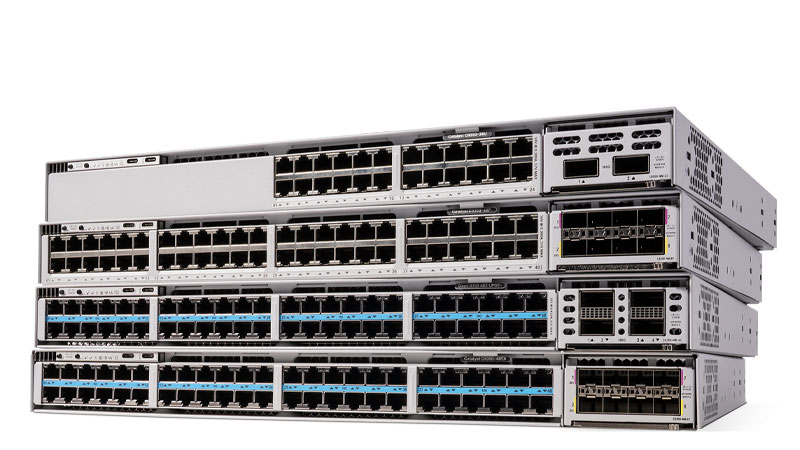 Guides
WS-C3560CX-8PC-S Replacement & Migration to Catalyst 9000
The Catalyst 3560-CX 8-port PoE (WS-C3560CX-8PC-S) is End-of-Sale, here is how to migrate to the Catalyst 9000 Compact C9200CX-8P-2X2G-A before support ends.
October 29, 2025 · 7 min read Guides
Cisco Catalyst 3560V2 (WS-C3560V2-48PS-S) to Catalyst 9200 Migration Guide
The WS-C3560V2-48PS-S reached Last Day of Support on May 31, 2021, no PSIRT patches, no TAC, no RMA. Here is a practical, specs-driven plan to migrate from the Fast Ethernet 3560V2 to the gigabit, IOS-XE Catalyst 9200 (C9200-48P-A).
May 13, 2026 · 7 min read Guides
How to budget a Cisco Catalyst 9300 refresh: ports, PoE, licensing, and services
A line-item approach to scoping a Catalyst 9300 refresh, so the number you bring to finance survives the year it has to live in.
May 12, 2026 · 10 min readGuidesWS-C4500X-32SFP+ EOL & Catalyst 9500-48Y4C Migration
The Catalyst 4500-X 32-Port 10G (WS-C4500X-32SFP+) hit Last Day of Support on October 31, 2025, here is a concrete plan to migrate to the higher-density, 25G/100G Catalyst 9500-48Y4C.
November 20, 2025 · 8 min readGuidesWS-C2960X-24PS-L EoL: Migrate to Catalyst 9200L Guide
A practical, partner-built plan for replacing the end-of-sale Catalyst 2960-X 24-port PoE switch (WS-C2960X-24PS-L) with the Catalyst 9200L-24P-4G before the October 2027 last day of support.
October 20, 2025 · 7 min readGuidesCisco 2960-48TC-L EoL: Migrate to Catalyst 9200L 48-Port
The Catalyst 2960-48TC-L (WS-C2960-48TC-L) passed Last Day of Support on October 31, 2019. Here is why this Fast Ethernet LAN Base switch has to come out of the wiring closet, and how to refresh cleanly to the Catalyst 9200L 48-port C9200L-48T-4X-A.
June 9, 2026 · 8 min read