
AP density and counts: Wi-Fi 6 vs Wi-Fi 7
Wi-Fi 7 changes the math on how many access points a high-density space actually needs. Here is how AP counts shift between Wi-Fi 6 and Wi-Fi 7, why the answer is rarely "fewer APs," and how to size a Cisco Catalyst deployment that holds up under real load.

Key takeaways
- AP density is driven by client count, capacity demand, and RF design, not by the wireless standard alone. Wi-Fi 7 rarely lets you delete APs in a busy space.
- Wi-Fi 7's biggest density wins come from the 6 GHz band, 320 MHz channels, and Multi-Link Operation, which let each AP serve more clients without choking on co-channel interference.
- Real spaces (lecture halls, EDs, trading floors, warehouses) are usually capacity-bound, so the AP count is set by concurrent clients and application bandwidth, not coverage radius.
- Cisco's Wi-Fi 7 Catalyst lineup (CW9172I, CW9176I, CW9178I, CW9179F) maps to distinct density tiers, the same way the 9120/9130 mapped tiers in Wi-Fi 6.
- A predictive RF survey and a controller capacity plan matter more than the band number. Right-size the controller and switching uplinks before you finalize AP counts.
- Mixing Wi-Fi 6 and Wi-Fi 7 on the same Catalyst 9800 controller is supported and often the smart phased path for budget-constrained refreshes.
Density is a capacity problem, not a coverage problem
Walk into a half-empty office and almost any access point gives you full bars. The trouble starts when 400 people crowd a lecture hall, a nurse pushes a workstation-on-wheels through an emergency department, or a warehouse fills with handheld scanners during peak shipping. In those moments wireless stops being about signal reach and becomes a contest for airtime. That distinction is the whole story behind AP density, and it is why the jump from Wi-Fi 6 to Wi-Fi 7 does not automatically shrink your access point count.
Coverage answers one question: can a client hear the AP? Capacity answers a harder one: can every client get its turn fast enough that the application feels instant? A single radio is a shared medium. Only one device transmits on a channel at a time, so the more clients and the heavier the traffic, the more you have to spread that load across separate APs on separate channels. Vendors love to imply that a newer standard means fewer boxes on the ceiling. In a genuinely dense room the opposite is often true, because the better radios simply let you pack channels tighter and serve heavier per-seat bandwidth.
The practical takeaway for anyone budgeting a refresh is to stop thinking in square feet per AP and start thinking in clients per AP and megabits per client. A 5,000-seat arena and a 50-person clinic can occupy similar floor area and need wildly different AP counts. We size every wireless plan on our Cisco access points and Wi-Fi 7 wireless pages around concurrent-client and application-bandwidth targets first, then validate coverage second.
What Wi-Fi 6 actually solved for dense spaces
Wi-Fi 6 (802.11ax) was the first standard built primarily for density rather than headline speed. Its marquee feature, Orthogonal Frequency-Division Multiple Access (OFDMA), lets one transmission carry data for multiple clients at once by slicing a channel into smaller resource units. Combine that with uplink and downlink MU-MIMO and Target Wake Time, and a Wi-Fi 6 AP handles a crowded room far more gracefully than the Wi-Fi 5 gear it replaced. The standard is ratified and governed through the IEEE, and interoperability is certified by the Wi-Fi Alliance, which is why a mixed-vendor client population behaves predictably on it.
On the Cisco side, Wi-Fi 6 is the Catalyst 9100 family. The C9120AXI and C9130AXI became the workhorses for high-density enterprise and education, while smaller models like the C9105 covered branch and low-density rooms. These APs still ship and still perform well, and for many organizations they remain the right call on a tight budget. The chips are mature, the drivers are battle-tested, and the per-AP cost is attractive compared to the newest silicon.
Where Wi-Fi 6 hits a wall is spectrum. It operates in the congested 2.4 GHz and 5 GHz bands, and in a dense deployment you run out of clean, non-overlapping channels fast. Once neighboring APs are forced onto the same channel, they spend airtime deferring to each other instead of moving data. That co-channel interference ceiling is the single biggest reason a Wi-Fi 6 design in a packed venue needs careful channel planning and, frequently, more APs running at lower power than intuition suggests.
What changes with Wi-Fi 7 in a packed room
Wi-Fi 7 (802.11be) attacks the density problem from three directions at once. First, it fully embraces the 6 GHz band that Wi-Fi 6E opened, and 6 GHz is the key to density because it offers a large block of fresh spectrum with room for many wide, non-overlapping channels. Second, it doubles channel width to 320 MHz, so a single client transmission can move far more data and clear the air faster. Third, Multi-Link Operation (MLO) lets a capable client use two bands simultaneously, which cuts latency and smooths out congestion in a way no prior standard could.
The combination matters for AP count in a subtle way. Because 6 GHz gives you more usable channels, you can place APs closer together without them stepping on each other, and because each transaction finishes faster, each AP serves more clients before airtime runs out. The net effect in a high-density room is usually not fewer APs. It is more capacity from a similar number of APs, plus the ability to support bandwidth-hungry applications that a Wi-Fi 6 design would have throttled. Allocation of 6 GHz spectrum and power rules differ by country and are set by regulators such as the FCC in the United States, which is worth confirming early in any federal or multi-site plan.
Cisco's Wi-Fi 7 line is the Catalyst CW91xx series, and it tiers cleanly. The CW9172I targets moderate density, the CW9176I and CW9178I serve high-density indoor environments with 4x4:4 MU-MIMO and 10 Gbps uplinks, and the CW9179F is built for the most demanding large public venues. The 4x4 high-tier models, detailed on our access points page, are the direct spiritual successors to the C9130 in a Wi-Fi 6 design.
Side by side: how the AP math actually shifts
The honest comparison is not standard versus standard. It is how each generation changes the constraint that sets your AP count. In a coverage-bound space such as a sparse warehouse or a low-occupancy office, AP counts are similar between Wi-Fi 6 and Wi-Fi 7, because the limiting factor is signal reach, not airtime, and both standards reach about the same distance at a given power. In a capacity-bound space, Wi-Fi 7 lets each AP carry more load, but you still place APs to manage cell size and client distribution.
Consider a 600-seat lecture hall as a worked example. A Wi-Fi 6 design might place a dozen C9130AXI units, carefully power-tuned and channel-planned across 5 GHz to avoid co-channel contention, accepting that some seats share a busy channel. A Wi-Fi 7 design of the same room might use a similar number of CW9176I units, but now spread across far more 6 GHz channels, delivering higher per-seat bandwidth and lower latency, with MLO clients riding two bands at once. You did not save many APs. You bought a dramatically better experience and real headroom for the next five years of client growth.
A few patterns hold across most deployments. Coverage-bound spaces land at roughly equal AP counts, with Wi-Fi 7 chosen mainly for future-proofing and faster client roaming. Capacity-bound spaces stay at similar or slightly lower counts but gain a large jump in usable per-client throughput. Ultra-high-density venues often keep the very same dense AP grid, because RF cell sizing, not the standard, dictates spacing. And for greenfield builds, Wi-Fi 7 is usually the better long-term value even when Wi-Fi 6 would meet today's load.
The controller and switching costs nobody budgets for
AP count is only half the bill of materials. Every access point terminates on a wireless LAN controller and a switch port, and Wi-Fi 7's higher throughput pushes both. A high-tier CW9178I with dual 10 Gbps uplinks expects multigigabit switch ports, not legacy gigabit access ports, and it draws more power, which can change your PoE budget and your switch model. A density plan that ignores the wiring closet is a plan that stalls at install time.
On the controller side, Cisco's Catalyst 9800 family scales from embedded and virtual instances up to the 9800-80 appliance, and the right pick depends on AP count, client count, and aggregate throughput rather than the wireless standard alone. The good news is that the 9800 supports Wi-Fi 6, 6E, and Wi-Fi 7 APs on the same controller, so a phased refresh is fully supported. You can introduce Wi-Fi 7 in your densest, most painful rooms first and leave proven Wi-Fi 6 elsewhere until budget allows. We map controllers and uplinks together on our wireless controllers and Catalyst switching pages so the closet keeps pace with the ceiling.
Plan the lifecycle, too. Track each platform against the published Cisco end-of-life policy and keep coverage current through Smart Net Total Care. A density refresh is a multi-year asset, and the support and software-update path is part of the real cost of ownership, not an afterthought.
How to size it: a survey-first method
The reliable way to land an accurate AP count is to model the RF before you buy anything. A predictive survey takes the floor plan, wall materials, ceiling height, and expected client density and produces a heatmap plus an AP placement plan for the band you are targeting. Because 6 GHz attenuates slightly more than 5 GHz through walls, a Wi-Fi 7 design optimized for 6 GHz capacity sometimes places APs a touch closer in obstructed environments, which is one more reason newer does not mean fewer.
Translate business requirements into numbers a survey can use. Decide the concurrent-client target per room, the per-client application bandwidth (a clinical imaging viewer and a guest browsing session are not the same load), and the latency tolerance for real-time traffic like voice or video. Those three inputs drive AP count far more than coverage area does. Our wireless design and architecture team builds this capacity model first, then validates with an on-site survey before anything ships, and our deployment and cutover team stages and phases the install so production never goes dark.
For public-sector and regulated buyers there is an extra layer. Hardening guidance from the DoD STIGs and controls baselines such as NIST SP 800-53 shape controller configuration, segmentation, and authentication, all of which interact with how you carve up SSIDs and VLANs across a dense AP fabric. Bake those requirements into the design phase rather than retrofitting them after cutover.
Choosing by environment, not by spec sheet
The cleanest way to decide is to start from the room, not the radio. A standard enterprise office with laptops and soft-phones is rarely capacity-bound, so Wi-Fi 6 Catalyst 9120-class APs or entry Wi-Fi 7 CW9172I units both work, and the choice comes down to refresh timing and budget. The moment you add density, the calculus flips toward Wi-Fi 7's spectrum advantage.
High-density and mission-critical environments are where Wi-Fi 7 earns its premium. A hospital that needs reliable airtime for healthcare clinical devices, a university packing students into lecture halls and dorms under education budgets, or a manufacturing floor running dense IoT and AGV traffic all benefit from 6 GHz capacity and MLO latency. In those settings the AP count stays high because RF cell sizing demands it, and Wi-Fi 7 simply makes each of those APs far more capable.
Outdoor and large-venue density is its own discipline. The Wi-Fi 7 CW9177I and CW9179F are built for stadiums, transit hubs, and campus quads where thousands of clients converge, and their switchable radio configurations let you shape coverage to the space. As an authorized Cisco partner we can quote any of these tiers for federal, SLED, and enterprise buyers through the purchase paths available to us today, including Government Purchase Card and FAR-based purchase orders. If you want a sized plan instead of a spec-sheet guess, start a Wi-Fi 7 quote and we will model your densest rooms first.
Common density mistakes that inflate or starve a design
The most expensive mistake is buying APs by coverage radius alone. Teams that size a venue at one AP per so-many square feet routinely under-provision the busy rooms and over-provision the empty hallways. The fix is to weight placement toward where the people and devices actually concentrate, which a survey makes obvious and a rule of thumb hides.
The second mistake is forgetting client capability. Wi-Fi 7's gains only materialize when clients support 6 GHz and MLO, and a 2026 device fleet is a mix of old and new. A good design serves legacy Wi-Fi 6 and Wi-Fi 5 clients well on 5 GHz while reserving 6 GHz capacity for the modern devices that can exploit it. That is exactly the kind of mixed-fleet planning a phased Catalyst 9800 deployment supports, and it keeps you from paying for capacity no current client can reach.
The third mistake is treating wireless as an island. Density changes the controller tier, the PoE budget, the multigigabit port count, and the lifecycle support contract all at once. We tie those threads together across managed operations so the design that looks right on a heatmap also survives a Monday-morning peak. Get the inputs right and the AP count almost answers itself.
Cisco products involved
- Cisco Catalyst Wi-Fi 7 access points (CW9172I, CW9176I, CW9178I, CW9179F, CW9177I)
- Cisco Catalyst Wi-Fi 6 access points (C9120AXI, C9130AXI, C9105)
- Cisco Catalyst 9800 Series Wireless Controllers
- Cisco Catalyst multigigabit access switches
- Cisco Smart Net Total Care
- Cisco Catalyst 9100 Series access points
- Cisco Wi-Fi 6E access points (CW9162I, CW9166, C9136I)
Frequently asked questions
Does Wi-Fi 7 mean I need fewer access points than Wi-Fi 6?
Usually no, at least not in a high-density space. AP count in busy rooms is set by concurrent clients, per-client bandwidth, and RF cell sizing, not by the standard. Wi-Fi 7 lets each AP serve more load and deliver higher throughput, but you typically deploy a similar number of APs and gain capacity and headroom rather than removing boxes. In sparse, coverage-bound areas the counts are roughly equal between the two standards.
What makes Wi-Fi 7 better for density specifically?
Three things working together: full use of the clean 6 GHz band, which provides many wide non-overlapping channels; 320 MHz channel width, which clears each transmission off the air faster; and Multi-Link Operation, which lets capable clients use two bands at once to cut latency. The combination lets you pack APs tighter without co-channel interference and serve more clients per AP.
Which Cisco Wi-Fi 7 access point fits a high-density room?
For high-density indoor environments, the Cisco Catalyst CW9176I and CW9178I with 4x4:4 MU-MIMO and 10 Gbps uplinks are the typical choice, and they are the direct successors to the Wi-Fi 6 C9130. The CW9172I covers moderate density, while the CW9179F and outdoor CW9177I serve large public venues. The exact model depends on your client count and bandwidth targets, which a survey confirms.
Can I mix Wi-Fi 6 and Wi-Fi 7 access points?
Yes. Cisco's Catalyst 9800 wireless controllers support Wi-Fi 6, 6E, and Wi-Fi 7 access points on the same controller, which makes a phased refresh straightforward. A common approach is to deploy Wi-Fi 7 in your densest, most painful rooms first and keep proven Wi-Fi 6 gear elsewhere until budget allows, all managed from one controller.
What else has to change when I move to Wi-Fi 7 besides the APs?
High-tier Wi-Fi 7 APs expect multigigabit switch ports and draw more power, so your access switching and PoE budget often need attention. You should also confirm the wireless controller tier fits the new client and throughput load, and verify multigigabit uplinks in the wiring closet. Budgeting the APs alone is the most common reason a density refresh stalls at install time.
How do you determine the right AP count for my building?
We start with a predictive RF survey that uses your floor plan, wall materials, ceiling height, and expected client density, then layer in the real drivers: concurrent clients per room, per-client application bandwidth, and latency tolerance. That capacity model sets the AP count, and an on-site survey validates it before anything ships. For regulated buyers we also fold in STIG and NIST 800-53 requirements during design.
Uniqcli Team
The Uniqcli Team is an authorized Cisco partner specializing in Catalyst wireless, switching, datacenter fabric, licensing, and managed services for U.S. federal, state, local, and education customers. We scope Cisco bills of materials, validate procurement paths (TAA, FIPS, contract vehicles), and deliver design, deployment, and managed operations.
Ready to scope your Cisco build?
Build a quoteRelated reading
View all →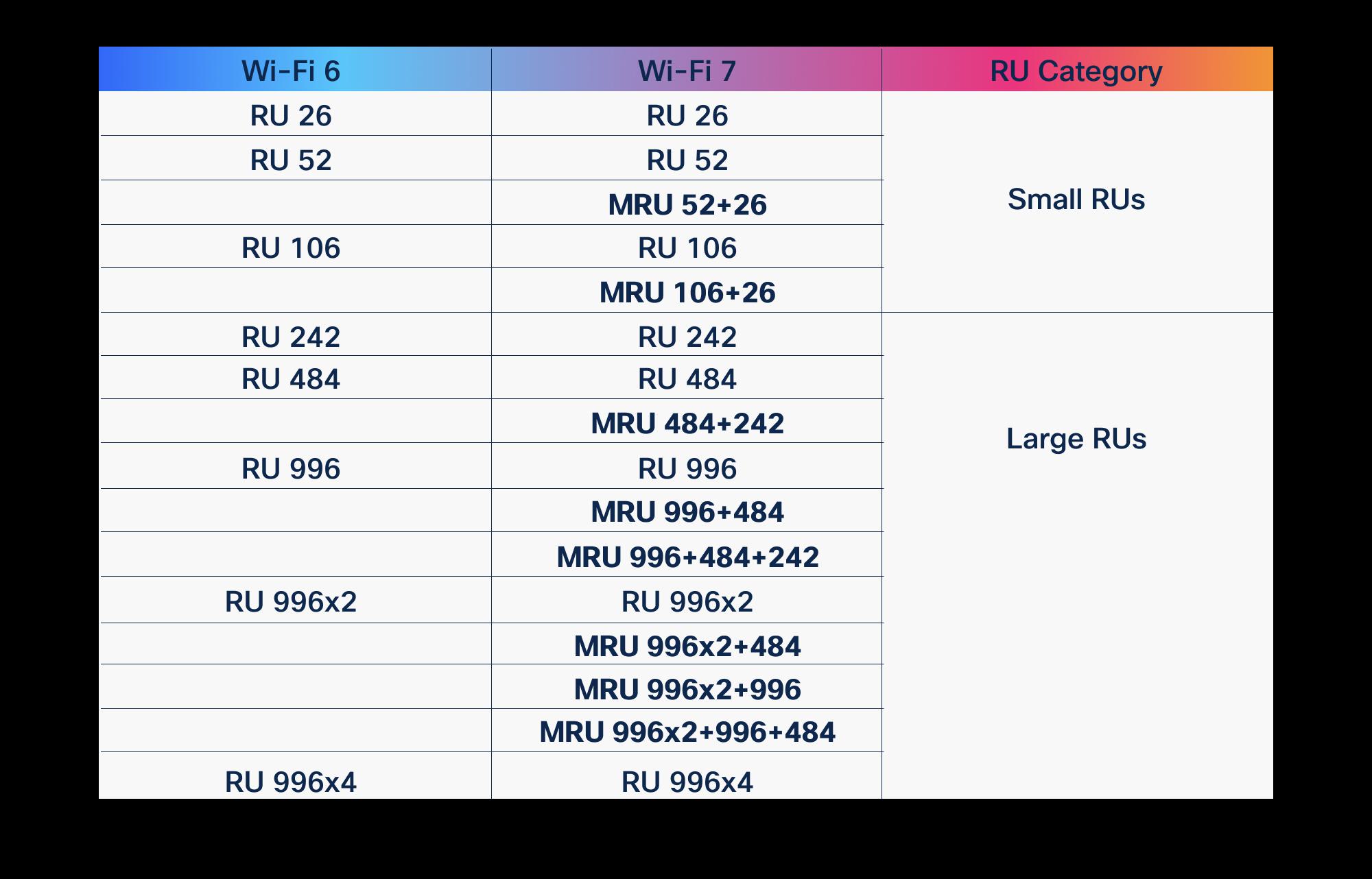 Guides
OFDMA in Wi-Fi 6 vs Wi-Fi 7: what improved
OFDMA arrived with Wi-Fi 6 to fix the airtime problem. Wi-Fi 7 didn't replace it, it gave it wider lanes, more granular scheduling, and a second radio to schedule across. Here is what actually changed, and why it matters for high-density enterprise and public-sector networks.
March 19, 2026 · 10 min read Guides
Stadium Wi-Fi capacity planning: sizing for a packed house
A sold-out crowd is the most hostile RF environment your wireless will ever face. Here is how to size Cisco Wi-Fi for a packed house, from device density math to antenna geometry to controller headroom.
June 6, 2026 · 12 min read Guides
Wi-Fi 6 vs Wi-Fi 7: the complete comparison
Wi-Fi 7 is not a minor refresh of Wi-Fi 6. It reworks how spectrum, channels, and client connections are handled, and that changes how you plan a campus, a hospital floor, or a federal facility. Here is what actually differs, where the gains are real, and how to decide what to deploy.
January 22, 2026 · 11 min read Insights
Is Wi-Fi 6E worth it, or should you skip to Wi-Fi 7
Wi-Fi 6E opened the 6 GHz band and still ships in capable Cisco access points, but Wi-Fi 7 adds Multi-Link Operation, 320 MHz channels, and 4K-QAM. Here is how to decide which one belongs in your next refresh, and when waiting actually costs you.
February 27, 2026 · 10 min read Guides
Wi-Fi 7 vs Wi-Fi 6E: what actually changes for enterprise networks
Wi-Fi 7 and Wi-Fi 6E both lean on the 6 GHz band, but the differences that matter to an enterprise are the ones nobody puts on a spec sheet: client mix, switch uplinks, controller versions, and whether your building can actually use 320 MHz channels. Here is what changes, what does not, and how to size a Cisco refresh that earns its budget.
May 20, 2026 · 11 min read Insights
Wi-Fi 7 in practice: what MLO and 320 MHz really change
Multi-Link Operation and 320 MHz channels are the two features that actually separate Wi-Fi 7 from Wi-Fi 6E. Here is what they do on real Cisco Catalyst hardware, where the gains evaporate, and how to plan a rollout that survives contact with a U.S. enterprise RF environment.
June 6, 2026 · 10 min read